1.
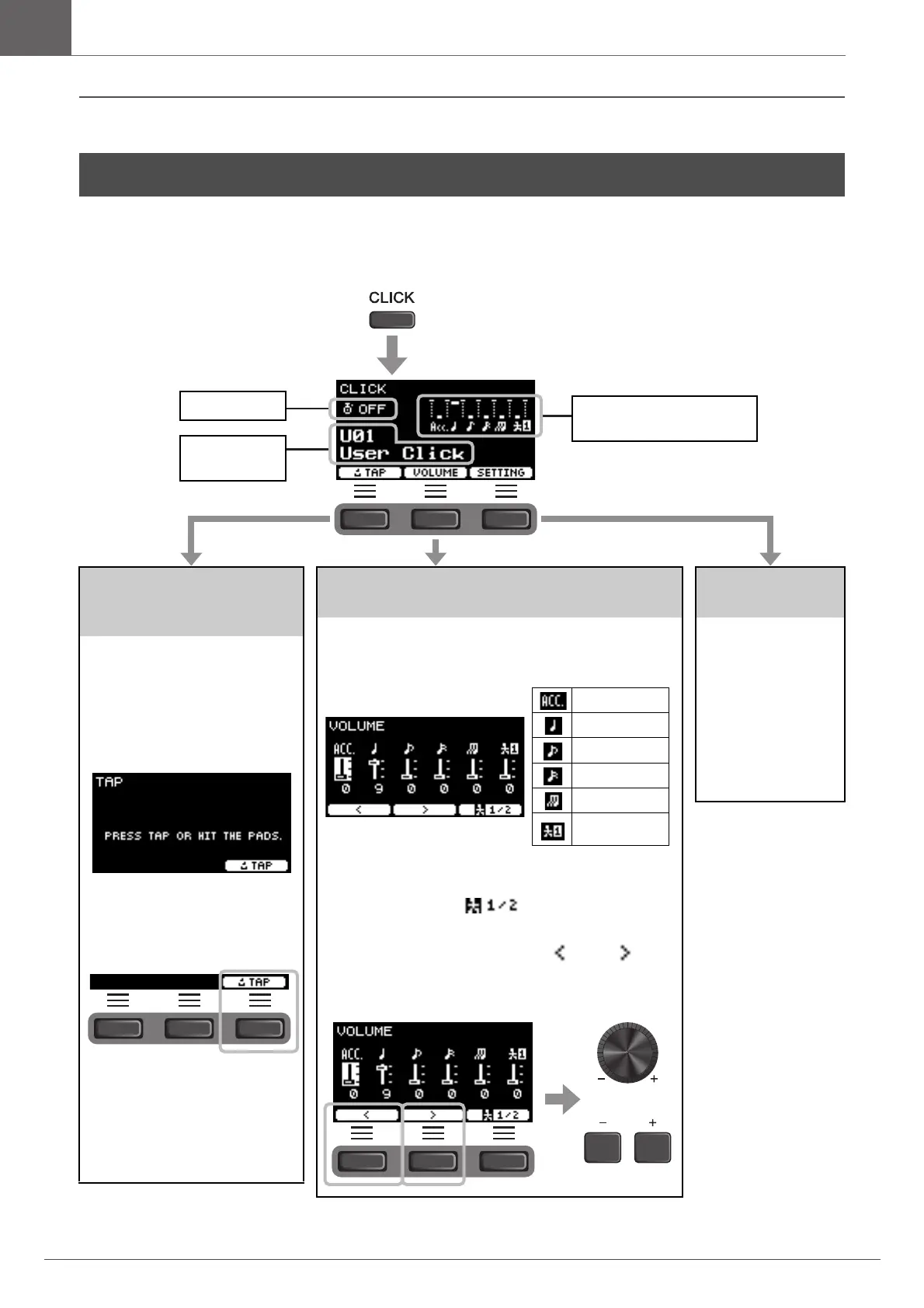
Setting the Tempo by
Tapping the Button
(Tap Tempo)
Tap the button at the desired tempo
to set the tempo.
2.
Press the button
below “TAP” ([F1]).
The TAP screen appears.
3.
Tap the button below
“TAP” ([F3]) at least
3 times.
The tapped tempo is detected and
appears on the screen.
NOTE
You can also set the tempo by
striking a pad connected to the
Trigger Input jacks.
Changing the Volume of the Individual Click
Timing
2.
Press the button below “VOLUME”
([F2]).
3/8, 6/8, 9/8, 12/8, 15/8 beats only have settings for Acc, dot-
ted quarter, eighth, and sixteenth notes.
Press the button below “ ” ([F3]) to switch between
Human voice1 and Human voice2 to change counts.
3.
Use the buttons below “ ” or ” ”
([F1] or [F2]) to move the cursor and
use [–][+] to change the volume.



 To Next Page