1.
Recording
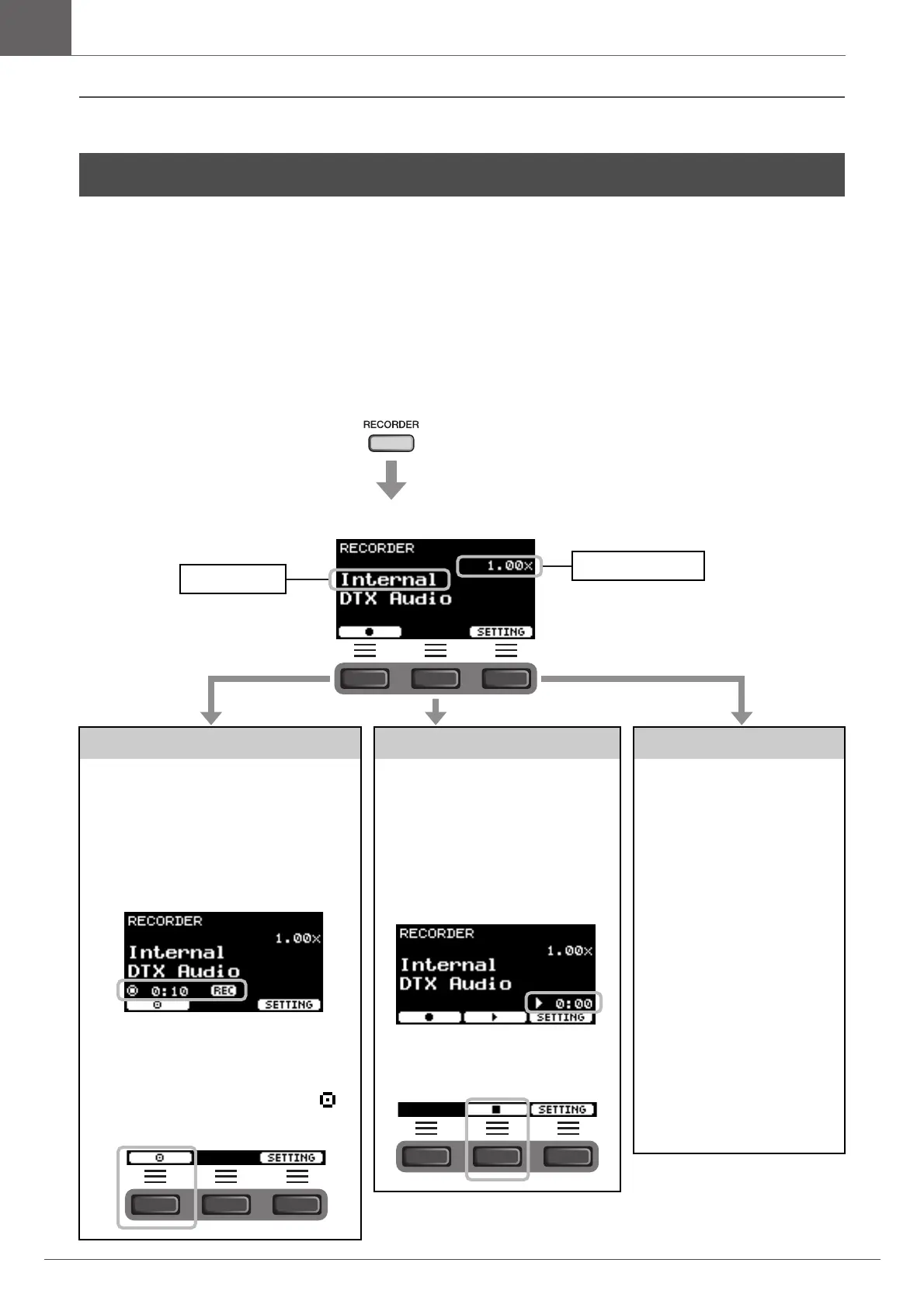
Recording time to the DTX-PRO is about 1
minute 30 seconds.
2.
Press the button below “”
([F1]) to start recording.
While recording, the elapsed recording time
(min: sec) appears.
3.
Play the drums.
4.
After you finish playing,
press the button below “ ”
([F1]) to stop recording.
Playing Back
NOTE
This is not displayed when there is no
recorded song.
2.
Press the “>” button
([F2]) to start playback.
While playing back, the elapsed play-
back time (min: sec) appears.
3.
To stop playback, press
the “
” button ([F2]).
Changing other settings
Other settings such as the play-
back speed or the recording
source can be changed. For more
information, refer to the Refer-
ence Manual (PDF).
NOTICE
• When your performance is
already recorded on the
DTX-PRO, recording again
on the DTX-PRO erases the
previous recording.
• Any performance recorded
to the DTX-PRO will be lost
when the power is turned
off. If you wish to save your
recordings, export the
recorded data as audio files.
For more information, refer
to the Reference Manual
(PDF). (MENU/Job/Recorder/
Export Audio)
The [RECORDER] button
flashes while recording.
Destination
Playback speed
The RECORDER screen opens.



 To Next Page