Instruments and indicators
44
EMU48821
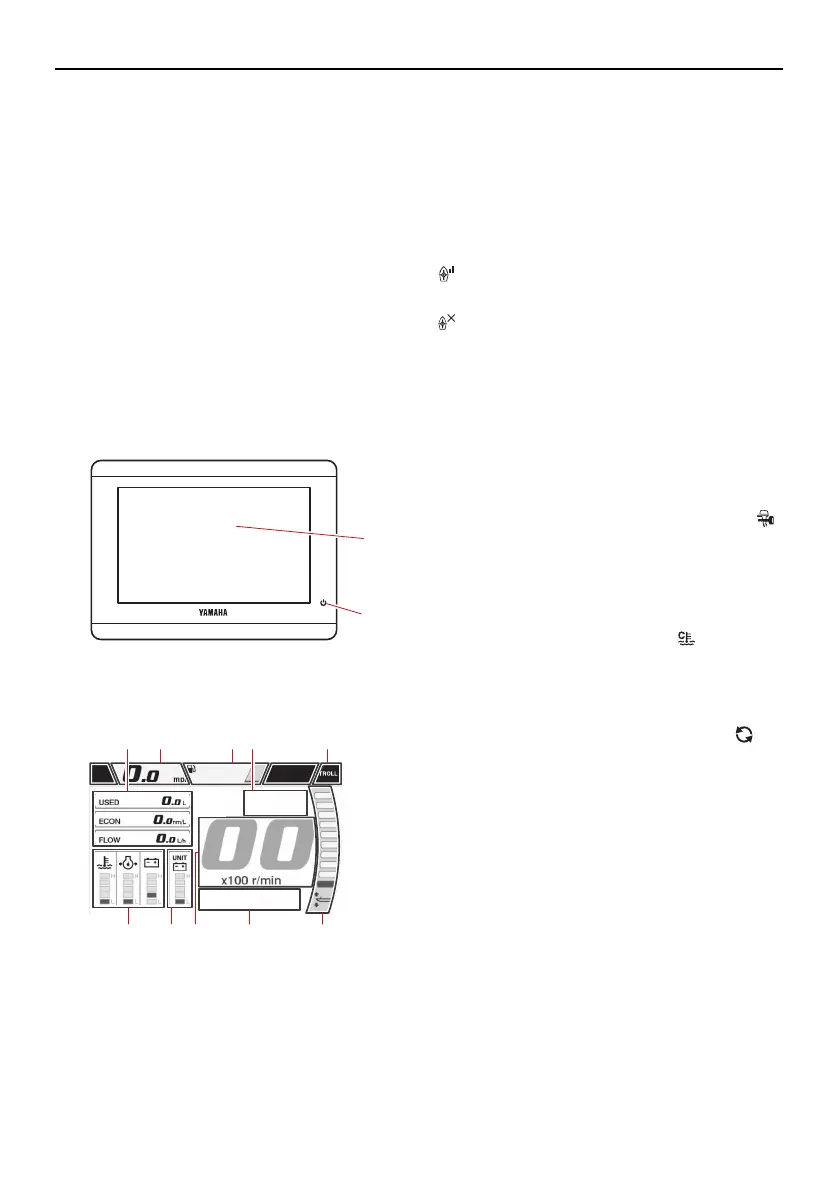
CL5 Display
The CL5 Display shows engine status and
alert information. The display can be
changed. This manual mainly covers the alert
display.
If a warning message appears on the CL5
Display, follow the instructions on the dis-
play.
The functions shown in the display varies
according to the equipment of the boat.
For more information, see the CL5 owner’s
manual.
GPS signal strength icons
The icons shown in the upper-right of the en-
gine screen indicate the GPS signal strength.
“ ” shows GPS satellite signal strength ac-
cording to the number of antenna symbol.
“ ” shows no GPS antenna connection.
To use the GPS feature, a GPS receiver must
be connected to this device.
Contact your Yamaha dealer for information
on how to connect a GPS receiver.
Engine condition icons
Orange icons indicate engine conditions.
Yamaha Security System indicator “ ”
(optional)
This indicator appears when the Yamaha
Security System is in lock mode. Make
sure it is off before starting the engine.
Engine warm-up indicator “ ”
This indicator appears while the engine is
being warmed up and goes off when
warming-up is finished.
Engine synchronization indicator “ ”
In multiple engine types, this indicator ap-
pears while the engines are under synchro-
nization control. It goes off when engine
synchronization control is released.
Engine alert icons
Red icons indicate engine abnormalities.
When an abnormality occurs, a pop-up win-
dow will be displayed, and the buzzer will
sound.
1. Touchscreen
2. Power button
1. Boat status
2. Speedometer
3. Tank level
4. Engine condition
5. Trolling mode button
6. Trim angle
7. Engine alert
8. Tachometer
9. Sub status
10.Engine status
U6EK38E0.book Page 44 Wednesday, December 1, 2021 10:35 AM



 To Next Page