Yamaha Commercial Audio LS9 StageMix V1.0 User Guide
Page 7
3.3.1 OFFLINE DEMO
If [OFFLINE DEMO] is pressed in the “Select Mixer” screen, all the functions of
StageMix will operate independently of any mixing console. It is a useful way
to demonstrate and learn how to use the app without the need for a mixer.
Level meters will not work in this mode.
3.3.2 Configure StageMix to Work with an LS9
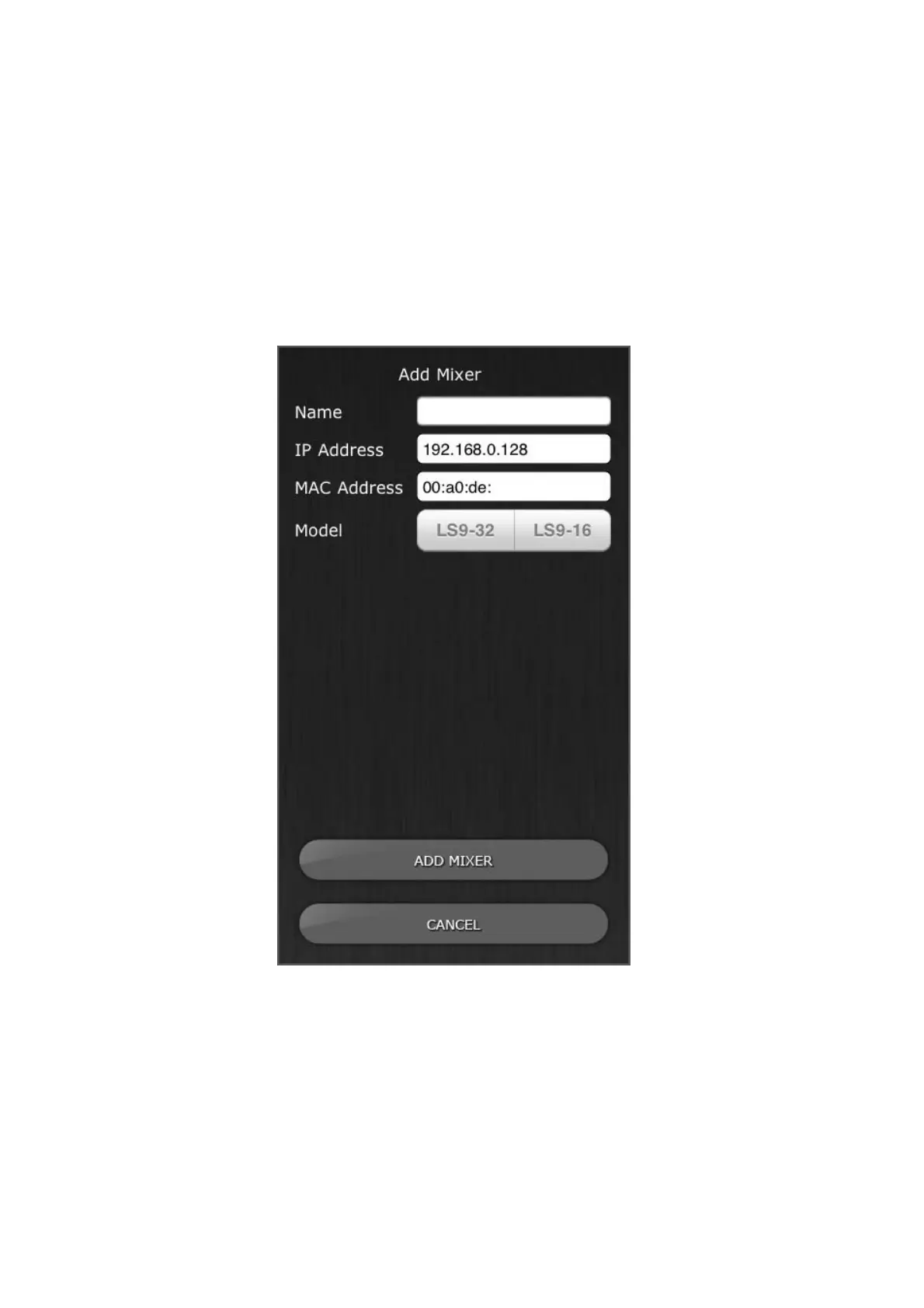
i. Press [ADD MIXER] to open the following screen:
ii. Tap on the blank Name field and enter a name for your LS9 using the
iPad’s onscreen keyboard.
iii. Enter the LS9 IP address noted in 3.1. The default IP Address may not
need to be changed but confirm this in the Network Setup screen of the
LS9 console (refer to 3.1). If you need to modify the IP Address in
StageMix, make sure you include the dots between the sets of numbers
(as shown above).




 To Next Page