Setting the Stereo Out and Bus Out 1–8 from the Display 103
01V96—Owner’s Manual
Bus Outs
8
C Fader
This fader adjusts the Stereo Out output levels, and links with the [STEREO] fader. The
fader knob is highlighted when the fader is set to 0.0 dB.
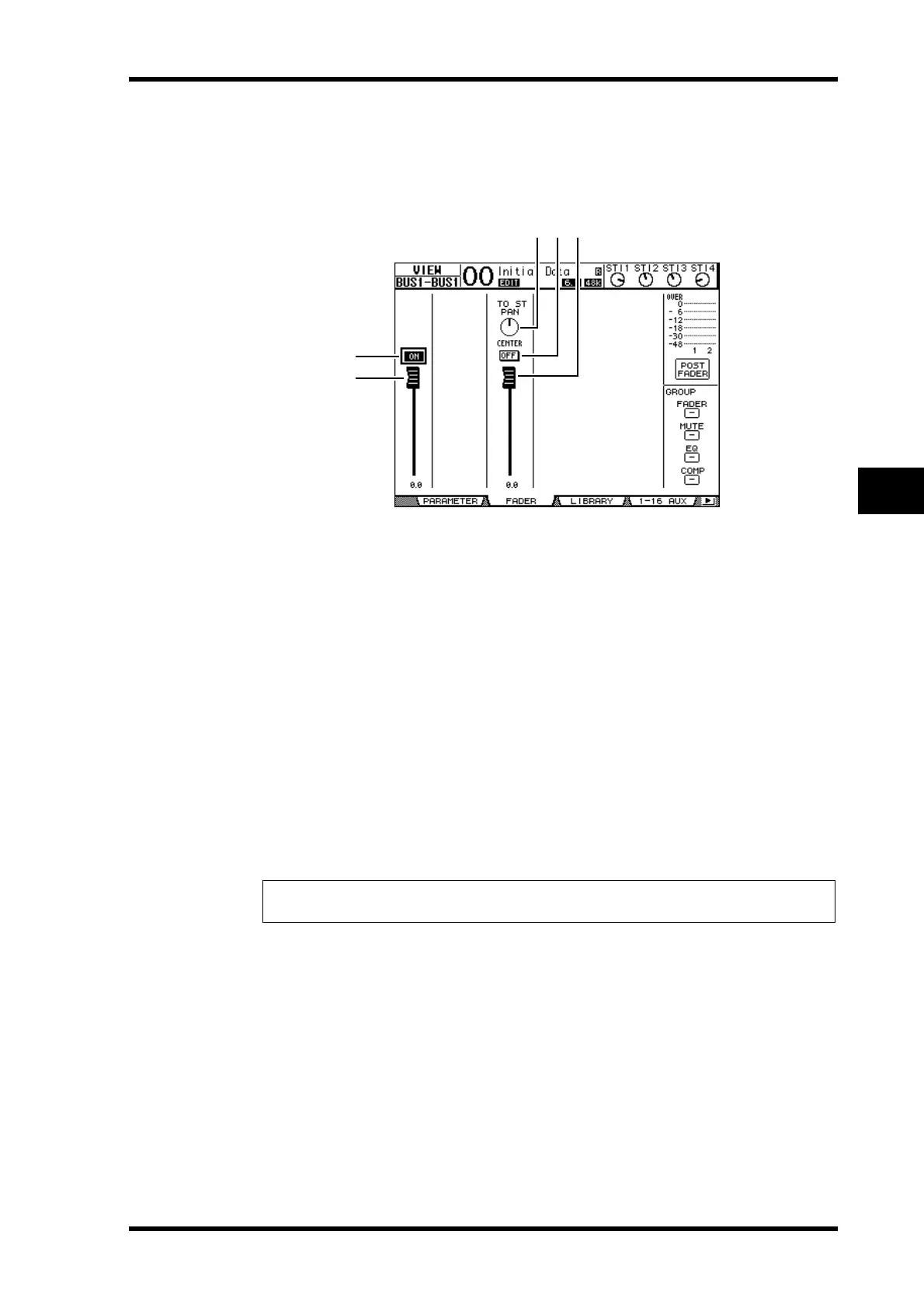
• Bus Out (1–8) Fader page
A ON/OFF
This button turns the currently-selected Bus Out (1–8) on or off, and links with the
[ON] (9–16) button in the Master layer.
B Fader
This fader sets the currently-selected Bus Out (1–8) level, and links with the fader (9–16)
in the Master layer. The fader knob is highlighted when the fader is set to 0.0 dB.
C TO ST PAN
This control sets the Bus Out to Stereo Out Pan position for the currently-selected Bus
Out (1–8).
D TO ST ON/OFF
This button turns on or off the Bus Out to Stereo Out signal for the currently-selected
Bus Out (1–8).
E TO ST Fader
This fader sets the Bus Out to Stereo Out signal level for the currently-selected Bus Out
(1–8).
Tip: The TO ST PAN, ON/OFF, and TO ST Fader parameters also appear on the Pan/Route
| Bus to St page.
1
2
345






 To Next Page