148 Chapter 13—Grouping Channels & Linking Parameters
01V96—Owner’s Manual
Using Fader Groups and Mute Groups
Follow the steps below to group faders or [ON] buttons for Input Channels or Output
Channels.
1 Press the DISPLAY ACCESS [PAIR/GROUP] button repeatedly until one of the
pages that contains the desired group and channels appears.
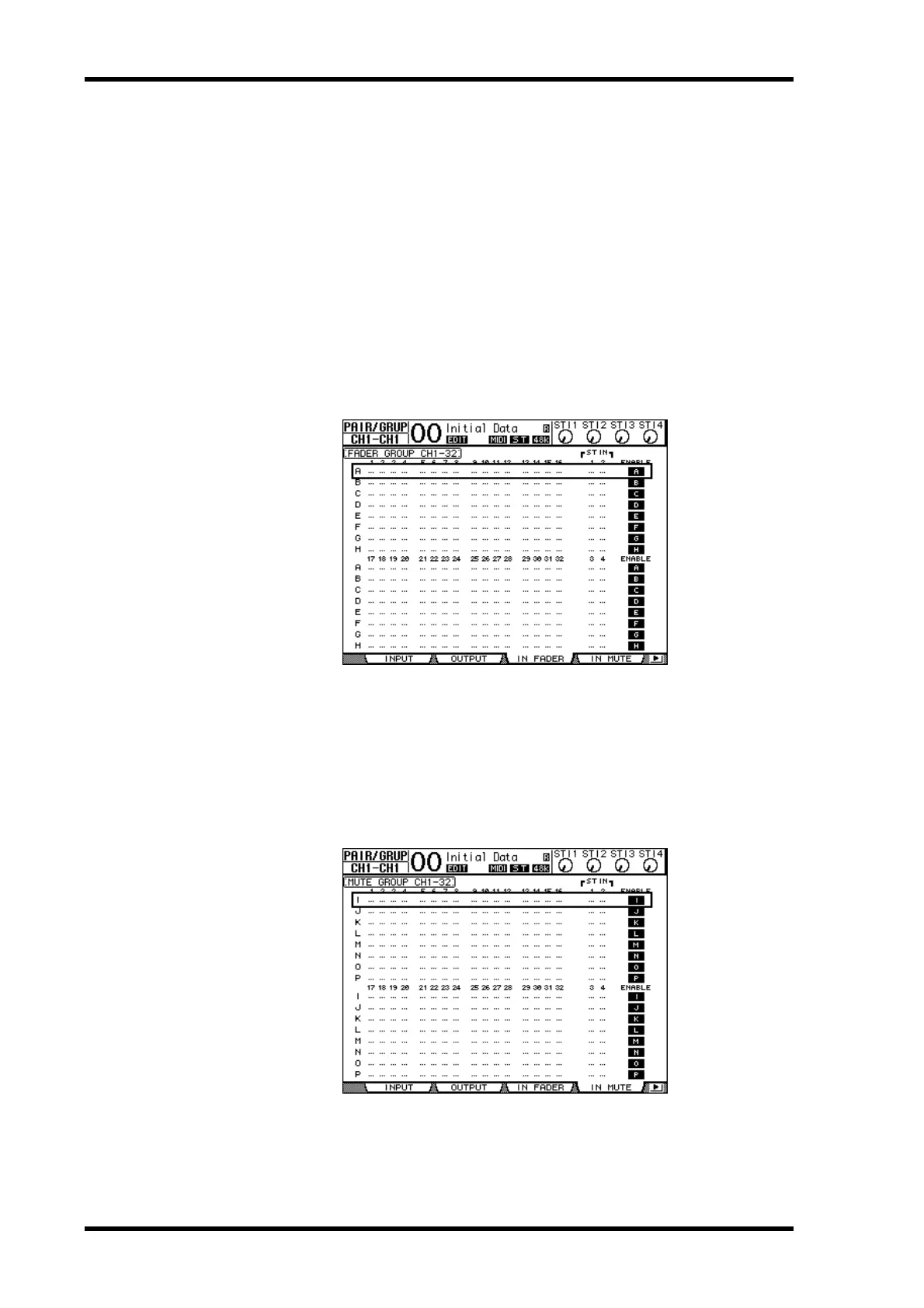
-In Fader page
This page enables you to set Fader groups (A–H) for Input Channels 1–32 and ST IN
Channels 1–4.
-Out Fader page
This page enables you to set Fader groups (Q–T) for Bus Outs (1–8), Aux Outs (1–8)
and Stereo Out.
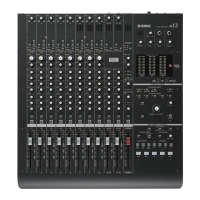
-In Mute page
This page enables you to set Mute groups (I–P) for Input Channels 1–32 and ST IN
Channels 1–4 respectively.
-Out Mute page
This page enables you to set Mute groups (U–X) for Bus Outs (1–8), Aux Outs (1–8) and
Stereo Out.
• In Fader page
• In Mute page







 To Next Page