34 Chapter 3—Operating Basics
01V96—Owner’s Manual
Metering
This section describes how to check Input and Output Channel levels using the Meter
pages.
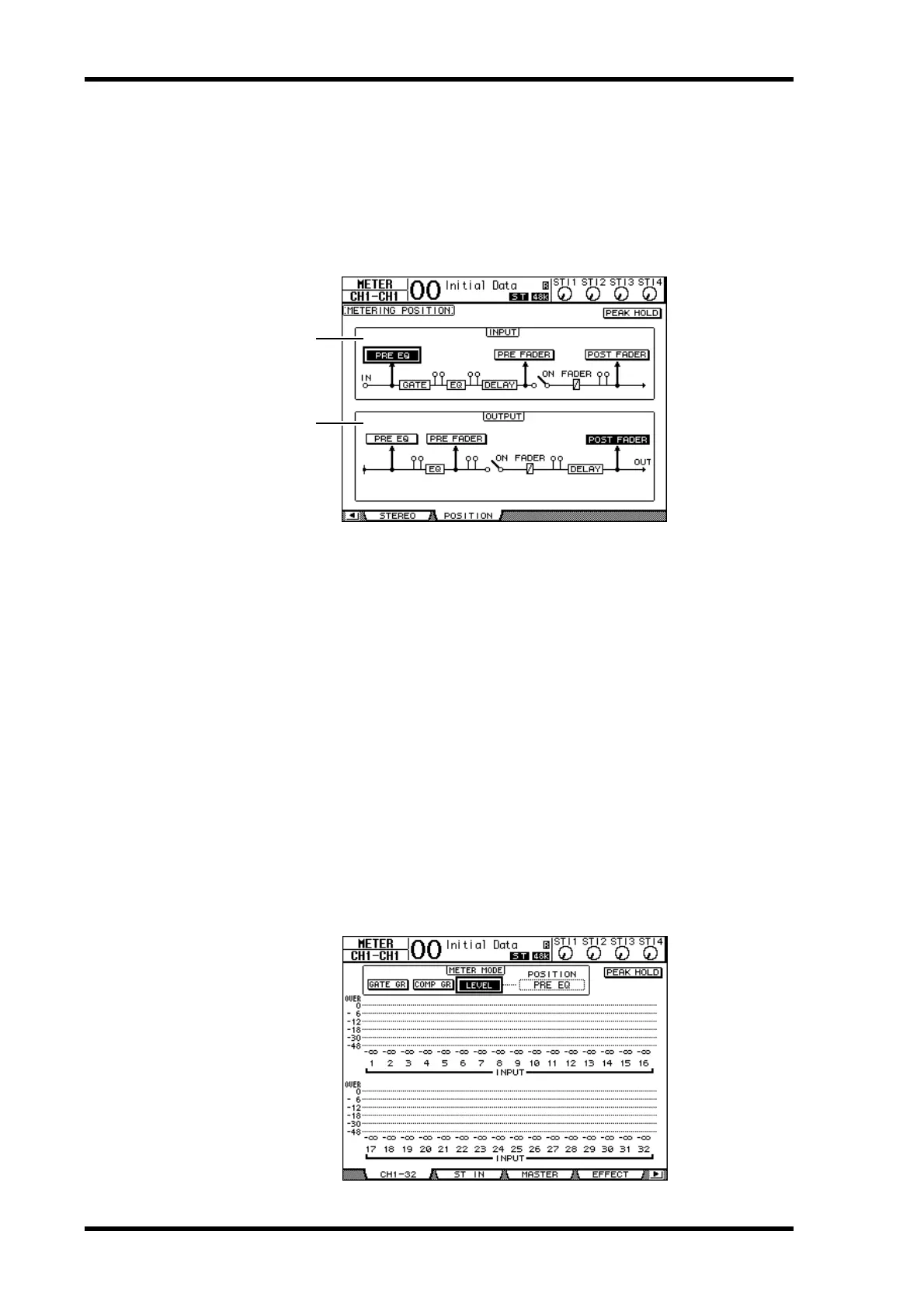
1 Press the FADER MODE [HOME] button repeatedly until the Meter | Position
page appears.
This page enables you to set the metering position for Input and Output Channels.
A INPUT section
This section enables you to select the metering position for Input Channel and ST IN
Channel signals.
B OUTPUT section
This section enables you to select the metering position for Output Channel (Aux Out
1–8, Bus Out 1–8, Stereo Out) signals.
2 Move the cursor to the desired parameter button in the INPUT or OUTPUT
section, then press [ENTER].
You can select one of the following three positions in each section.
• PRE EQ.......................... Immediately before EQ.
• PRE FADER.................. Immediately before the fader.
• POST FADER ............... Immediately after the fader.
3 Press the FADER MODE [HOME] button repeatedly until the page listed
below that contains the desired channels appears.
- CH1-32 page
This page displays the Input Channel 1–32 levels respectively.
1
2













 To Next Page