84 Chapter 7—Input Channels
01V96—Owner’s Manual
EQ’ing Input Channels
The 01V96’s Input Channels feature 4-band (LOW, LOW-MID, HIGH-MID, HIGH) para-
metric EQ. The LOW-MID and HIGH-MID bands are a peaking type of EQ. The LOW and
HIGH bands can be set to shelving, peaking, or HPF and LPF respectively.
1 Press the [SEL] button of the channel for which you want to adjust EQ.
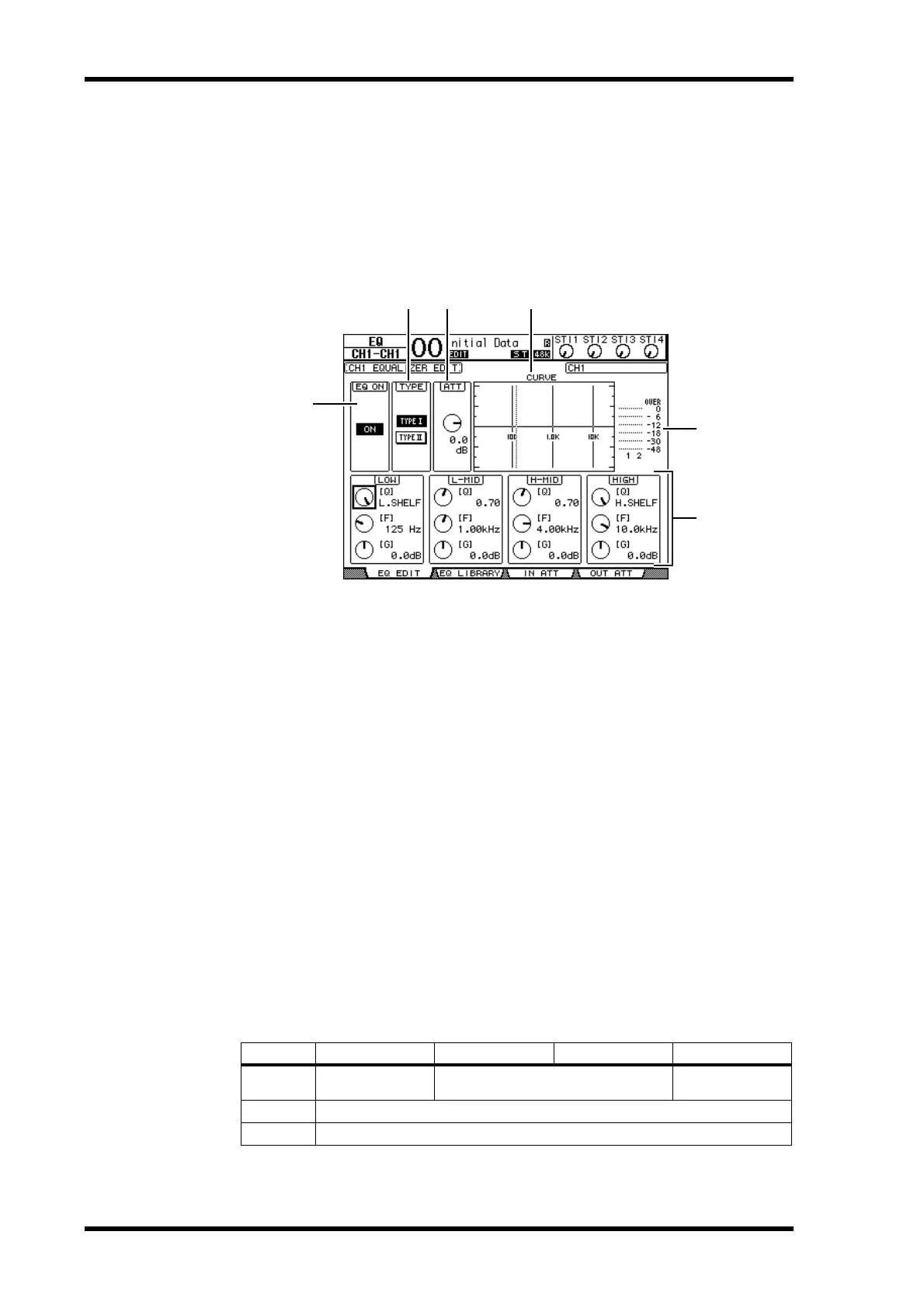
2 Press the DISPLAY ACCEESS [EQ] button, then press the [F1] button to dis-
play the EQ | EQ Edit page.
The parameters on this page are described below:
A EQ ON
The ON/OFF button turns the currently-selected Input Channel’s EQ on or off. You can
press the [ENTER] button to turn the EQ on or off as long as the cursor is located on
any parameter other than TYPE.
B TYPE
Selects the type of EQ. TYPE I is the EQ type used on legacy Yamaha 02R series digital
mixing consoles. TYPE II is a newly developed algorithm.
C ATT
Determines the amount of pre-EQ signal attenuation in dB. It is the same Attenuator
parameter that appears on the EQ | ATT In page.
D CURVE
This area displays the current EQ curve.
E Meters
These meters indicate the post-EQ signal levels of the currently-selected Input Channel
and its available pair partner.
F LOW, L-MID, H-MID, HIGH sections
These sections contain the Q, Frequency (F), and Gain (G) parameters for the four
bands. These parameter values range as follows:
Parameter LOW LOW-MID HIGH-MID HIGH
Q
HPF, 10.0 to 0.10
(41 steps), L.SHELF
10.0 to 0.10 (41 steps)
LPF, 10.0 to 0.10
(41 steps), H.SHELF
Frequency
21.2 Hz to 20.0 kHz (120 steps per 1/12 octave)
Gain
–18.0 dB to +18.0 dB (0.1 dB steps)
1
1. The LOW and HIGH GAIN controls function as filter on/off controls when Q is set to HPF or LPF
respectively.
5
1
4
32
6













 To Next Page