116 Chapter 9—Aux Outs
01V96—Owner’s Manual
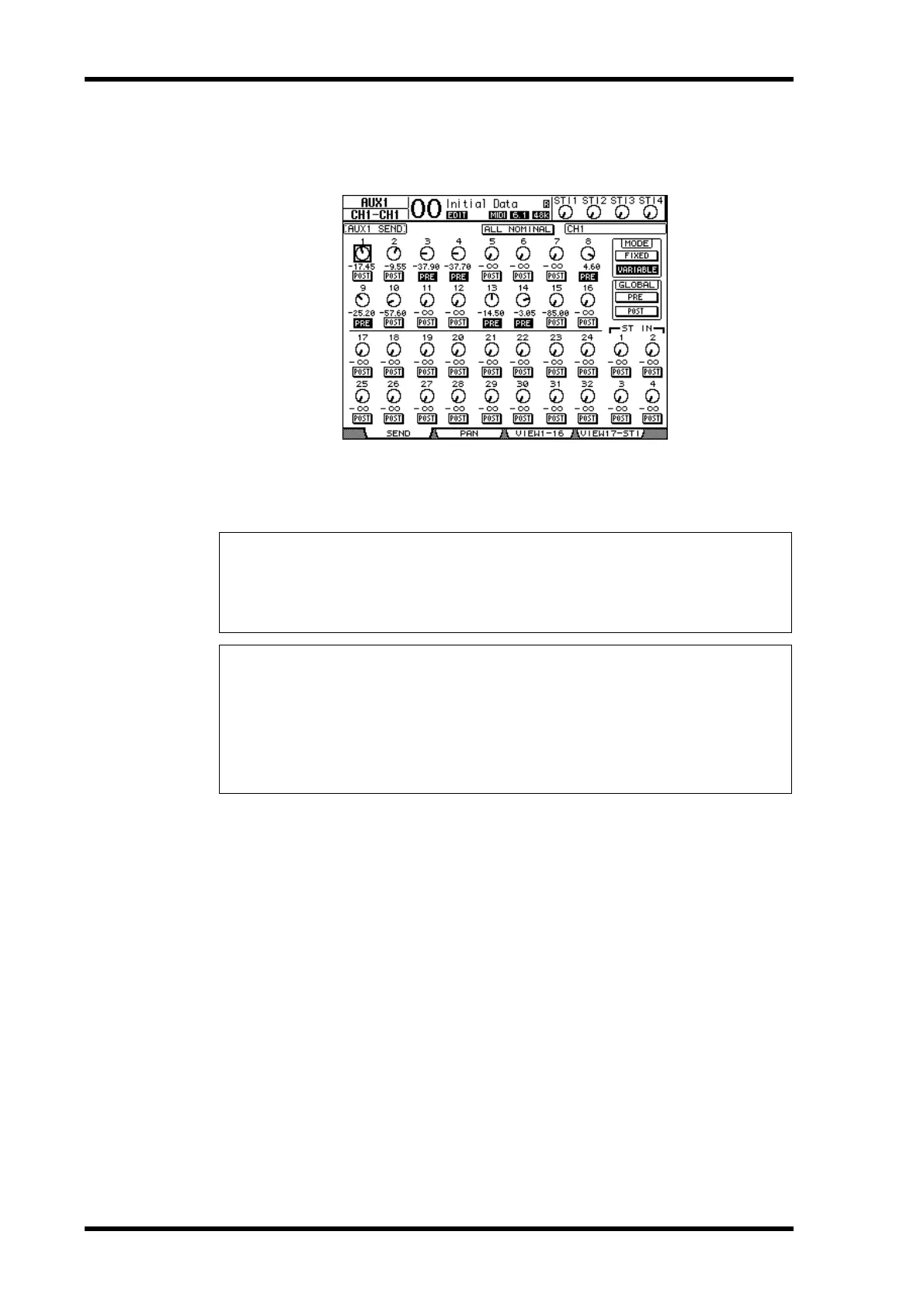
5 If you switched to Variable mode in Step 3, the PRE/POST buttons and Send
level rotary controls enable you to adjust the signal source points and Send
levels.
You can turn each Input Channel on or off for the currently-selected Aux Send even in Vari-
able mode. To do this, move the cursor to the desired Send level control, then press
[ENTER]. (The rotary controls for Off channels are grayed out.)
Tip:
•In Variable mode, Aux Send levels, Aux On/Off, and Pre/Post parameters for paired Input
Channels are linked to each other.
•GLOBAL PRE/POST buttons enable you to set all Input Channels simultaneously (includ-
ing those not displayed on the current page) to pre-fader or post-fader.
Note:
•Do not raise the level of the Aux Sends (patched to the effects processor) on the effects return
channels.
•For example, by default, Aux 1 is routed to the input of the internal Effects processor 1, and
L and R of ST IN Channel 1 are patched to the processor's output. Under these conditions,
if you raise the level of the send signals from ST IN Channel 1 to Aux 1, the signals are
returned to ST IN Channel 1, creating a signal loop and possibly damaging your speakers.





 To Next Page