Setting Up and Selecting Surround Pan Modes 137
01V96—Owner’s Manual
Surround Pan
12
2 Move the cursor to the Surround mode button you want to use.
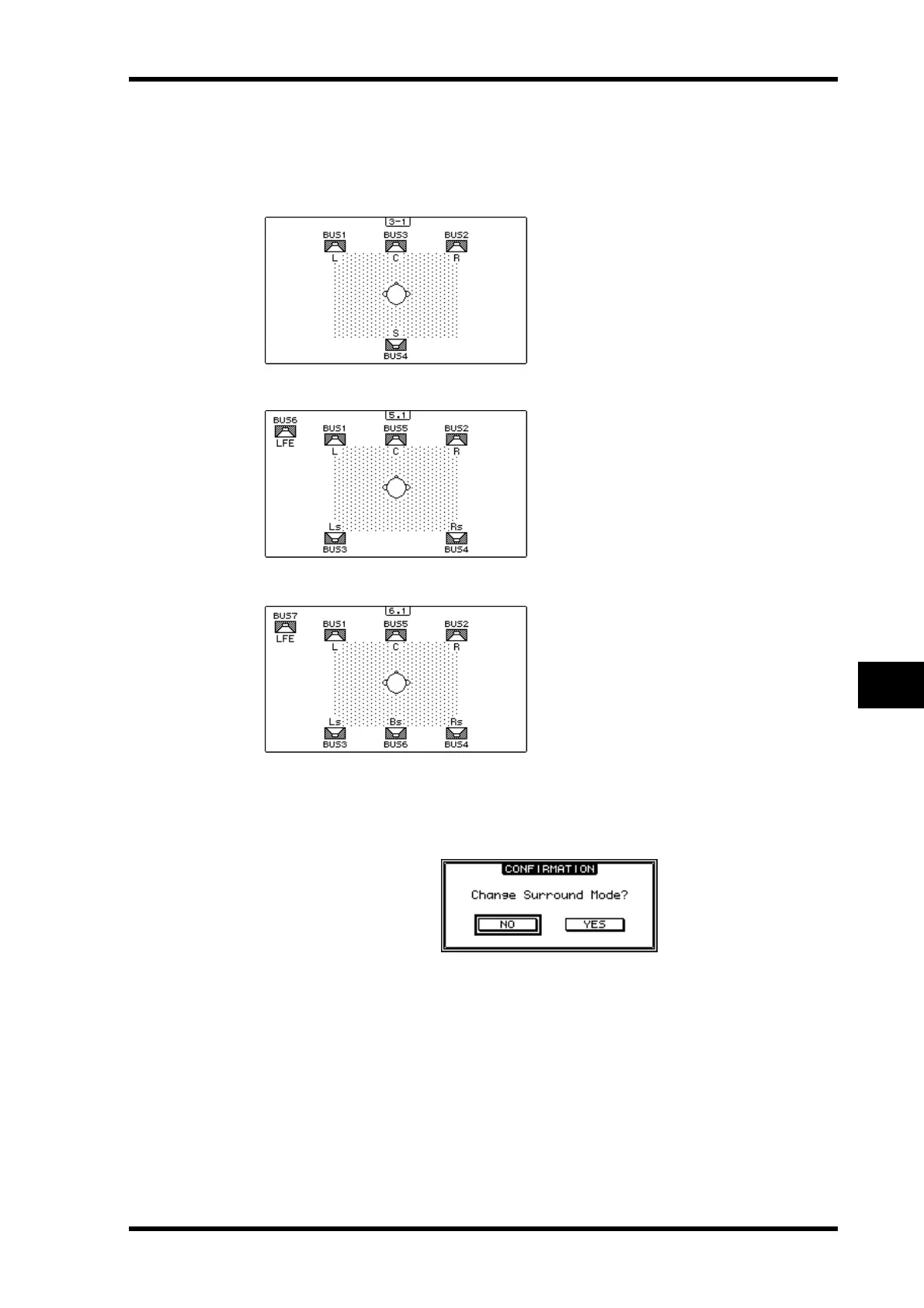
When you move the cursor to one of these buttons, speaker icons appear, indicating a typ-
ical listening position and the Surround Channel to Bus Out configuration.
• 3-1 Surround
• 5.1 Surround
• 6.1 Surround
3 Press the [ENTER] button.
The confirmation window for changing the Surround mode appears.
4 Move the cursor to the YES button, then press [ENTER].
The 01V96 enters the selected Surround mode.
5To link the Input Channel Pan setting with the stereo surround panning,
move the cursor to the PAN/SURR LINK button, then press [ENTER].
When the PAN/SURR LINK button is turned on, adjusting the Input Channel pan settings
will also change the stereo surround panning accordingly, and vice versa.





 To Next Page