Assigning Parameters to Control Changes for Real-time Control 217
01V96—Owner’s Manual
MIDI
18
4 Move the cursor to the MODE parameter’s TABLE button (1), then press
[ENTER].
The MODE parameter determines which MIDI messages are transmitted when 01V96
parameters are adjusted. The following options are available for the MODE parameter:
• TABLE............................MIDI Control Change messages are transmitted in accordance
with the assignments on this page.
• NRPN.............................The assignments on the Ctl Asgn page are ignored, and pre-
defined NRPNs (Non Registered Parameter Numbers) are
transmitted for remote control.
5 If you turned on the TABLE button in Step 4, move the cursor to a parameter
box in the No. (CH) column, then rotate the Parameter wheel or press the
[INC]/[DEC] buttons to select the MIDI channels and Control Changes to
which you want to assign parameters.
You can assign parameters to up to 16-channel Control Changes on the Ctl Asgn page,
regardless of the MIDI Channels currently selected for transmission and reception.
Skip Steps 5 and 6 if you turned on the NRPN button in Step 4.
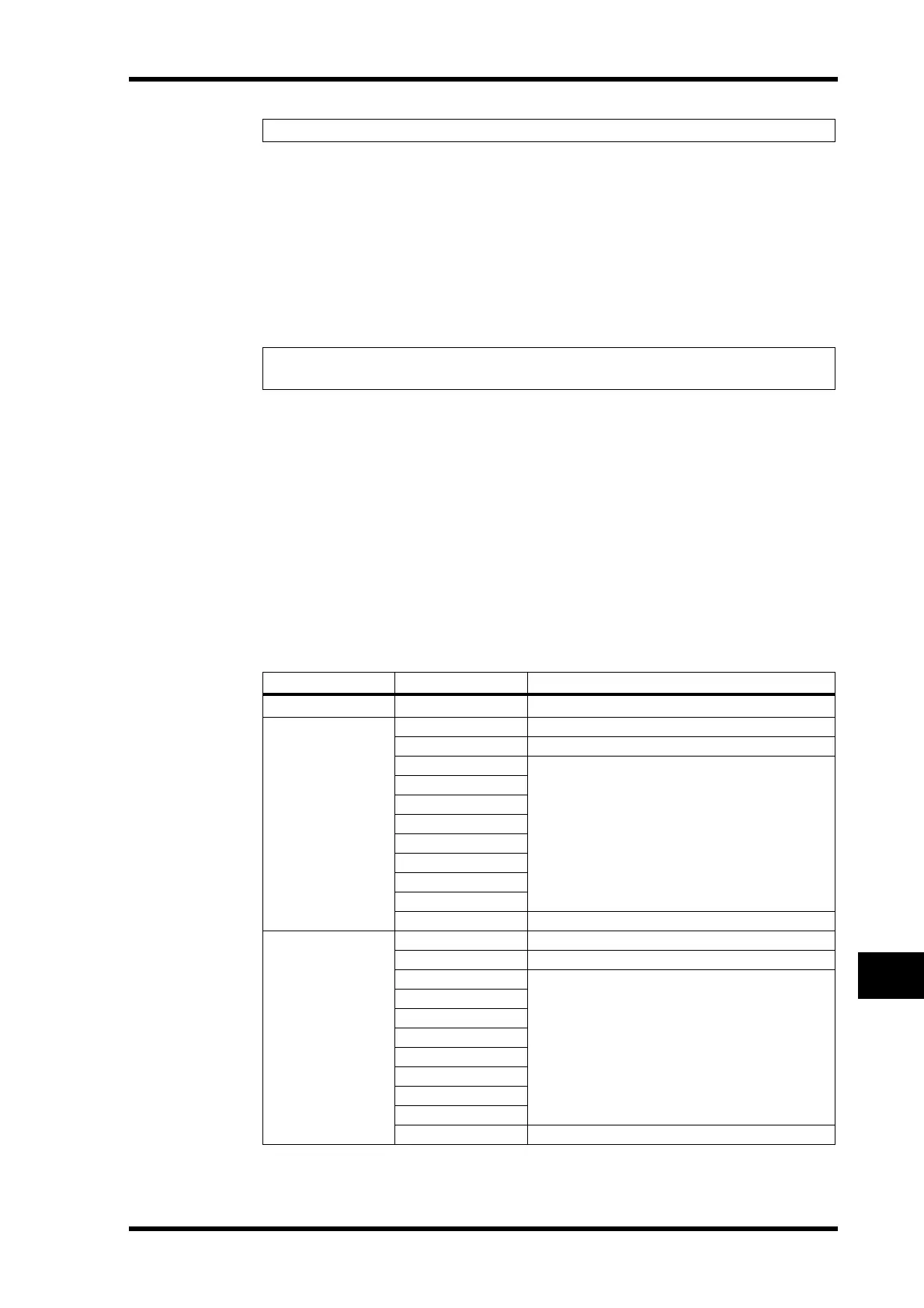
6 Select parameters in the parameter boxes in the three PARAMETER columns.
Select a parameter group in the parameter box in the first PARAMETER column, and spec-
ify the desired values in the parameter boxes in the second and third PARAMETER col-
umns.
The following parameters and values are available:
Tip: See page 293 for information on the default Parameter to Control Change assignments.
Tip: NRPNs are special MIDI messages that combine three different Control Changes. They
enable you to control many parameters on a single MIDI Channel.
HIGH MID LOW
NO ASSIGN
——
FADER H
CHANNEL INPUT1–32/ST IN1–4
MASTER BUS1–8/AUX1–8/STEREO
AUX1 SEND
INPUT1–32/ST IN1–4
AUX2 SEND
AUX3 SEND
AUX4 SEND
AUX5 SEND
AUX6 SEND
AUX7 SEND
AUX8 SEND
BUS TO ST BUS1–8
FADER L
CHANNEL INPUT1–32/ST IN1–4
MASTER BUS1–8/AUX1–8/STEREO
AUX1 SEND
INPUT1–32/ST IN1–4
AUX2 SEND
AUX3 SEND
AUX4 SEND
AUX5 SEND
AUX6 SEND
AUX7 SEND
AUX8 SEND
BUS TO ST BUS1–8





 To Next Page