Performance Editor Essential Owner’s Manual 4
Voice List
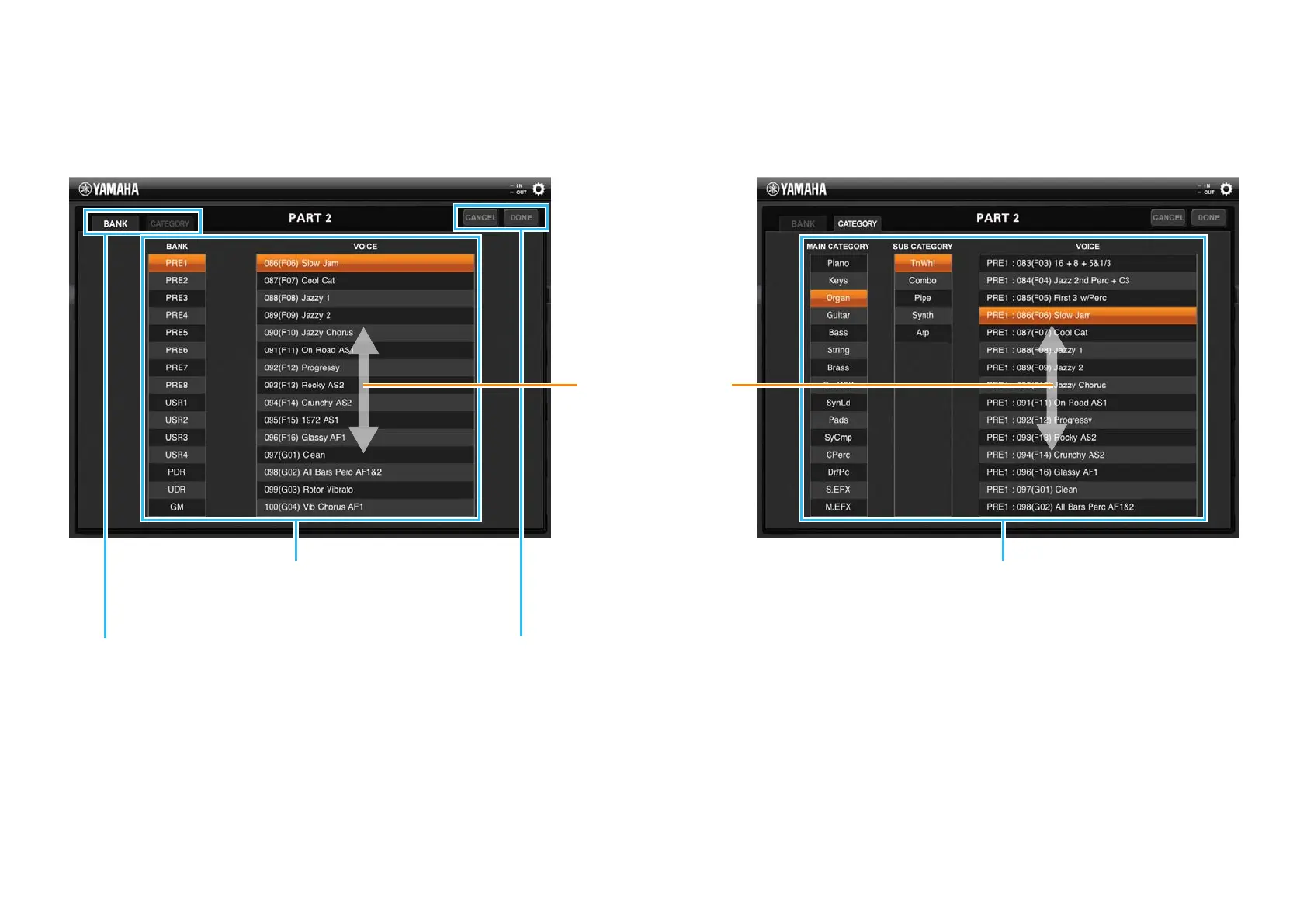
This list is called up by tapping the Voice Bank, Voice number or Voice name for each Part. As shown below, the Voice List features two indication types: Bank order and
Category order. Note that User Voices are not shown in the Voice List by Category.
Voice List with the Bank order Voice List with the Voice Category order
BANK and CATEGORY tabs
Selects the indication type of the Voice List
from two types: Bank order or Category
order. When a User Voice is selected, the
CATEGORY tab is not available.
Tapping [DONE] will actually assign the
selected Voice to the current Part, then
close the List. Tapping [CANCEL] will abort
selection then close the List.
Tap the desired Bank to call up the
corresponding Voice List, then tap the desired
Voice name. The Voice List can be scrolled.
Tap the desired Main Category and Sub Category
to call up the corresponding Voice List, then tap the
desired Voice name. The Voice List can be scrolled.
Dragging upward or
downward will scroll
through the Voices.


 To Next Page