112 RM1x SEQUENCE REMIXER
PATTERN CHAIN MODE
3. Job
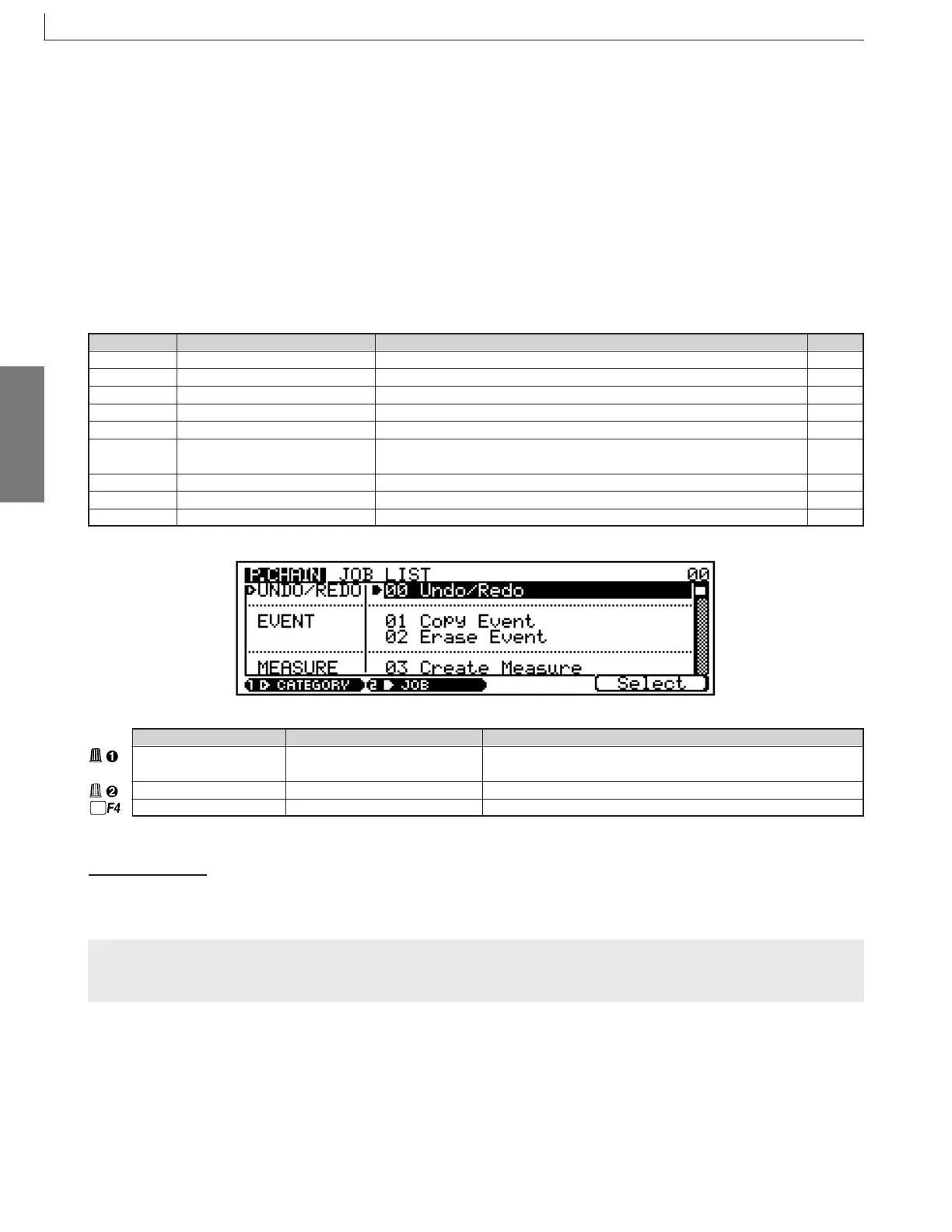
You use the RM1x’s pattern chain jobs to perform various operations on phrases and patterns.
You select the job from the job menu using the Display Knob 1, 2 or the CURSOR buttons. You can also make your selection
using the F4 button.
Note that the job menu is too large to fit entirely on the screen. But you can scroll through the list using the Display Knob 1, 2
or the CURSOR buttons.
❏ Job List
3. Job
Category Values Function
UNDO/REDO 00 Undo/Redo If UNDO: Cancel the last operation. If REDO: Cancel the last UNDO
EVENT 01 Copy Event Copy all events in specified segment to designated destination.
EVENT 02 Erase Event Erase all events over selected segment (and replaces with rests).
MEASURE 03 Create Measure Insert empty measures into all tracks.
MEASURE 04 Delete Measure Delete specified measures from all tracks.
CONVERT 05 Convert to Song Converts the Pattern Chain data to Song data and places the results in the
normal song tracks after converting the data to standard MIDI format.
CHAIN 06 Copy Chain Copy data from selected pattern chain into destination pattern chain.
CHAIN 07 Clear Chain Delete all data from selected pattern chain.
CHAIN 08 Chain Name Assign a name to the selected pattern chain.
Parameter Values Function
Category UNDO/REDO, EVENT, Selects the category.
MEASURE, CONVERT, CHAIN
Job 00 ... 08 Selects the job.
Select Jumps to the job currently selected in the job list.
See page
113
113
113
113
113
114
114
114
114
To Select a Job
Same as in the PATTERN mode. Refer to page 81.
CAUTION !
Do not turn off the power while a job is executing (while the “Executing...” message is on the screen), as this may cause
destruction of your recorded data.



 To Next Page