RM1x SEQUENCE REMIXER 117
SONG MODE
2. Recording
You use SONG RECORDING mode to record your songs.
You start a recording session from the SONG PLAY screen by pressing the REC button. This puts you into Recording Standby.
You can then select the recording method and set the relevant parameters, before beginning the actual recording.
Refer to the PATTERN mode recording instructions (page 49) for details on recording using the REPLACE, OVERDUB,
STEP, and GRID recording modes. The SONG mode additionally allows PUNCH-IN recording, which will be described
below.
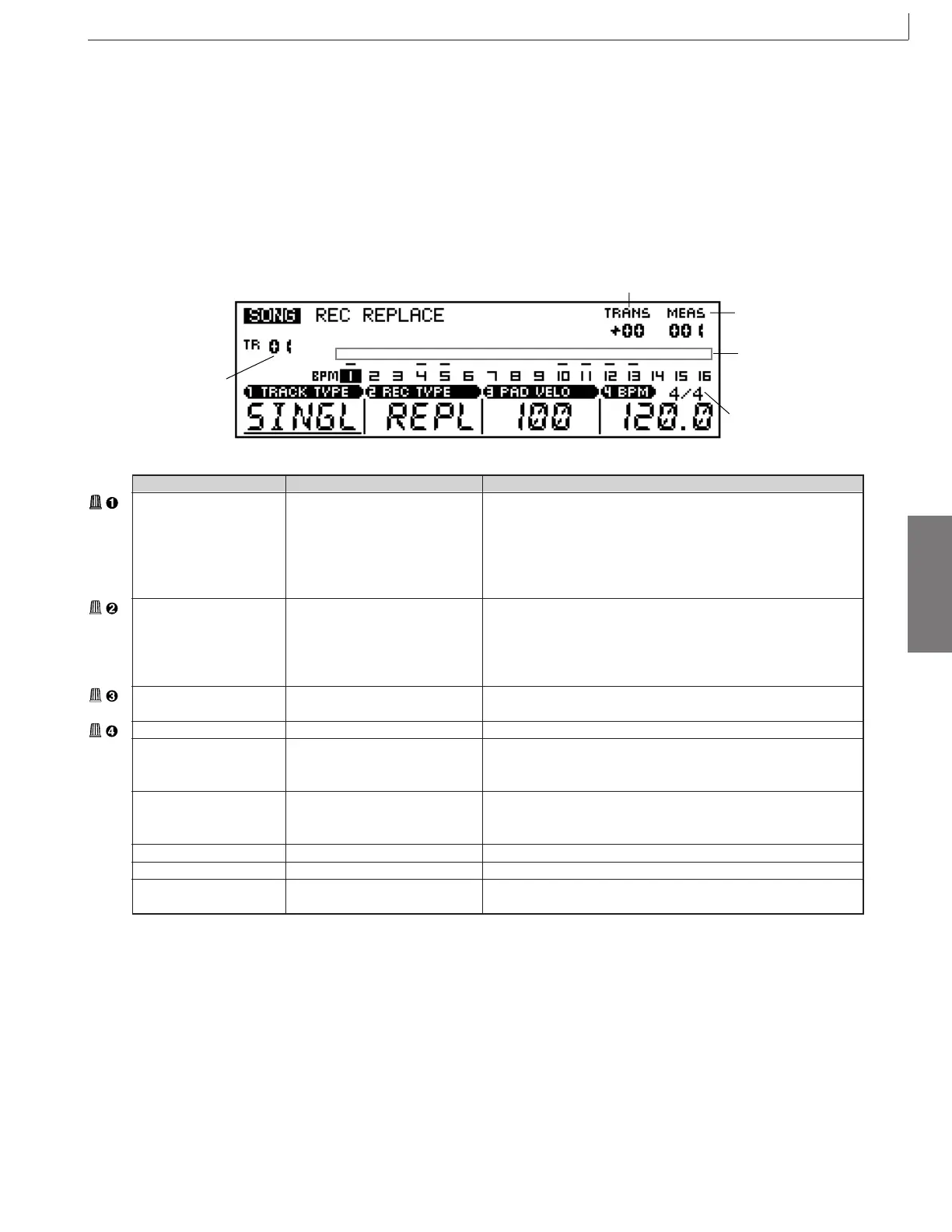
Time signature
Track number
Track status
Transpose
Measure
Parameter Values Function
Track Type Single, Multi Specifies SINGLE or MULTI-TRACK recording. When SINGLE is
selected only a single track is recorded at a time as in the PATTERN
mode. When MULTI is selected all 16 tracks can be recorded at the
same time via the corresponding MIDI channels. Please note that
only the REPLACE, OVERDUB, and PUNCH-IN recording modes
are available when MULTI is selected.
Recording type Replace (Realtime) Selects the recording method.
Overdub (Realtime)
Punch In (Realtime)
Step (Step)
Grid (Step)
Keypad velocity 001 ... 127, RND1 ... RND4 Specifies the note velocity value for the RM1x keyboard. Higher val-
ues produce louder sound.
BPM 25 ... 300 Sets tempo for song playback.
Track number 01 ... 16 Shows the current selected track number. Track number selection
can be accomplished via this parameter, or by the keyboard method
described on page 27.
Transpose -36 ... +36 Shows the current transpose value. Transposition can be accom-
plished via this parameter, or by the keyboard method described on
page 27.
Measure Sets recording start location; or shows current recording location.
Time Signature
1/16 ... 16/16; 1/8 ... 16/8; 1/4 ... 8/4
Sets the song’s time signature.
Track status MUTE, SOLO Indicates track SOLO or track MUTE.
The highlighted track number indicates the currently selected track.
2. Recording
* For information about how to change values, refer to the Basic Operation (page26).



 To Next Page