RM1x SEQUENCE REMIXER 145
APPENDIX
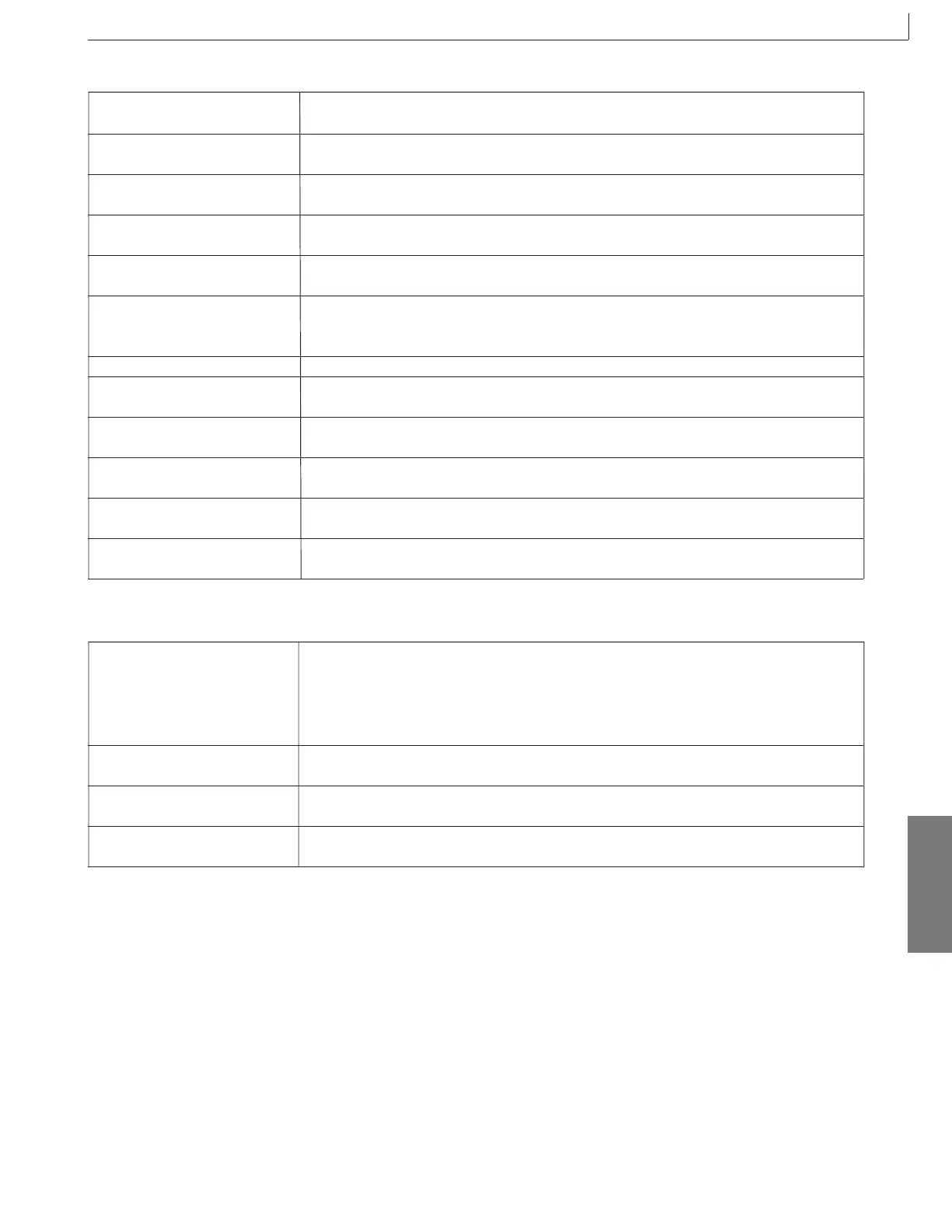
•Disk
Disk Full This will appear if the floppy disk is full and has no room to save the file. Either use a
new floppy disk, or delete unneeded files before trying the operation once again.
File Not Found When loading, this will appear if the specified file does not exist in the floppy disk.
Insert the disk once again, and try the operation again.
Bad Disk Format Now? The floppy disk is faulty. Press the [Yes +1] button to format the disk.
(Y/N)
No Disk This indicates that the floppy disk is not correctly inserted into the RM1x. Insert the
floppy disk correctly.
Unformat Format Now? This will appear if the floppy disk is not formatted. Press the [Yes +1] button to format
(Y/N) the disk.
Write Protected This will appear if the write-protect slider of the floppy disk is in the write prohibit
position. Remove the floppy disk, close the write-protect slider, and try the operation
once again.
Bad File This will appear when you attempt to load a defective file.
Illegal Format This will appear if the floppy disk is of a format which the RM1x is not able to handle.
Check the contents of the disk.
Disk Changed This will appear if you have exchanged disks when you should not have. Try the
operation once again from the beginning.
Can’t Change File Name When renaming, this will appear if the floppy disk already contains a file with a name
identical to the specified filename. Specify a different filename.
Illegal File When loading, this will appear if the specified file cannot be handled by the RM1x.
Check the contents of the file.
No Data When saving data to floppy disk, this will appear if the selected song or style contains
no data, and the save operation is invalid. Select a different song or style.
•Messages other than error messages
Can’t Undo. Ok? (Y/N) If executing a job would fill up the internal memory so that Undo will not be available,
this message will appear. If you are sure that you will not need to Undo this job, press
the [YES +1] button. To cancel without executing the job, press the [NO -1] button,
and delete unneeded songs, patterns, or user phrases before trying the operation once
again.
Are you sure? (Y/N) Before an operation is executed, this message will ask you for confirmation. Use the
[YES +1]/[NO -1] button to either cancel or execute.
Completed This will appear when the current process has been completed. Press any button and
the message will disappear.
Executing... When loading, saving, or formatting, this message will appear while the job is being
executed. Please wait.
3. Error messages



 To Next Page