RM1x SEQUENCE REMIXER 47
PATTERN MODE
❏ Patch
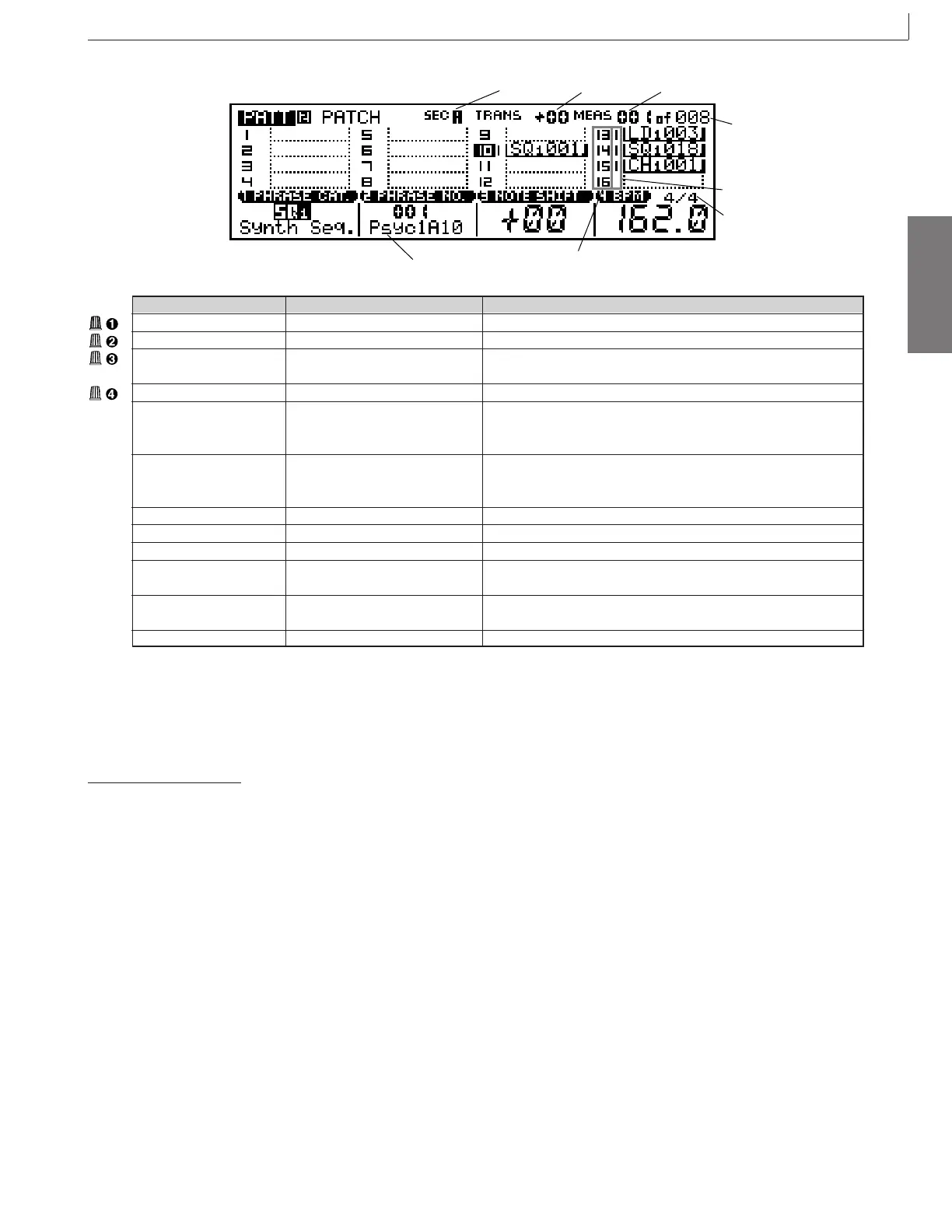
Time signature
Track number
Track status
Transpose
Measure
Length
Section
Phrase name
You can use this screen to create a pattern (by arranging phrases
onto the 16 pattern tracks), or to select and replay an existing
pattern.
To create a pattern
1 After selecting the style you want to work on in the
PATTERN mode, use the MODE
[
PATTERN
]
button
to select the PATCH mode. “PATT 2 PATCH” should
appear in the upper left-hand corner of the LCD dis-
play.
2 Select the section you want to program via the key-
board as described on page 28.
3 Set the length of the section via the Length param-
eter.
4 Press the PLAY p button to start playback if you
want to monitor the sound of the pattern as you work
on it. The PLAY p button indicator will flash at the
current BPM rate, the velocity bars next to active
tracks will indicate playback level in the correspond-
ing tracks, and the MEAS parameter will indicate the
current measure during playback.
Parameter Values Function
Phrase category Selects the phrase category.
Phrase number Selects the phrase number.
Note shift -99 ... +99 Shifts the pitch of the currently selected phrase by the specified
number of semitones.
BPM 25 ... 300 Sets tempo for pattern playback.
Track number 01 ... 16 Shows the current selected track number. Track number selection
can be accomplished via this parameter, or by the keyboard method
described on page 27.
Transpose -36 ... +36 Shows the current transpose value. Transposition can be accom-
plished via this parameter, or by the keyboard method described on
page 27.
Measure Sets playback start location; or shows current playback location.
Length Shows total length of pattern.
Time Signature
1/16 ... 16/16; 1/8 ... 16/8; 1/4 ... 8/4
Sets the pattern’s time signature.
Section A ... P Shows the current selected section. Section selection can be ac-
complished by the keyboard method described on page 28.
Track status M, S Indicates track SOLO or track MUTE.
The highlighted track number indicates the currently selected track.
Phrase name Indicates the currently selected phrase.
5 Select the track to which you want to assign a phrase
via the keyboard as described on page 27. The cor-
responding track number will be highlighted on the
display.
6 Use display knobs 1 and 2 to select the category and
number of the phrase you want to assign to the cur-
rent track, respectively (phrase titles are composed
of two parts: a category abbreviation on the left, and
a number on the right).
7 Continue selecting tracks and assigning phrases un-
til your pattern is complete.
8 Press STOP s to stop playback when done.
1. PATTERN Playback
* For information about how to change values, refer to the Basic Operation (page26).



 To Next Page