RM1x SEQUENCE REMIXER 87
PATTERN MODE
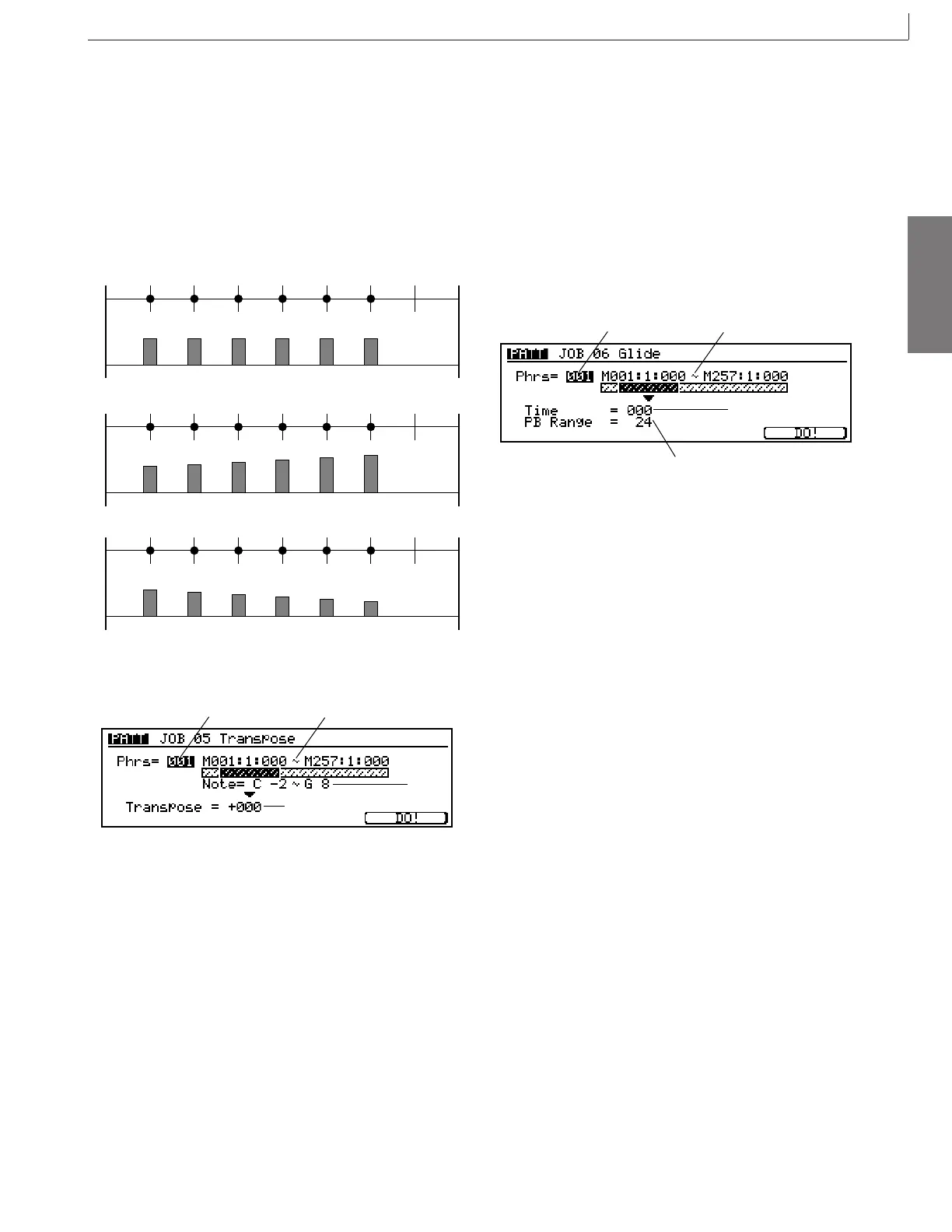
tracted from) the velocities within the segment, begin-
ning with a “0” amount at the beginning of the seg-
ment, and ending with the full Range amount at the end
of the segment.
Velocity cannot be less than 1 or higher than 127. Ad-
justed valves below 1 are raised to 1, adjusted values
above 127 are set to 127.
■ Settings : -127 ... 0 ... +127
Original velocities
Range = +50 (M: 001:1 ~ 003:1)
(Vel)
64 64 64 64 6464
64 74 84 94 114104
64 54 44 34 1421
Range = –50 (M: 001:1 ~ 003:1)
(Vel)
(Vel)
Job 05 Transpose
1
3
2
4
You use this job to tranpose a specified range of notes (pitches)
in a specified segment of the designated track. You set the
transposition level in semitone increments.
1. Phrase setting: Phrs
Sets the phrase to which adjustment is applied.
■ Settings : 001 ... 256
2. Segment (M001:1:000 ~ M257: 1:000)
Sets the area of the phrase over which adjustment is
carried out. The first segment sets the measure, beat,
and clock for the start point; the second segment sets
the end point.
■ Settings : Measure: beat : clock
001:1:000 ... 257:1:000
3. Note range (Note = C-2~G8)
Sets the note range to be transposed.
■ Settings : C-2 ... G8
4. Transpose
The Transpose value sets the number of transposition
intervals (semitones). A value of +12 would transpose
all targeted notes up by exactly one octave, while a value
of -12 would transpose down by an octave.
■ Settings : -127 ... +000 ... +127
Job 06 Glide
1
3
2
4
Replaces all notes following the first note in the specified seg-
ment with pitch bend data, producing smooth glides from note
to note.
1. Phrase setting: Phrs
Sets the phrase to which adjustment is applied.
■ Settings : 001 ... 256
2. Segment (M001:1:000 ~ M257: 1:000)
Sets the area of the phrase over which adjustment is
carried out. The first segment sets the measure, beat,
and clock for the start point; the second segment sets
the end point.
■ Settings : Measure: beat : clock
001:1:000 ... 257:1:000
3. Time
Specifies the length of the glide. Higher values pro-
duce a longer glide between notes.
■ Settings : 000 ... 100
4. PB Range
Specifies the maximum pitch bend range to be applied
by the glide job in semitone increments.
■ Settings : 01 ... 24
12. Job



 To Next Page