24
ADD KX-E100 AND/OR MDX-E100 TO YOUR SYSTEM
Before recording
When you record by using MDX-E100 or KX-E100, you
must first make the connections as shown in “Connecting
the system” on page 5. For details, refer to the instructions
supplied with the MDX-E100 or KX-E100. A source from
the component which is connected to the AUX terminal
component can be recorded on a tape or MD.
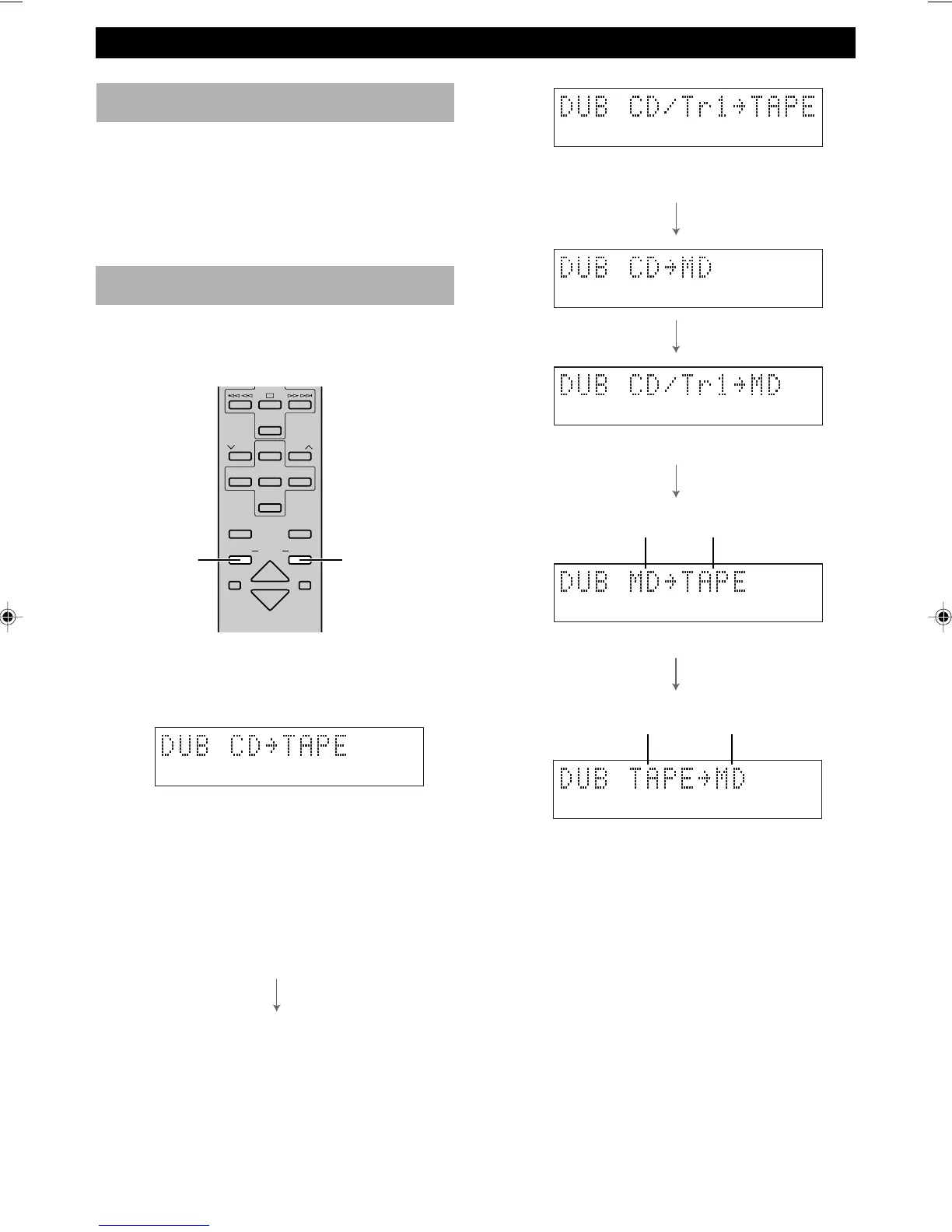
Dubbing setting
There are six different combinations of components. Once
you choose a certain mode, recording starts and ends
automatically in a certain way for each mode.
DUBBING
START
DUBBING
MODE
1
2
5
6
1 Decide the combination of the components. Each
time you press DUBBING MODE, the mode will
change in the below order.
• Recording automatically starts from the beginning
of the tape. (By pressing DUBBING START, the
tape automatically rewinds to the beginning if it is
in the middle.)
• When the recording on side A finishes while a
track is being played back, the recording on side B
starts from the beginning of the same track.
• The sound is automatically faded out when it gets
close to the end of side B.
3
4
Record unitPlay unit
TAPE
DIRECTION
PRESET
TUNER
PRESET
MD CD TAPE
AUX
MD
REC
/
PAUSE
TAPE
REC
/
PAU SE
MODE
SLEEP
DISPLAY
DUBBING
VOLUME
START
• Only the first track is recorded. After recording
the CD tray opens automatically.
• Same as CD (Tr1) = TAPE
• Same as CD = TAPE
• Recording automatically starts at the beginning of
the tape. (By pressing DUBBING START, the
tape automatically rewinds to the beginning if it is
in the middle.)
2 Press DUBBING START to start recording.
Note
• The displays 1~6 which include the component you have
not connected to your receiver (RX-E200) will be skipped.
To stop dubbing
Press & on CDX-E200 or & on the recording component
(MDX-E100 or KX-E100).
Record unitPlay unit



 To Next Page