4
Connecting the speakers
Never plug the AC power cord to the wall outlet until all connections are
completed.
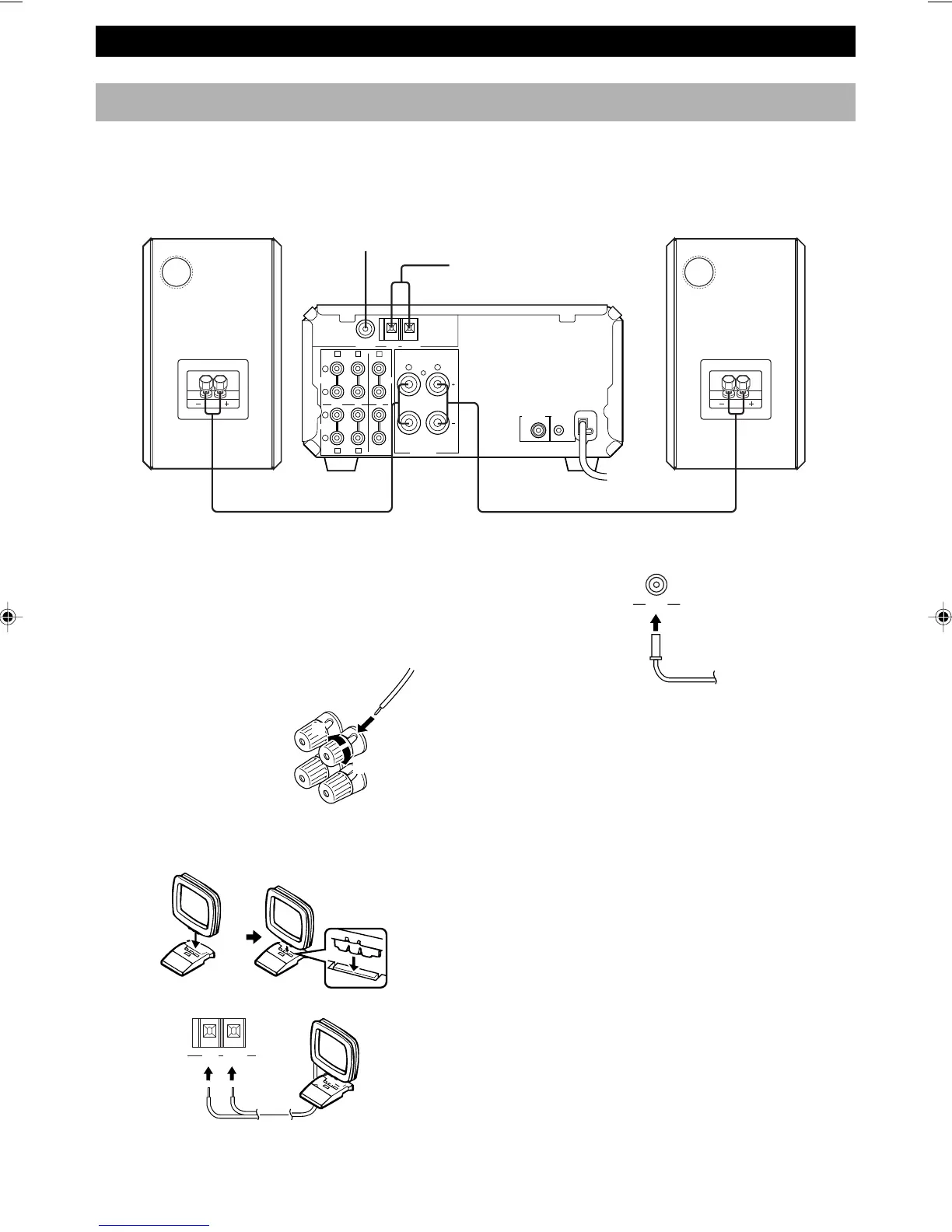
Follow the steps as shown below to connect the system using the supplied cords and accessories.
1 Connect the Speakers.
1 Unscrew the knob.
2 Remove approx. 10 mm (3/8”) of insulation from
each of the speaker wires and insert the bare wire
into the terminal.
3 Tighten the knob to secure the wire.
2 Connect the AM Antenna.
Set up the AM loop antenna, then connect it.
3 Connect the FM Antenna.
4 Connect the AC power cord to a wall outlet.
Notes
• Use external FM/AM antennas if you need better reception.
Consult your dealer.
• The AM loop antenna should be placed apart from the main
unit. The antenna may be hung on a wall.
To Connect the Subwoofer (optional)
You can reinforce the bass frequencies by adding a
subwoofer (optional).
Connect the SUBWOOFER OUT terminal of the unit to
the INPUT terminal of the subwoofer.
1
3
FM antenna
2 AM loop antenna
Right speaker
Left speaker
GETTING STARTED
Red: positive(+)
Black: negative(–)
GND AM ANT
FM ANT
75 Ω UNBAL
1
2
3
D
L
R
C
AB E
LR
L
R
SYSTEM
CONNECTOR
SUBWOOFER
OUT
OUT IN IN
MD
CD
AUX
TAPE
6 Ω MIN./SPEAKER
SPEAKERS
FM ANT GND AM ANT
75 Ω UNBAL
4 To wall outlet



 To Next Page