CONTROLS AND FUNCTIONS
9 En
INTRODUCTION
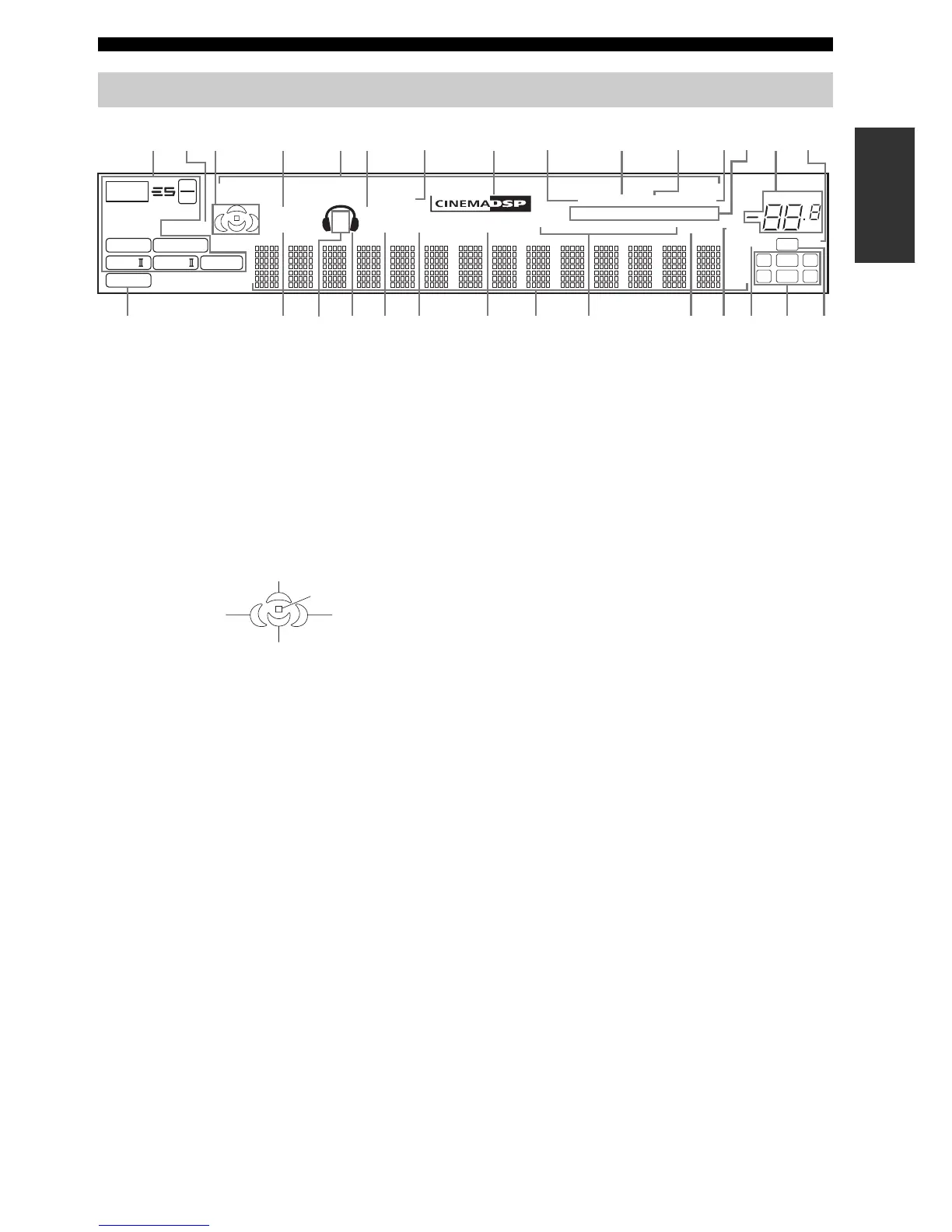
1 Decoder indicators
The respective indicator lights up when any of the
decoders of this unit functions.
2 ENHANCER indicator
Lights up when the Compressed Music Enhancer mode is
turned on (see page 37).
3 Sound field indicators
Light up to indicate the active DSP sound fields.
4 VIRTUAL indicator
Lights up when Virtual CINEMA DSP is active (see
page 44).
5 Input source indicators
The corresponding cursor lights up to show the currently
selected input source.
6 SILENT CINEMA indicator
Lights up when headphones are connected and a sound
field program is selected (see page 34).
7 DOCK indicator
Lights up when you station your iPod in a YAMAHA iPod
universal dock (such as YDS-10 sold separately)
connected to the DOCK terminal of this unit
(see page 21).
8 CINEMA DSP indicator
Lights up when you select a CINEMA DSP sound field
program (see page 71).
9 AUTO indicator
Lights up when this unit is in the automatic tuning mode
(see page 46).
0 TUNED indicator
Lights up when this unit is tuned into a station
(see page 46).
A STEREO indicator
• Lights up when this unit is receiving a strong signal for
an FM stereo broadcast while the AUTO indicator is lit
(see page 46).
• Lights up when this unit is receiving a stereo DAB
service.
B MEMORY indicator
Flashes to show that a station or a DAB service can be
stored (see pages 48 and 60).
C DAB indicators
Indicate the current DAB tuning status when this unit is in
the DAB tuning mode (see pages 58 to 69).
D VOLUME level indicator
Indicates the current volume level.
E DUAL indicator
Lights up when dual monaural signals are being input to
this unit when this unit is in the DAB tuning mode.
F PCM indicator
Lights up when this unit is reproducing PCM (Pulse Code
Modulation) digital audio signals.
G STANDARD indicator
Lights up when the “SUR. STANDARD” or “SUR.
ENHANCED” program is selected.
H SP A B indicators
Light up according to the set of front speakers selected.
Front panel display
p
NET
USB
p
DVR
p
DVD
p
CD
p
V-AUX
p
DTV/CBL
p
MD/CD-R
p
TUNER
96
24
q
PL
q
EX
q
PL
ENHANCER
MATRIX DISCRETE
SILENT CINEMA
ZONE2 NIGHT
DOCK
STANDARD
AUTO
DAB
SECONDARY DRC PRESET
PSHOLD RT
EON
PTYPTY
TUNED
MUTE
VOLUME
MEMORY
SLEEP
VIRTUAL
PCM
q
PL x
A B
SP
mS
ft
dB
96/24
HiFi DSP
LFE
DUAL
LCR
SL SB SR
q
DIGITAL
t
dB
STEREO
CT
2
J
GKILM O
C
QP
E
SRNF
H
13 4567 8 B
0A9D
Presence DSP sound field
Listening position
Surround left
DSP sound field
Surround right
DSP sound field
Surround back DSP sound field


 To Next Page