20 En
CONNECTIONS
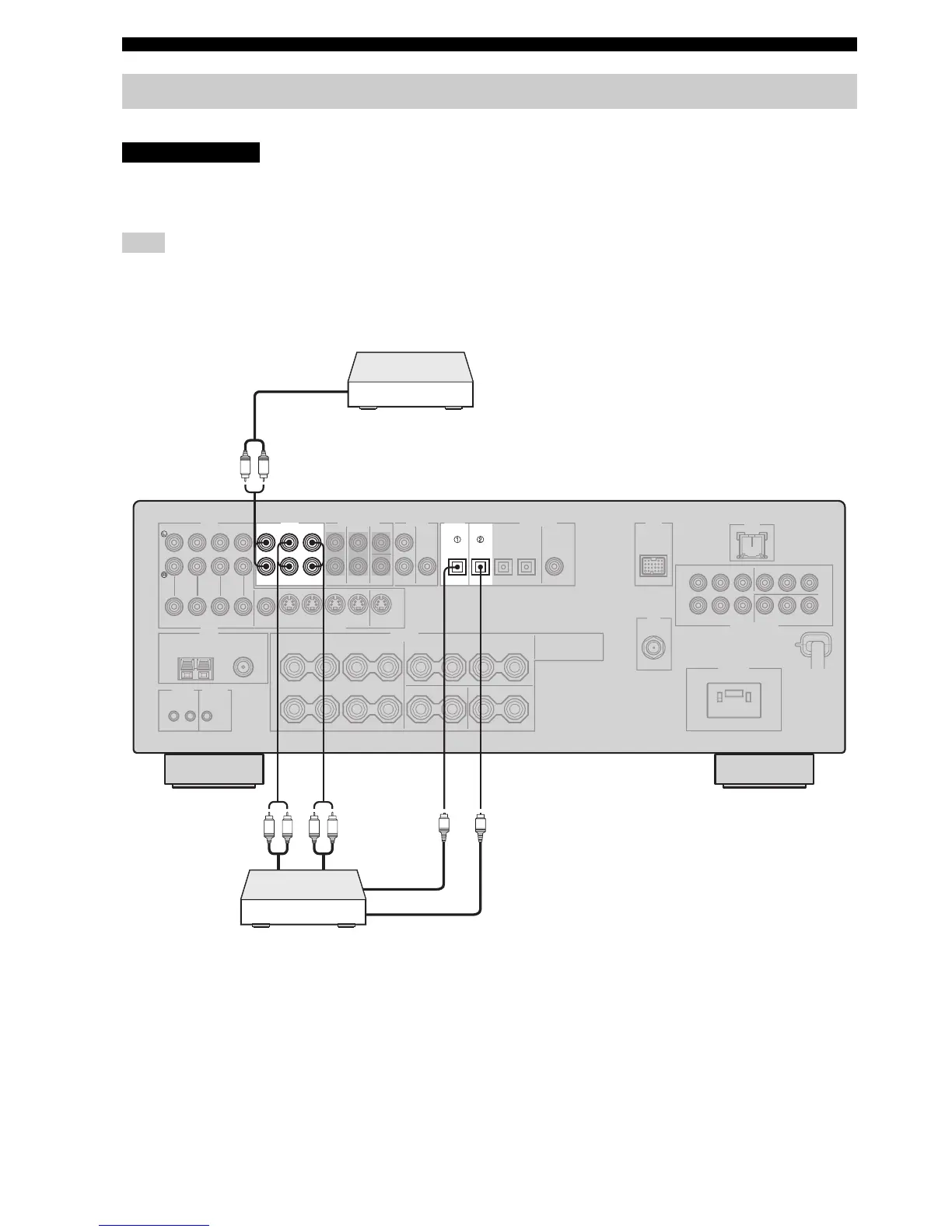
Connect your CD player, MD player or tape deck via analog and/or digital connections.
Do not connect this unit or other components to the AC power supply until all connections between
components are complete.
To make a digital connection to a component other than the default component assigned to each DIGITAL INPUT or DIGITAL
OUTPUT jack, select the corresponding setting for “OPTICAL OUT”, “OPTICAL IN”, or “COAXIAL IN” in “I/O ASSIGNMENT”
(see page 87).
Connecting a CD player, an MD player or a tape deck
Note
CAUTION
AUDIO DIGITAL INPUT
MD/CD-RMD/CD-R
OUT
(REC)
IN
(PLAY)
MD/
CD-R
CD
DIGITAL
OUTPUT
OPTICAL OPTICAL
LR
LR LR
O
O
CD player
MD recorder or
tape deck
Audio out
Audio out
Audio in
Optical audio out
Optical audio in


 To Next Page