CHASSIS
3-23
EAM20136
CHASSIS
EAM30479
ADJUSTING THE FRONT DISC BRAKE
There should be no free play at the brake lever
end.
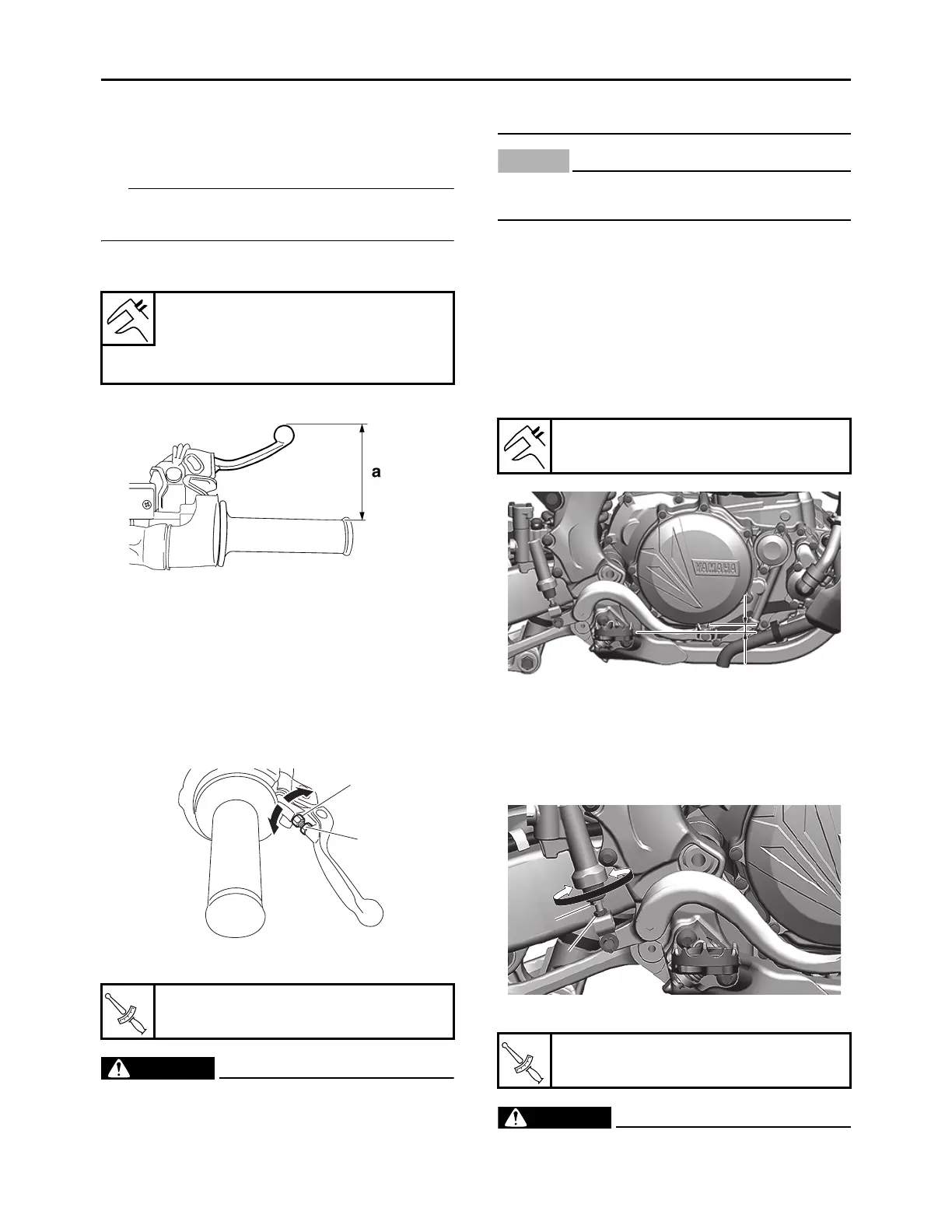
1. Check:
• Brake lever position “a”
2. Remove:
• Brake lever cover
3. Adjust:
• Brake lever position
a. Loosen the locknut “1”.
b. Turn the adjusting bolt “2” until the speci-
fied brake lever position is obtained.
c. Tighten the locknut.
EWA13050
A soft or spongy feeling in the brake lever
can indicate the presence of air in the brake
system. Before the vehicle is operated, the
air must be removed by bleeding the brake
system. Air in the brake system will consid-
erably reduce braking performance.
ECA13490
After adjusting the brake lever position,
make sure there is no brake drag.
4. Install:
• Brake lever cover
EAM30480
ADJUSTING THE REAR DISC BRAKE
1. Check:
• Brake pedal position “a”
(distance from the top of the rider footrest to
the top of the brake pedal)
Out of specification Regulate.
2. Adjust:
• Brake pedal position
a. Loosen the locknut “1”.
b. Turn the adjusting bolt “2” until the speci-
fied brake pedal position is obtained.
c. Tighten the locknut.
EWA19150
A soft or spongy feeling in the brake pedal
Brake lever position
100 mm (3.94 in)
Extent of adjustment
86–105 mm (3.39–4.13 in)
Locknut
5 N·m (0.5 kgf·m, 3.7 lb·ft)
2
1
Brake pedal position
5.0 mm (0.20 in)
Locknut
6 N·m (0.6 kgf·m, 4.4 lb·ft)
a
1
2




 To Next Page