Maintenance and Troubleshooting Yamatake Corporation
7-8 ST3000 Smart Transmitter Series 900 Electronic Differential Pressure/Pressure Transmitter
7-2-2 :Restoring Data
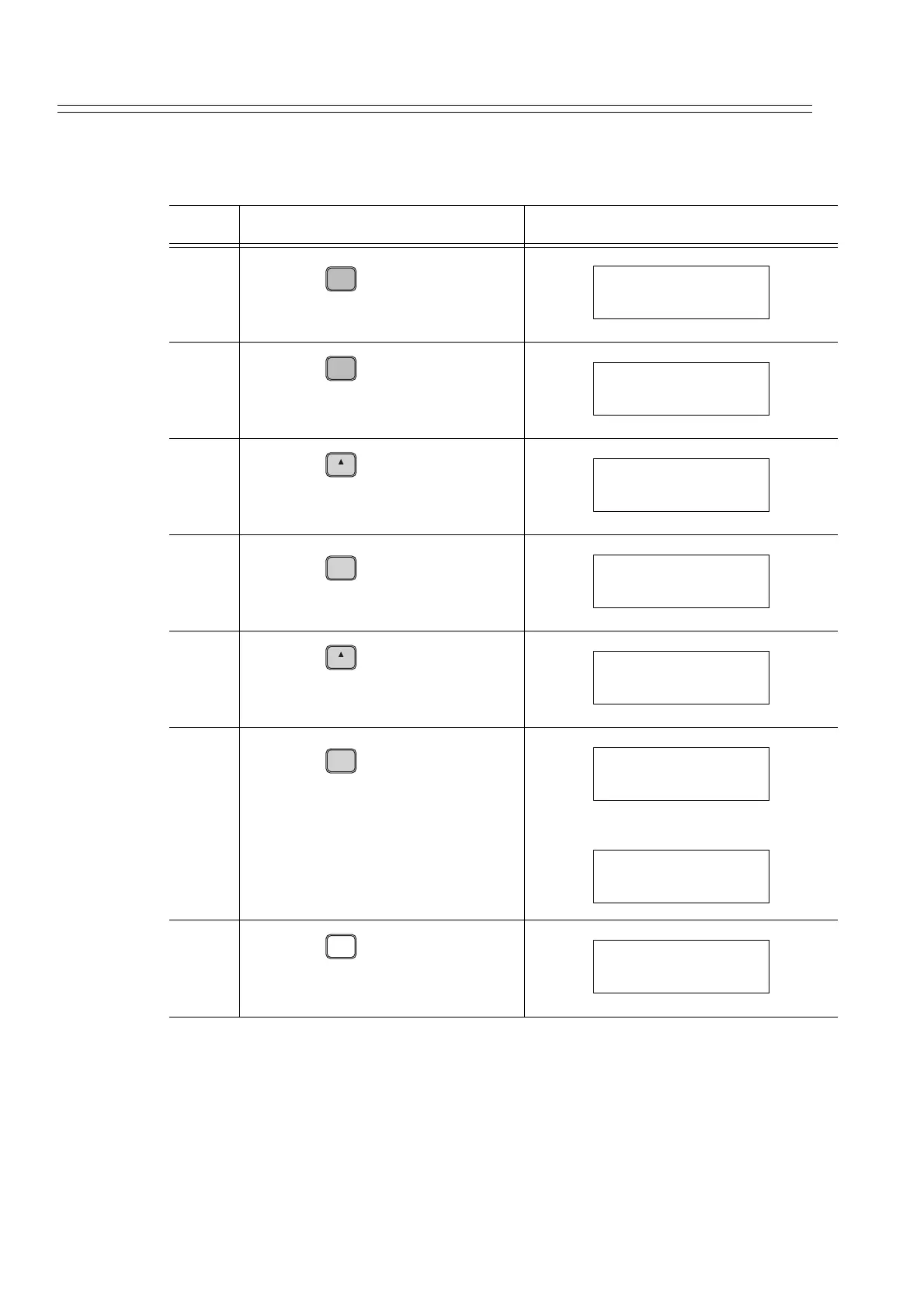
How to restore data:
Step Description SFC screen
1
Press the key.
2
Press the key.
3
Press the key to display the
screen shown on the right.
4
Press the key.
5
Press the key.
6
Press the key.
• Restoring has been completed.
• Release the restore mode by step
7.
7
Press the key.
• The restore mode has been
released.
A
ID
DE READ
DSTJ TAG NO.
LIN DP FIT-1234
B
CONF
DSTJ CONFIG
CONFORM?
H
NEXT
DSTJ CONFIG
SAVE/RESTORE?
ENTER
( Yes )
NON-VOL
SAVE/RESTORE
SAVE DATA?
H
NEXT
SAVE/RESTORE
RESTORE DATA?
ENTER
( Yes )
NON-VOL
RESTORE DATA
WORKING...
RESTORE DATA
DATA RESTORED
CLR
( No )
DSTJ FIT-1234
READY...



 To Next Page