EasyManua.ls Logo

Yealink T41P - Conference; Network Conference

Yealink T41P
126 pages
Print Icon
To Next Page IconTo Next Page
To Previous Page IconTo Previous Page
Loading...
User
80
Ne
Guide for th
e
The
3. Ent
e
4. Wh
e
par
t
To join t
w
1. Pla
c
first
c
2. Pres
(
for
3. Pres
Durin
g
t
h
- Pres
- Pres
- Pres
-
-
-
- Pres
- Pres
twork C
o
You ca
n
confere
n
This feat
z
Joi
n
z
Invi
z
Re
m
To use t
h
advanc
e
SIP-T41P IP P
active call is
e
r the numb
e
e
n the secon
t
ies in the co
n
w
o calls in a
c
e two calls
u
c
all using ac
s or
example, se
l
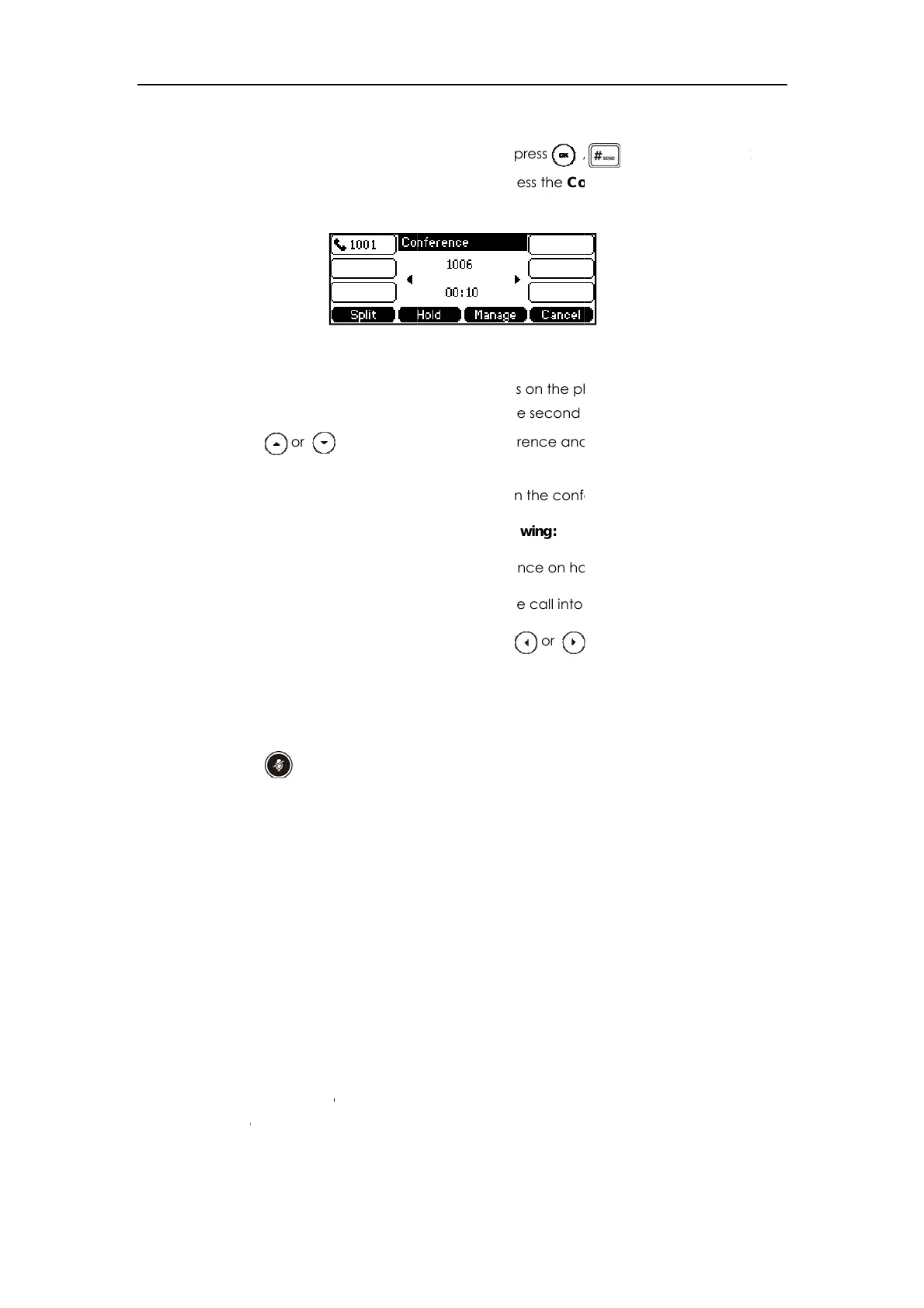
s the Conf s
o
h
e conferen
c
s the Hold s
o
s the Split so
f
s the Mana
g
Press the Fa
Press the R
e
Press the B
a
s to m
u
s the Cance
l
o
nferenc
e
n
use networ
k
n
ce with mu
l
ure allows y
o
n
two calls t
o
te another
p
m
ove a spe
c
h
is feature, c
o
e
, and confi
g
hone
placed on
h
e
r of the sec
o
d party ans
w
n
ference.
conference:
u
sin
g
two dif
f
count 1, an
d
to select th
e
l
ect the call
o
o
ft key to
j
oin
c
e call, you
c
o
ft key to pla
c
f
t key to split
e soft key, a
n
r Mute soft k
e
e
move soft k
e
a
ck soft key t
u
te the conf
e
l
soft key to
d
e
k
conferenc
e
l
tiple partici
p
o
u to perfor
m
o
g
ether into
a
p
arty into an
a
c
ific confere
n
o
ntact your
s
g
ure the net
w
h
old.
o
nd party an
w
ers the call,
f
erent acco
u
d
then place
e
call for co
n
o
n account
the two cal
l
c
an do the f
o
c
e the conf
e
the confere
n
n
d then pres
e
y to forbid
t
e
y to remov
e
o return to t
h
e
rence call.
d
rop the con
e
feature on
p
ants.
m
the followi
n
a
conferenc
e
a
ctive conf
e
n
ce party.
s
ystem admi
w
ork confer
e
d press
,
press the C
o
u
nts on the p
h
the second
n
ference an
d
1
)
.
l
s in the conf
e
o
llowin
g
:
e
rence on h
o
n
ce call into
s or
t
he party sp
e
e
the party fr
o
h
e previous i
n
ference call
the SIP-T41P
I
ng
:
e
call.
e
rence call.
nistrator for t
e
nce via we
b
,
, or th
e
o
nf soft key a
h
one
(
for ex
a
call usin
g
a
c
d
make sure
t
e
rence on a
o
ld.
some indivi
d
to select th
e
e
akin
g
.
o
m the conf
e
n
terface.
.
I
P phone to
c
he network
c
b
user interfa
e
Send soft
k
g
ain to
j
oin
a
a
mple, plac
e
c
count 2).
t
he call is ac
ccount 1.
d
ual calls.
e
desired pa
r
e
rence call.
c
onduct a
c
onference-
U
ce.
k
ey.
a
ll
e
the
tive
r
ty:
U
RI in

Other manuals for Yealink T41P

Related product manuals