9 EN
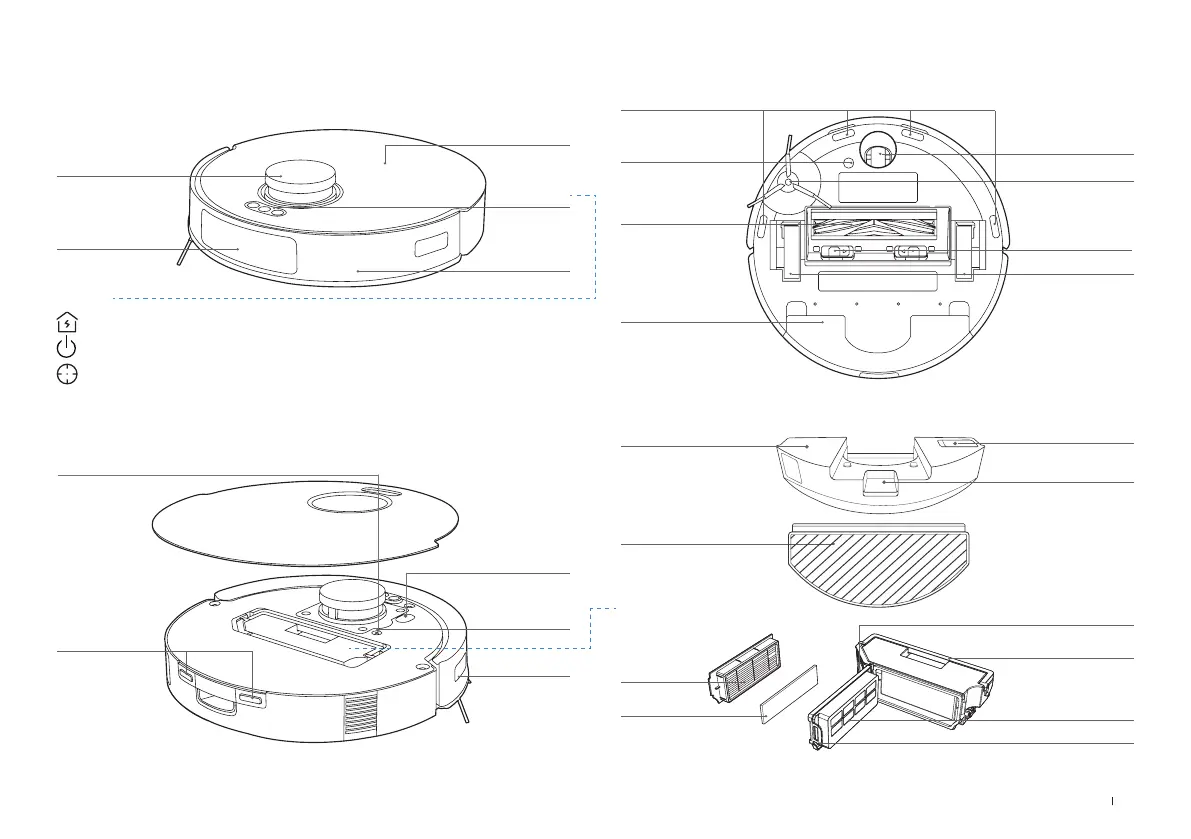
Robot
Bumper
Top Cover
Buttons
Edge Sensor
Buttons
Obstacle
Avoidance
Module
Short Press: Return to charge
Short Press: Start/Pause/Continue Long Press: Power on/off
Short Press: Start/End Spot Clean Long Press: Child Lock
RESET Button
Connect APP: Short press RESET button and follow voice prompts to connect to the App�
Restore to default settings: Press and hold RESET Button for 5 s� After you hear the voice
prompt, the startup music will be played and the robot will be restored to default settings�
Wi-Fi Status
Indicator
Dust Bin
Filter
Sponge Filter
Dust Disposal Port
Filter Net
Dust Bin Handle
Release Button
Bottom View (
DKX55
)
OZMO Pro 2.0 Vibrating Mopping System
Driving Wheels
Universal Wheel
Side Brush
Brush
Carpet Detection
Sensor
Anti-drop Sensor
Brush Release
Button
Vacuum Module
Charging
Contacts
Navigation Module
Washable Mopping Pad
Water Inlet
Reservoir Release
Button
Reservoir
PRODUCT DIAGRAM
Data Transfer Port
For professional
maintenance
personnel use only�


 To Next Page