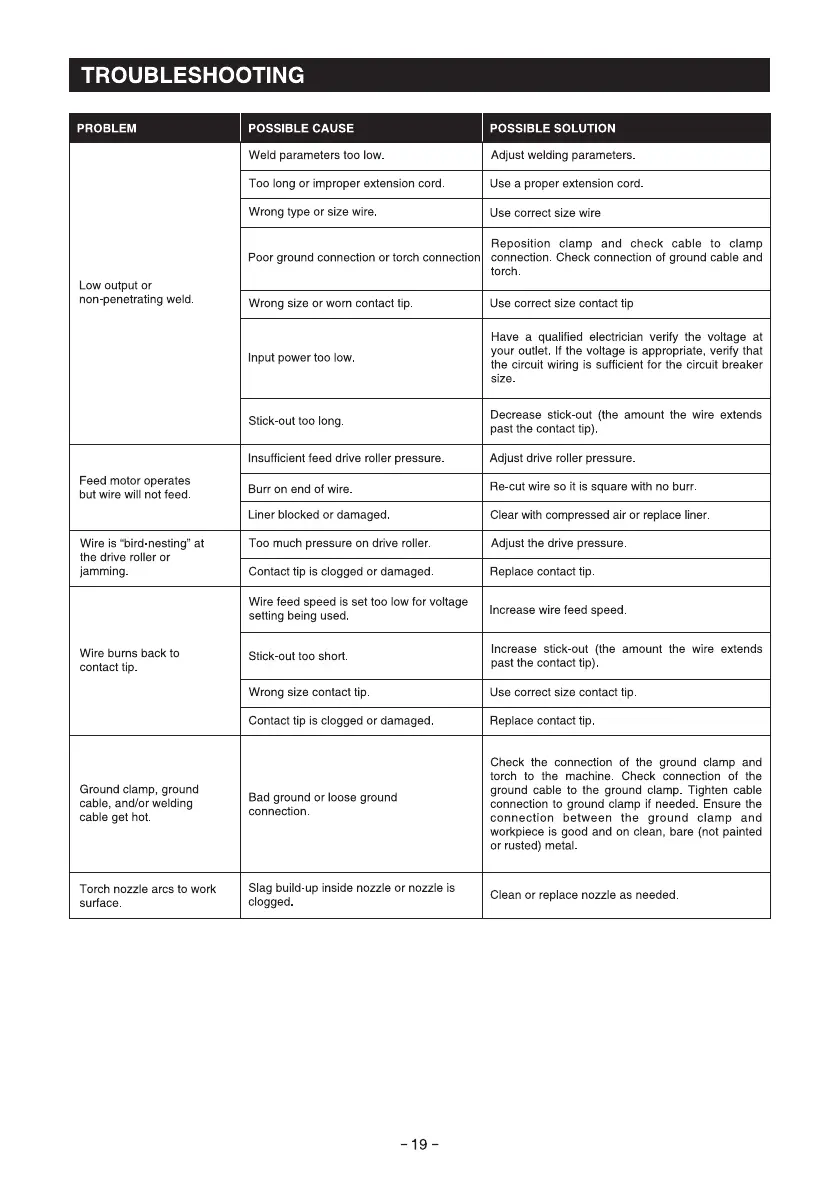
TROUBLESHOOTING
PROBLEM
Low output or
non-penetrating weld.
Feed motor operates
but wire will not feed
Wire is "bird-nesting" at
the drive roller or
Jammlng
Wire burns back to
contact tip
Ground clamp, ground
cable, and/or welding
cable get hot
Torch nozzle arcs to work
surface
POSSIBLE CAUSE
Weld parameters too low.
Too long or improper extension cord.
Wrong type or size wire
Poor ground connection or torch connection
Wrong size or worn contact tip
Input power too low
Stick-out too long
Insufficient feed drive roller pressure
Burr on end Of wire
Liner blocked Or damaged
TOOmuch pressure on drive roller
Contact tip is clogged or damaged
Wire feed speed is set too low for voltage
setting being used.
Stick-out too short
Wrong size contact tip
Contact tip is clogged or damaged
Bad ground or loose ground
connection.
Slag build-up inside nozzle or nozzle is
clogged
-19-
POSSIBLE SOLUTION
Adjust welding parameters
Use a proper extension cord.
Use correct size wire
Reposition clamp and check cable to clamp
connection. Check connection Of ground cable and
torch
Use correct size contact tip
Have a qualified electrician verify the voltage at
your outlet. If the voltage is appropriate, verify that
the circuit wiring is sufficient for the circuit breaker
Size.
Decrease stick-out (the amount the wire extends
past the contact tip).
Adjust drive roller pressure
Re-cut wire so it is square with no burr.
Clear with compressed air or replace liner.
Adjust the drive pressure
Replace contact tip.
Increase wire feed speed
Increase stick-out (the amount the wire extends
past the contact tip)
Use correct size contact tip.
Replace contact tip.
Check the connection Of the ground clamp and
torch to the machine. Check connection of the
ground cable to the ground clamp. Tighten cable
connection to ground clamp if needed. Ensure the
connection between the ground clamp and
workpiece is good and on clean, bare (not painted
or rusted) metal
Clean or replace nozzle as needed



 To Next Page