Microscope Quick Guide
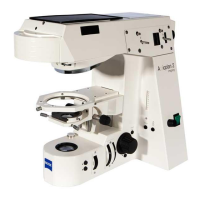
ZeissAxioObserver.D1MicroscopeGuide
Room:3164A
StartUpProcedure
1. Removedustcoverfrommicroscope
2 ToggleFluoArcLampswitchON
3 TogglePowerBarswitchON
4 TurnMicroscopeON
‐ bypressingpowerbuttonlocatedonleftsideofmicroscope
5 TurnONcomputer
6 Logonto:ObserverUseraccount(nopassword)
7 OpenProgram:AxioVision
Rel.4.8
ConfiguringImagingSetup
1. Ifnotalreadyvisible,opentheWorkareawindow
2. FromtheWorkareamenu,double‐clickonMultidimensionalAcquisitiontoexpandlist,andthen
selectMultidimensionalAcquisition.
3. Underthe tab,clickLoadbutton.Selecttheappropriateexperimentset‐updependingon
whatchannelsyouwanttoimage(ieAllChannels).
4. Selectthecolorstab
5. Youcanactivate/deactivatechannelsbyright‐mouseclickingonthechannelnumber
SetSampleonStageandFocus
Onlyuseslidesthathavebeenthoroughlycleanedofmountingmedium!
1. Choosetheappropriateobjectiveonmicroscope
2. Lightlycleanyourslide(onbothsides)withakimwipeandasmallamountof70%ethanol.
3. Ifusinganoillens,addaverysmalldropofimmersionoil.
4. Loadslideonstage.
5. Bringspecimenintofocusandbringyourareaofinteresttothecenterofthefieldofview.
CapturinganImage
1. Underthetab,selectyourchannelandclicktheMeasurebutton.Alivepreviewwindowappears.
2. Makesurethe‘Lineardisplayoffullrangeofpossiblevalues’buttonisselected.
3. Adjusttheexposuretimetogetanappropriatesignalintensity.ClickOKbuttononleftside.










 To Next Page