4. Repeatexposuretimemeasurementforeachchannel,however,adjustthefinefocusforonlyone
channeliethemostimportantone
5. Tocaptureyourfinalimage,pressthebuttonlocatedatthebottomoftheCtab.
Post‐AcquisitionAdjustments
Brightness/Contrast
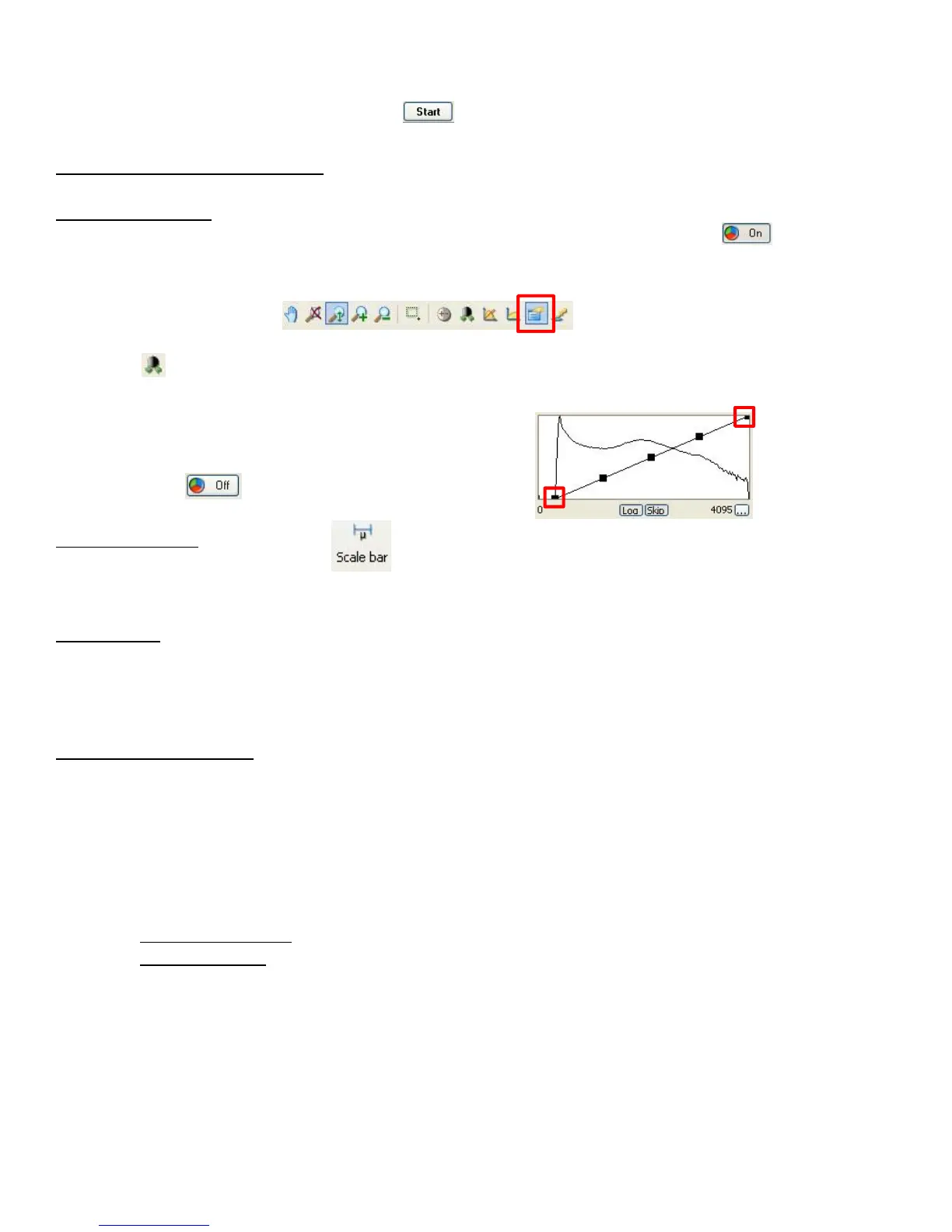
1. Temporarilyturnoffthepseudo‐coloringofthedisplayedimagebypressingthebutton.Each
channelisdisplayedinblack/white;youcanviewonechannelatatime.
2. Clickonthepropertiesbuttonfoundbelowtheimage
3. WhileunderDisplaytabofpropertieswindow,clicktheMin/Maxbutton,orunderyourimage,press
thebutton.
4. Youcanmakefurtheradjustmentsusingthedisplayedhistogram(iemovetopoflineleft,andbottom
oflineright)
‐ NOTE:donotadjusttheGamma
5. Repeatforeachchannel
6. Pressthebutton
AddingaScalebar
1. Toaddascalebar,pressthebutton,orAnnotationsfromthemainmenuandselectScalebar.
2. Dragcursoralongimagetogetdesiredscalebarsize
SavingFiles
1. Fromthemainmenu,selectFileSaveas
2. SaveyourfilesintheAxioVisionformat(.zvi)intheappropriatedestinationyourlabfolderyour
folder.PleaserefertotheAttentionUserssignspostedonthewall.
ShutDownProcedure
8 Ifusedoil,gentlyremoveoilfromobjectiveusingneatlyfoldeddrylenspaper
9 Put10xobjectiveinplace,andlowerobjective
10 CloseAxioVisionprogram.Donotsavechangesmadetotheexperiment!
11 Shutdowncomputer.Waituntilcompletelyturnedoff
12 TurnMicroscopeOFF
13 Toggle
PowerBarswitchOFF
14 FluoArcLamp:
‐ Regularworkhours:setintensityto50%oncontrolpad(F2),andleavelampON
‐ Non‐workhours:TurnlampOFF
15 Covermicroscopewithdustcover,butDON’TCOVERTHEHOTLAMPHOUSING!!










 To Next Page