34 35
Z
-
E 2 0 15
BASIC BLUETOOTH HANDS-FREE OPERATION
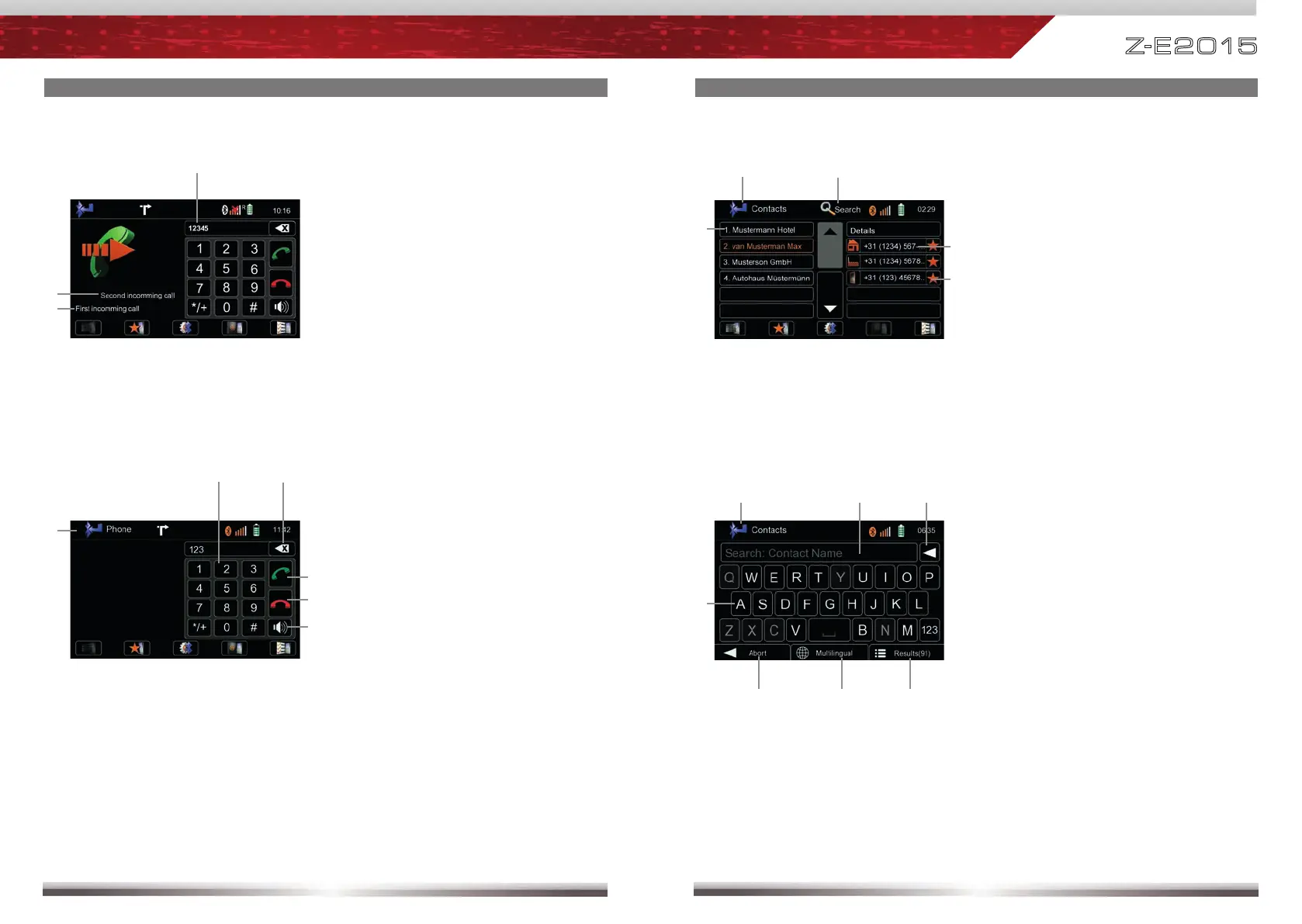
Display elements:
First incoming call
Second incoming call
Dialled number
Accept call, dial, hang up, switch between calls:
Control elements:
Keypad
Delete last digit
Pick up call / Switch to second call
Hang up active call / Back to fi rst
call
Toggle to shift call between hands-
free and mobile phone (privacy
mode)
Back to BT main menu
BASIC BLUETOOTH HANDS-FREE OPERATION
Display input
Tap to delete last character
Show all results of search function
Show between different keyboard
languages
Quit keypad
Back to Bluetooth main menu
Search for an entry
Tap a contact number to start a call
Tap on star to save as favourite
Choose contact name from list
Back to Bluetooth main menu
Control elements:
Contacts - Manage phonebook:
Search for an entry:
Control elements:



 To Next Page