11
AIR CONDITIONING (AC INFO)
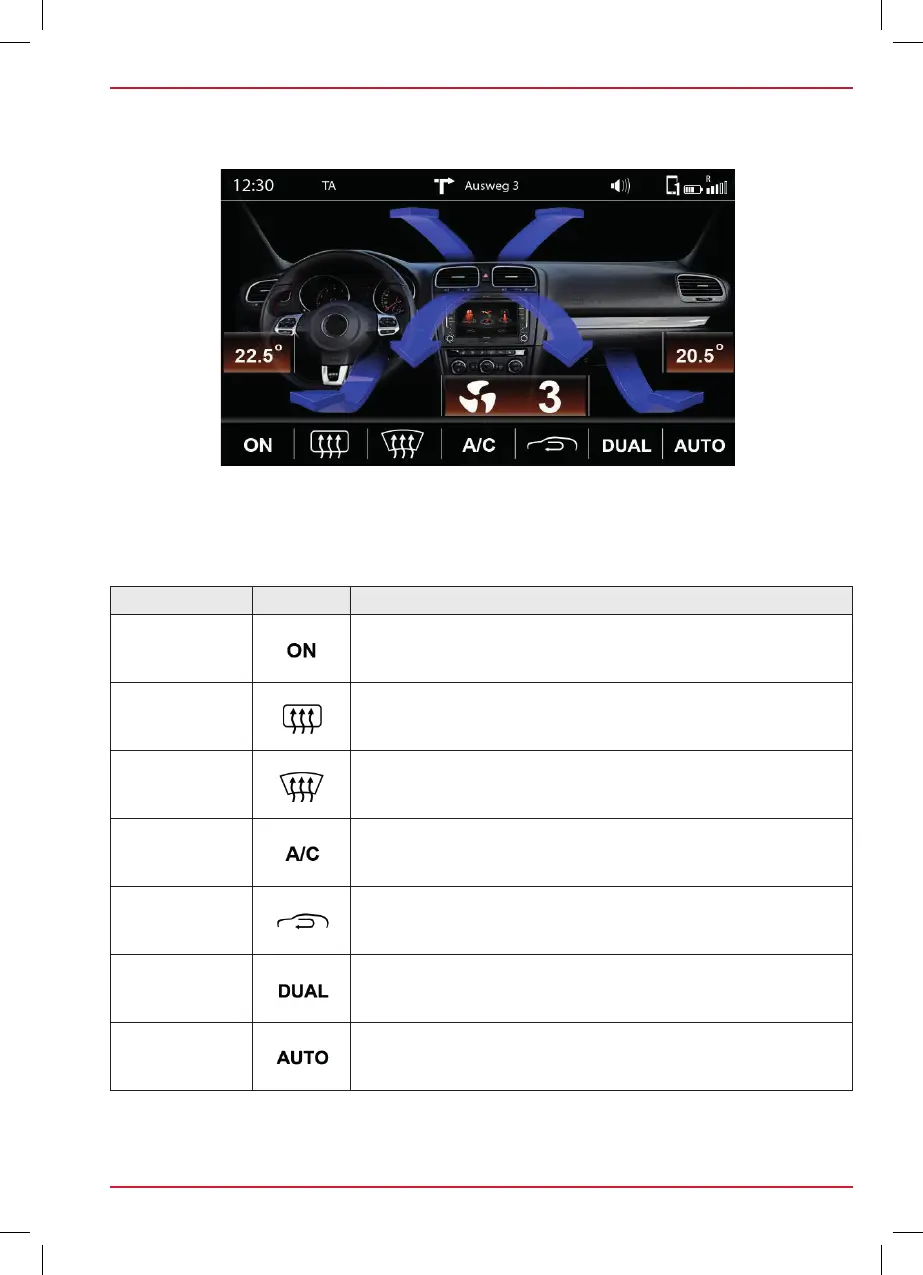
If AC Info is enabled, changes due to the operation of the air conditioning will be displayed by the
ZENEC system.
Fig. S / 07
OVERVIEW
Function Icon Operation
Ventilation
On = Switch for ventilation is minimum adjusted to level 1
Off = Switch for ventilation is adjusted to level 0
Rear window
heating
Rear window heating switched on or off
Windshield
heating
Defrost function switched on or off
Air conditioning
Air conditioning switched on or off
Recirculating air
operation
Recirculating air operation switched on or off
Dual
Temperature settings for driver and passenger side in
synchronously
Auto
Automatic adjustment of temperature
GERÄTEBEDIENUNG–ZE2026
AC Info
A
BB. S / 06
Ist AC Info auf EIN gesetzt, werden bei der Bedienung der Klimaanlage im ZENEC-System die jeweiligen
Veränderungen angezeigt.
ÜBERSICHT
ON = Gebläseschalter min. auf Stufe 1
OFF = Gebläseschalter auf Stufe 0
Heckscheibenbeheizung ein- oder ausgeschaltet
Defrostfunktion ein- oder ausgeschaltet
Kühlanlage ein- oder ausgeschaltet
Umluftbetrieb ein- oder ausgeschaltet
Temperatureinstellungen für Fahrerseite und
Beifahrerseite synchron
Automatische Regelung der Temperatur
Anzeige des derzeitigen Luftstroms:
Frontscheibe – Mitte - Fussraum
Blau ca. LOW – 20.0 C
Gelb ca. 20.0 – 24.0 C
Rot ca. 24.0 - HIGH
Anzeige der aktuellen Gebläsestufe
Anzeige der aktuellen Sitzheizung (Dynamische Anzeige)



 To Next Page