15
PREPARATION
On-Screen Display (OSD)
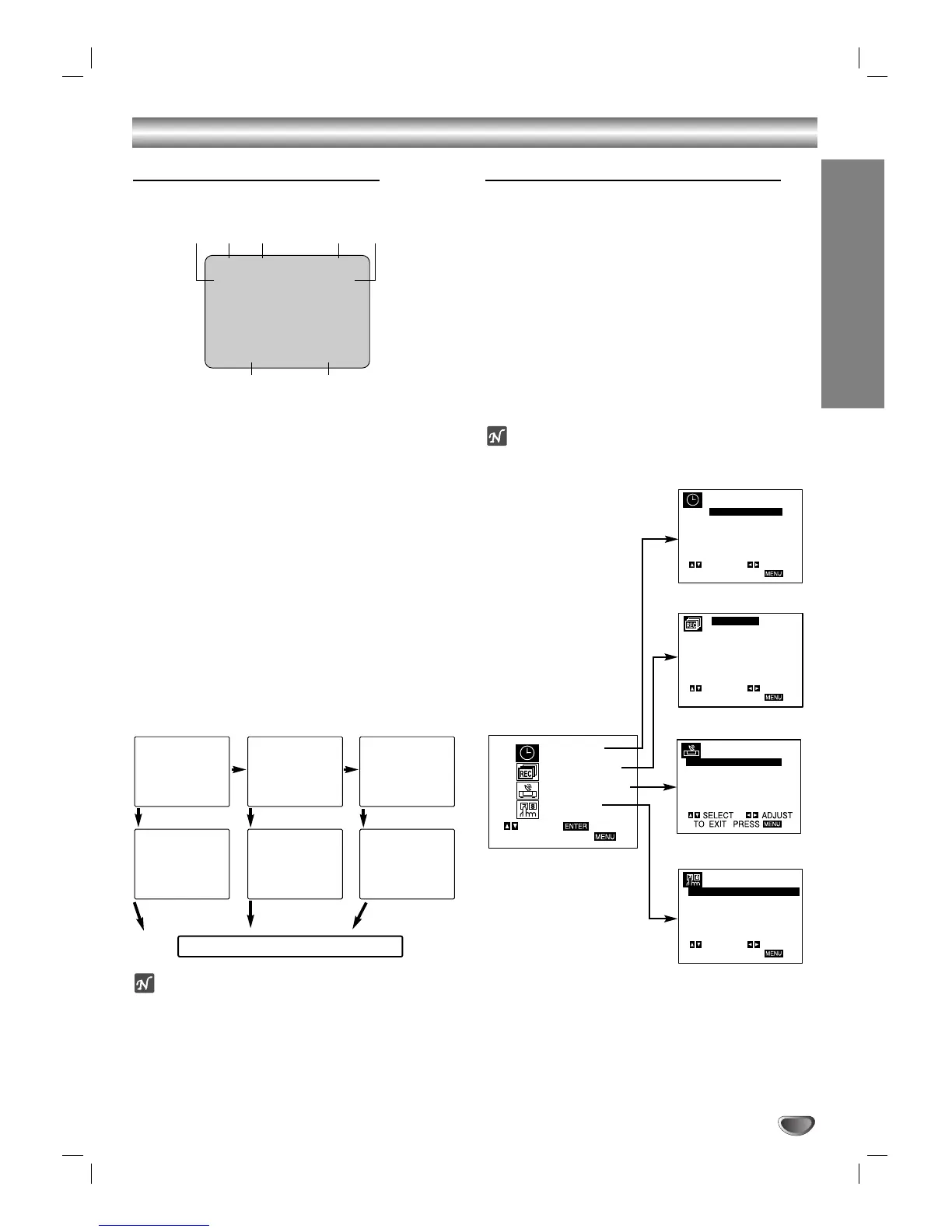
Some of these functions will be displayed every time the
VCR is operated.
❶❷❸ ❹ ❺
❻❼
❶ TAPE SPEED DISPLAY
Shows the current tape speed.
❷ FUNCTION DISPLAY
Indicates the function in progress.
❸ HI-FI DISPLAY
Indicates when this unit is playing back tape recorded with
Hi-Fi.
❹ CHANNEL DISPLAY
I
ndicates the selected channel (or LINE1, LINE2).
❺ STEREO/SAP DISPLAY (MONO is not displayed)
Shows the type of audio signal received by the VCR tuner.
❻ DATE DISPLAY
Shows the current date. (Month/Date/Day of the week
format)
❼ CLOCK/COUNT/REMAIN DISPLAY
Shows the current time, the tape counter and remaining time
on the tape.
Each press of the SELECT/ENTER changes the TV
screen in the following sequence.
Notes
The function displays can be seen displayed on the TV
screen for 3 seconds.
The clock (or tape counter, tape remaining) mode will contin-
ue until you press SELECT/ENTER.
The tape counter and the remaining tape length indicator
appear only when a cassette is inserted. Also, the remaining
tape length indicator appears after any tape operation.
Setting the On-Screen Display
The SETUP, clock setting, and timer recordings are
accessed conveniently with On-Screen Menu Displays
that lead you through each step. The following pages
describe the On-screen selections to be set.
Menu Selection
Your VCR allows remote control adjustment of several
features.
11
Press MENU and the MAIN menu will appear.
22
Select the desired menu with v/V button and
then press SELECT/ENTER.
Note
Menus remain on-screen for 3 minutes.
Before Operation - VCR Part
SET CLOCK (page 17)
TIMER RECORD (page 23)
CHANNEL SETUP (page 16)
VCR SETUP (page 16)
PLAY HI-FI CH 4
SP STEREO
JUL 5 , FRI 2:15 PM
MAIN MENU




 To Next Page