PRE-OPERATION
13
Connections (Continued)
Optional, Preferred TV Connections
otes
You can watch and listen ONLY to DVD playback
through the connections shown below.
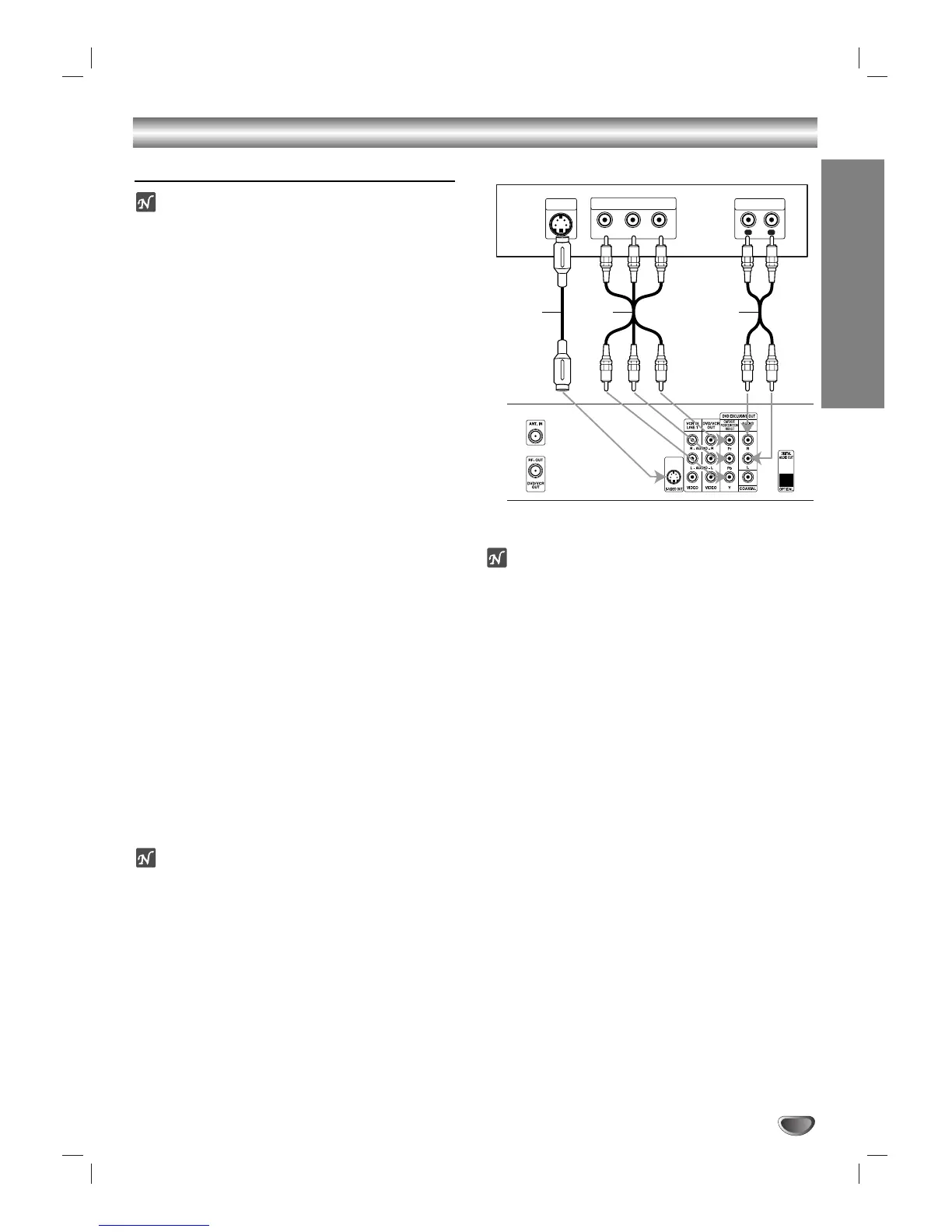
S-Video connection
11
Connect the S-VIDEO OUT jack on the DVD+VCR
to the S-Video in jack on the TV using an optional
S-Video cable (S).
22
Connect the Left and Right AUDIO OUT jacks of
the DVD+VCR to the audio left/right in jacks on the
TV using the supplied audio cables (A2).
Component Video (Color Stream
®
) connection
11
Connect the COMPONENT/PROGRESSIVE SCAN
VIDEO OUT jacks on the DVD+VCR Player to the
corresponding in jacks on the TV using an optional
Y Pb P
r cable (C).
22
Connect the Left and Right AUDIO OUT jacks of
the DVD+VCR to the audio left/right in jacks on the
TV (A2) using the supplied audio cables.
Progressive Scan (ColorStream
®
pro) connection
If your television is a high-definition or “digital ready”
television, you may take advantage of the
DVD+VCR’s progressive scan output for the highest
video resolution possible.
If your TV does not accept the Progressive Scan for-
mat, the picture will appear scrambled if you select
Progressive Scan output from the DVD+VCR.
11
Connect the COMPONENT/PROGRESSIVE SCAN
VIDEO OUT jacks on the DVD+VCR to the
corresponding in jacks on the TV using an optional
Y Pb Pr cable (C).
22
Connect the Left and Right AUDIO OUT jacks of
the DVD+VCR to the audio left/right in jacks on the
TV (A2) using the supplied audio cables.
otes
– Set the Progressive Scan option to “On” in the Setup
menu, see page 19.
– Progressive scan does not function simultaneously
with the analog video connections (yellow VIDEO
OUT jack).
ote
If the TV has an S-video input, connect the DVD+VCR
with the S-video cable. When using an S-video cable,
do not connect the yellow video cable.




 To Next Page