Operating Button-Based Consoles
32 025-9535L
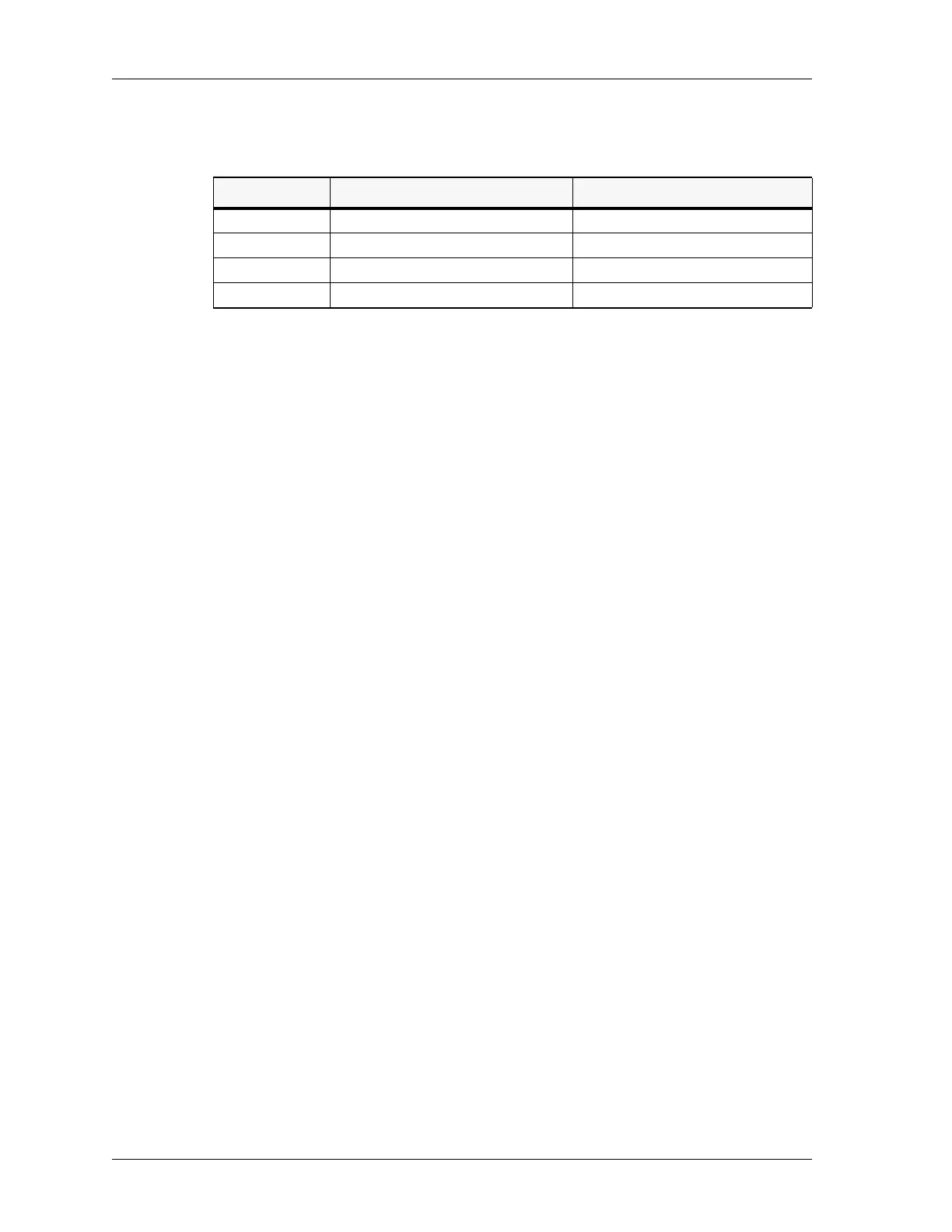
Table 2: Instant Call Status 4018/4118
Enter (PAGE ENTER)
This button terminates a manual paging code entry (entered via the paging keypad). This
button is only required for paging formats which have a variable number of paging digits
such as DTMF. Fixed length paging formats (such as Motorola/GE Two-Tone) are self-
terminating when the required digits have been entered, as indicated by the slash (/)
terminator character in the display. This button’s red LED blinks whenever one or more
pages have been manually entered.
Send (PAGE SEND)
This button terminates any manual paging code entry (under the same conditions as the
PAGE ENTER button). It then transmits the previously entered pages (the page stack) on
the currently selected channels in the same order as the pages were entered. The same
page stack can be retransmitted (on different channels, for example) by merely pressing
the PAGE SEND button again. The current page stack is retained until the PAGE
CLEAR button is pressed or a new manual page entry is started. This button’s red LED is
illuminated during the page stack transmission.
Clear (PAGE CLEAR)
This button’s operation depends on the current paging mode.
If manual paging code entry is in progress, PAGE CLEAR aborts the current button entry
sequence and clear the paging display. Any previously entered pages is retained.
If manual or instant call paging transmission is in progress, PAGE CLEAR immediately
aborts the paging transmission, flush all manual and instant call page stacks, and
extinguish all page button LEDs.
For all other operating modes, PAGE CLEAR clears all manual and instant call page
stacks and extinguish all page button LEDs. This button’s red LED is illuminated while it
is pressed.
Safety (PAGE SAFETY)
This function only applies to instant call paging and is only operational if the PAGE
SAFETY button has been programmed. In this case, when one or more instant call page
buttons have been pressed, the paging transmission does not begin until the PAGE
SAFETY button is pressed. Otherwise, the paging transmission would start immediately
LED Channel Control Button Panel System Control Button Panel
Solid Green Selected and pending transmission N/A
Solid Red Paging transmission in progress Paging transmission in progress
Blinking Green Pages were sent N/A
Blinking Red Pages were aborted and not sent Pages were aborted and not sent



 To Next Page