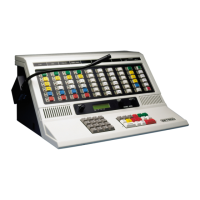
Operating IntegratorRD Workstations
52 025-9535L
hour time display, a level meter, and buttons for transmitting and monitoring on the
selected channel.
The knob labeled Function can be used with the volume adjustment screen button to
increase or decrease the console audio volume.
Console Audio Interface
The Model 4219 Console Audio Interface provides the select and unselect monitor audio
to a pair of external, amplified speakers, ports for various microphone options, a
multiformat tone encoder, a 24-hour time display, and a level meter. Volume, channel
select, and transmit control functions are supplied through the IntegratorRD software user
interface.
When used, the Model 4219 completely replaces the Model 4217B at the console position.
The new, slim design of the Model 4219 helps to clear the desktop and provide the
operator with the maximum free workspace. The Model 4219 is only 15” wide, by 1.75”
high, by 6” deep. It can placed under most LCD display monitors.
The Model 4219 has no front panel controls. The operator uses controls provided on the
monitor touchscreen by IntegratorRD to operate the Model 4219. This means that if the
monitor fails for some reason, the operator is left with only being able to transmit on the
last channel that was selected.
Video Monitor Display
The CRT or LCD screen is divided into six regions:
• IntegratorRD Workstation display screen configured for the Model 4048 CCE is
shown in Figure 10. The channel status display region of the console screen
supports a total of 36 channel displays, of which 24 are full size and the remaining
12 are condensed.
The full size displays are located in 4 rows of 6 at the top of the channel status
display area, and the 12 condensed displays are contained in 2 rows of 6 below the
full size region. The condensed channel displays contain the same information as
the full size display, just in a smaller size. Once the channel selector has been
highlighted either by touch or with the left mouse button, you can change various
parameters of the channel, such as the volume level, frequency select, etc.
• The System Region is a display-only region that presents the Zetron logo, clock
time, and various system messages.
• The System Menu Button Region contains menu buttons for the Group Select and
miscellaneous menus, such as buttons to activate the Paging and Auxiliary I/O
menus.
• The Status Line is used to display various text messages for specific menu
operations.



 To Next Page