87
Operation
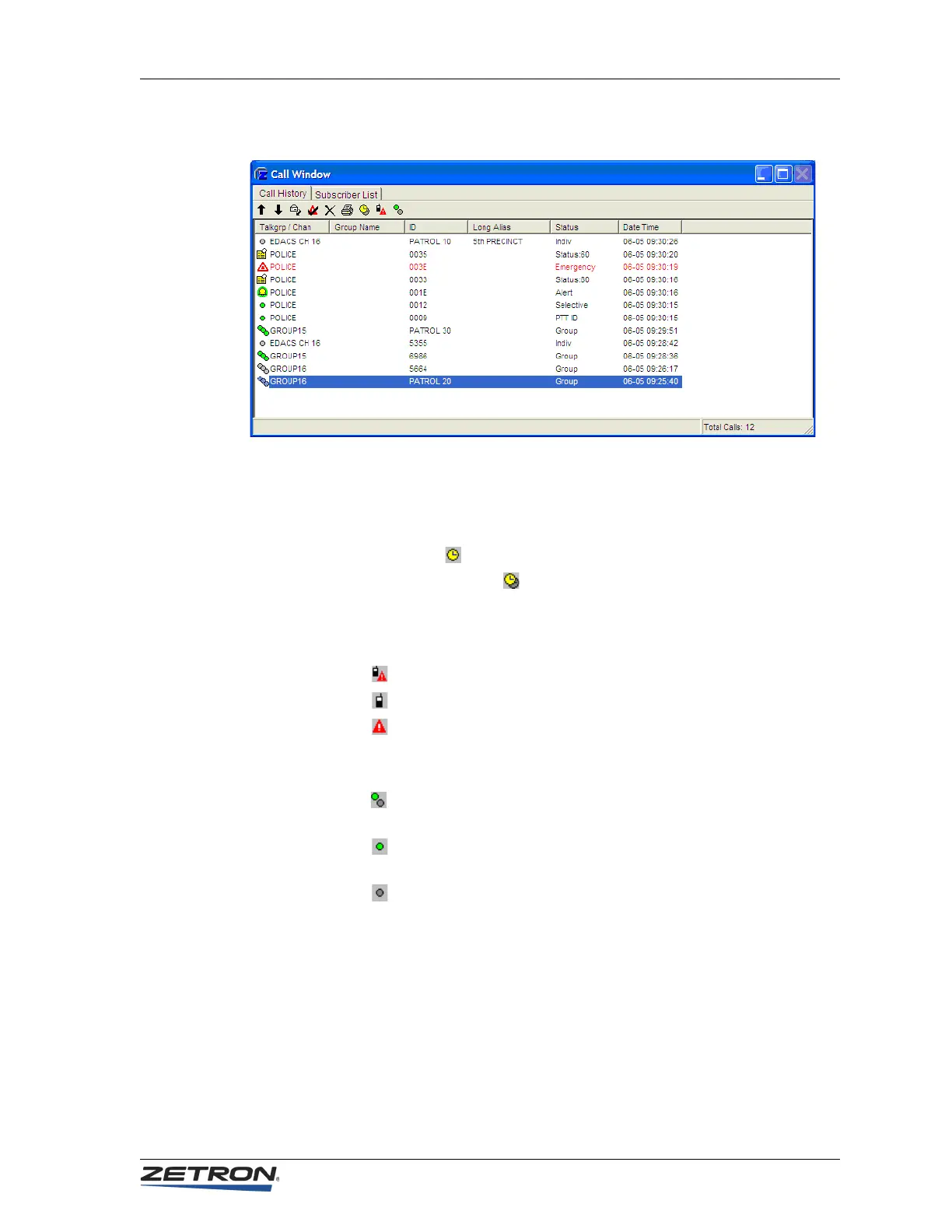
With the release of version 5.0 several new filters have been added to the Call Window to
control which call records are displayed.
•The HIDE OLDER CALLS key is a toggle button used to hide or display old calls.
The icons indicate the current mode of operation.
• A single clock face ( ) indicates that only current calls are displayed.
• A clock face with a shadow ( ) indicates that both current and older call
records are displayed.
•The SHOW CALLS AND AUX I/O ALARMS key cycles through three states for
displaying calls and aux I/O alarms in the window.
• This icon indicates that window is showing both calls and aux I/O alarms
• This icon indicates that only radio calls are displayed
• This icon indicates that only aux I/O alarms are displayed
• The Select/Unselect Calls key cycles through three states for displaying selected
and unselected calls.
• This icon indicates that both select and unselect calls are being displayed in
the Call Window
• This icon indicates that only select calls are being displayed in the Call
Window
• This icon indicates that only unselect calls are being displayed in the Call
Window
iDEN Functions
Incorporation of iDEN interface support into the IntegratorRD adds an iDEN Call
submenu and the option of adding iDEN-specific buttons to the main screen, so calls can
be made on each iDEN radio. A Call Window can be enabled, which has two sub-
windows. The first tab displays the Call History Window to show a list of received status
codes, call alerts, and private calls. The second tab displays the Subscriber List window to



 To Next Page