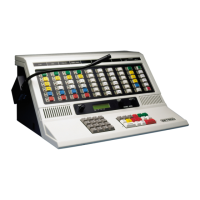
Operating IntegratorRD Workstations
74 025-9535L
These pages are either sent directly as a single page, or entered into queue/stack for
sending in a sequence. Manual pages are stacked/queued by using the Page Enter key.
When all pages have been entered, the page is sent by pressing the Page Send button.
Manual pages transmit on the currently selected channel(s). To resend the page, press
Page Send again. The entry of another page number replaces the previous entry.
To clear an incorrectly typed single manual page, press the Page Clear button.
Manual Page Alerts
If you enter a leading digit that is configured as a page alert, the type of alert generated
depends upon the second digit. If the second digit is 0, a custom alert is used (the custom
alert was defined during software configuration). If the second digit is 1-9, IntegratorRD
generates a pre-defined alert. The following list identifies which alert is generated based
on the second digit:
0 : Custom beep
1 : Slow siren
2 : Fast siren
3 : Hi/Lo warble
4-9 : Fast warble
Stacking Multiple Manually Entered Pages
To stack multiple pages for transmission on the same channel(s), enter each page number
using the numeric key, and press the Page Enter button. After all page numbers are
entered, press the Page Send button. The pages transmit in the order in which they were
entered. As each page is sent, the page number is displayed in the page number entry line.
To resend the page stack, press the Page Send button.
To clear the page number stack, press the Page Clear button.
Selecting Instant Call Pages
Instant Call pages are selected by pressing one or more of the buttons displayed in the
lower part of the screen. Initially, Instant Call stack page buttons are blue. When an Instant
Call stack page button is first pressed, the button color changes to green, indicating that it
is in the queue to be transmitted. As the page is transmitted, the page button color changes
to red and the associated page number(s) display on the “Page Num” line of the display as
Note With IntegratorRD consoles, manual pages transmit on the
currently selected channel(s). This is different behavior than
button-based consoles, which transmit on the channels and
frequencies defined with the corresponding leading digit.



 To Next Page