Setting up consists
A consist is a combination of locomotives with jointly
controlled speed, direction, MAN and shunting function.
The starting point is the operating mode LOCO; the
addresses intended for the consist must already be in the
LoR (loco recall memory) and must not be actively controlled
on another MX32 (FS).
Softkey III LoR opens (if not already open); the third col-
umn (after the address) gives information about existing
consists:
“FS”: A single vehicle active in another controller. Can
therefore NOT BE PART OF THIS CONSIST.
“FT(..)” means: CONSIST assignment is NOT possible,
because it is active on another controller EITHER as
single vehicle OR part of a consist.
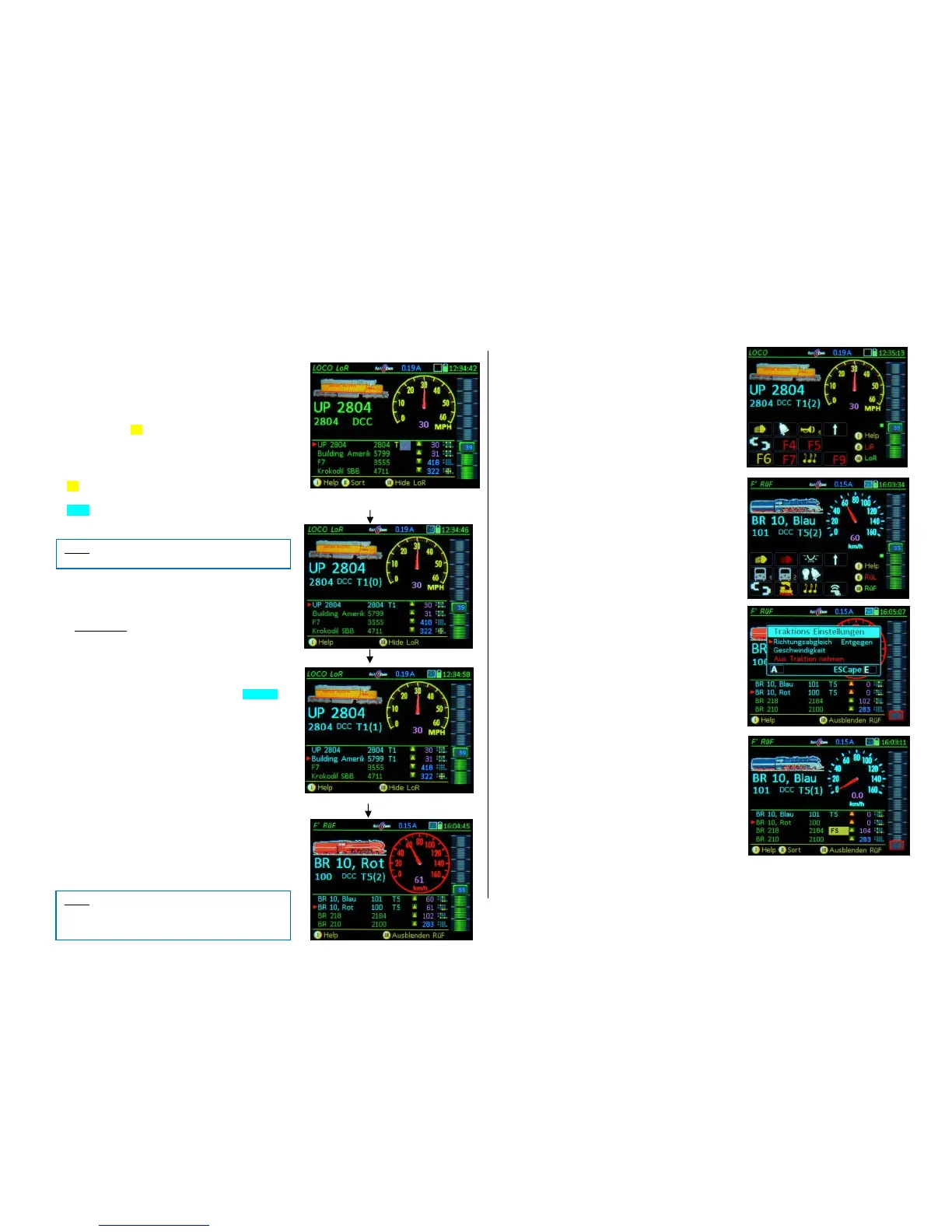
Scrolling wheel select the first vehicle to be part of
the consist and with the
TP-Key + Number key assign the selected vehicle to
the consist, i.e. “T1”, “T2”…“ etc.
(ATTENTION: 7 sec timeout). The consist designation
("T1", " T2"...) is visible in the LoR line AND in the up-
per main field (if this engine is in the foreground); the
line in the lower half AND the main text above appear in
the color turquoise.
The assignment to a consist causes the relevant address in
the LoR of other controllers to be marked with “FT (…)”,
and is therefore no longer available for consist building in
those controllers.
Scrolling wheel + TP-Key + Number key select more
addresses and add them with “T1”, “T2”…“ to the re-
spective engine/consist.
These LoR lines also turn turquoise and are sorted
automatically so that they are listed together.
The lines in the LoR that belong to a consist (at least two
addresses marked "T1" (up to "T9" is possible)), are auto-
matically shifted up in the LoR and the respective vehi-
cles are controlled together.
Speed, direction, MAN, and RG commands are the same
for all addresses, regardless of which of the addresses is
currently in the foreground and receives a speed change for
example.
Softkey III Open/Close the LoR is always possible,
in order to see the function icons for the active
vehicle in the foreground, for example.
The turquoise text and the “T1”, “T2”... behind the ad-
dress indicates that this vehicle is part of a consist.
TP-Key (only when LoR is off) on an address with a T-
marker and turquoise text (which belongs to a consist
“T1”, “T2”...) Switches to the next address of
this consist, that is, brings the next consist vehicle to
the foreground.
It is of course also possible to switch among the consist
addresses with LoR open, but requires an extra step:
by scrolling (with the Scrolling wheel) to the address
and activating it (with the A-Key).
Matching the Direction and Speed among vehi-
cles of a consist:
Only possible if the LoR is open (use Softkey III to
open, if necessary):
TP- Key opens a window to select the vehicle in
the LoR; use the Scrolling wheel to select:
Direction change: A-Key (Vehicle must be at stand-still)
Matching speed: Speed slider (Vehicle moving)
All other vehicles of the consist are not affected by
these changes. Store and exit with the E-Key.
Break up a consist or remove a consist vehicle:
Only possible if the LoR is open (use Softkey III to
open, if necessary):
Press the C-Key with the arrow pointing to an address
marked with a “T” in turquoise text (that belongs to a
consist “T1”, “T2”…“) Removes that address
from the current consist and deletes the T-marker.
The corresponding LoR text line turns green again.
Removing the second last vehicle dissolves
the consist.
At any time: Rocker switch switches to the Sec-
ond level of the LoR (with direction and position in-
dicators)



 To Next Page
 Loading...