Page 50 TETHERED CONTROLLER MX32, RADIO CONTROLLER MX32FU
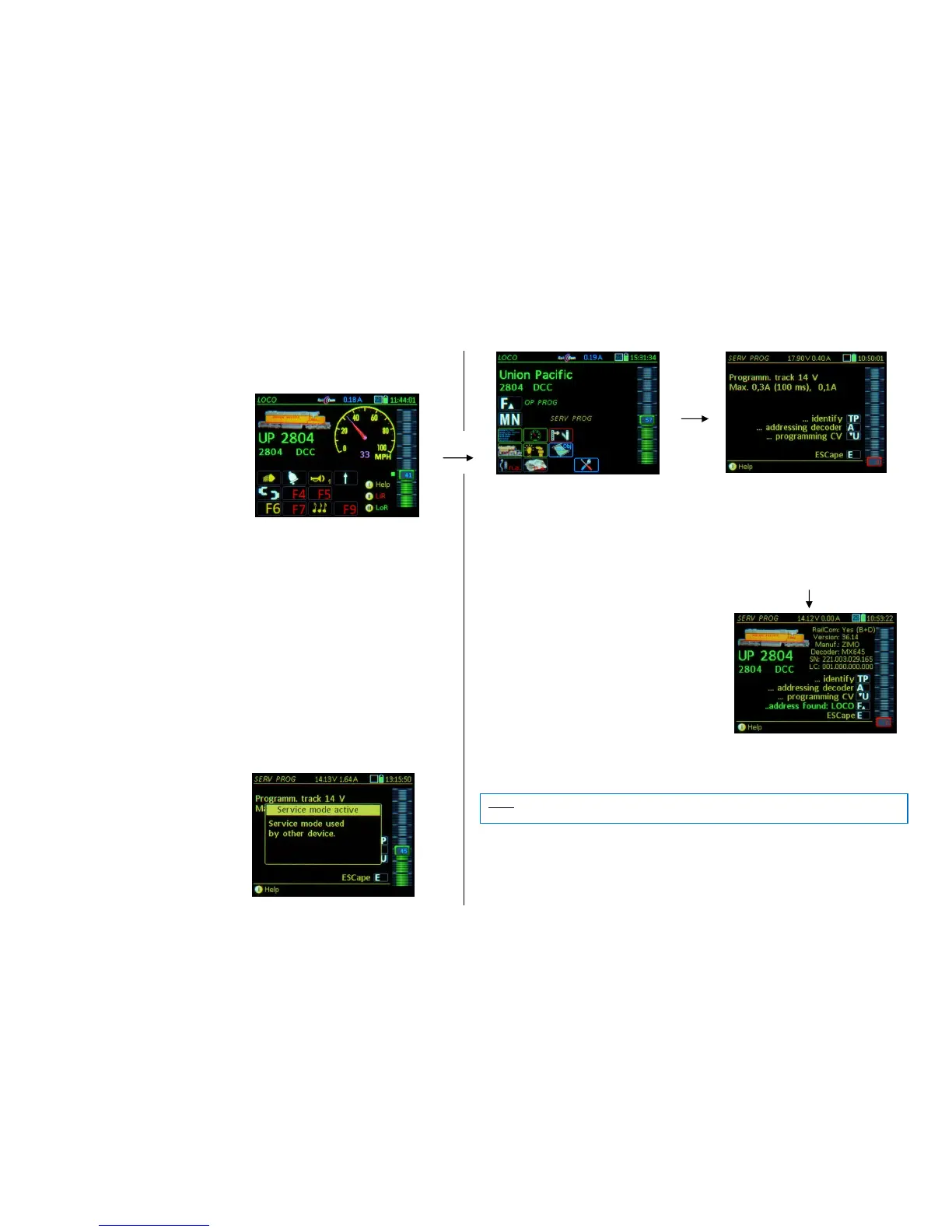
21. Programming in Service Mode: SERV PROG
= “Service Mode Programming”, that is,
programming on the programming track
SERV PROG can be reached with the
E- Key (to the E-screen) + MN-Key
(pressed in quick succession)
WILL BE ADDED LATER.
The SERV PROG Help-File accessible with
Softkey I.
Other controllers indicate that the command
station’s track output 2 is in Service Mode
(provided the command station has two
track outputs, otherwise the device itself).
E- Key Exits the SERV PROG mode
If the E-Key is pressed within the work area
“Addressing” or “CV-Programming”, it returns first
to the programming menu screen, a SECOND
E-Key actuation exits the SERV PROG mode.
The first screen after entering the SERV PROG mode (with E + MN keys) is the programming menu, which
also functions as a “security question” to prevent accidental deletion of decoder addresses or data.
Here, the currently applicable parameters of the command station’s programming track are also displayed
(if this is a MX10) such as maximum track voltage, maximum current etc., and that they correspond with
the standard of the VHDM ("Rail Community") standard. However, these settings can be changed in the
MX10 if needed (under "VOLT & AMP DETAIL, section " SERV"). This is necessary when a decoder or
a vehicle with installed decoder consumes more quiescent current during programming than the "Rail
Community" intended.
The keys displayed in the programming menu lead to the actual working areas:
TP- Key identifies the decoder on the program-
ming track with its address and displays it with name
and image, if present in the object database. Addi-
tionally, some other important information such as
manufacturer ID, decoder type, SW version and de-
coder ID is read and displayed (the latter points only
if it is a decoder manufactured by ZIMO).
If the decoder is identified as a ZIMO product, advanced
programming support is available by displaying de-
scriptions for the special ZIMO CVs (otherwise only
DCC standard CV descriptions).
F- Key (now that the address is known by decoder identification or address read-out)
activates the newly recognized address and switches over to the driving mode LOCO
TIP: This is a quick way to test a vehicle on the programming track if the address is not known.
The decoder identification with the TP-Key is, however, NOT necessary for changing the address or
CV programming; the A-Key for address programming (or A+A for reading the address) or the U-Key for
CV programming can be used immediately (without knowing the address). All this is possible in the ser-
vice mode without actually knowing the address, which of course carries a certain risk.



 To Next Page
 Loading...