Page 54 TETHERED CONTROLLER MX32, RADIO CONTROLLER MX32FU
22. Programming in Operational Mode: OP PROG
= “Operational Mode Programming“
also known as “Programming on the main” (POM) or
“Programming on-the-fly”.
OP PROG is started from the driving mode LOCO
or SWI with
E- Key (to E-screen) + F- Key
In contrast to SERV PROG, the OP PROG always re-
fers to the currently active address displayed on the
controller and therefore it is not necessary to enter or
read-out the address first.
The Help-File for OP PROG can be
reached with Soft-Key I:
E- Key Exits the OP PROG mode.
If the E-Key is pressed within the working area of
address or CV programming, the program switch-
es back to the programming menu first; only a
SECOND E-Key actuation exits OP PROG com-
pletely.
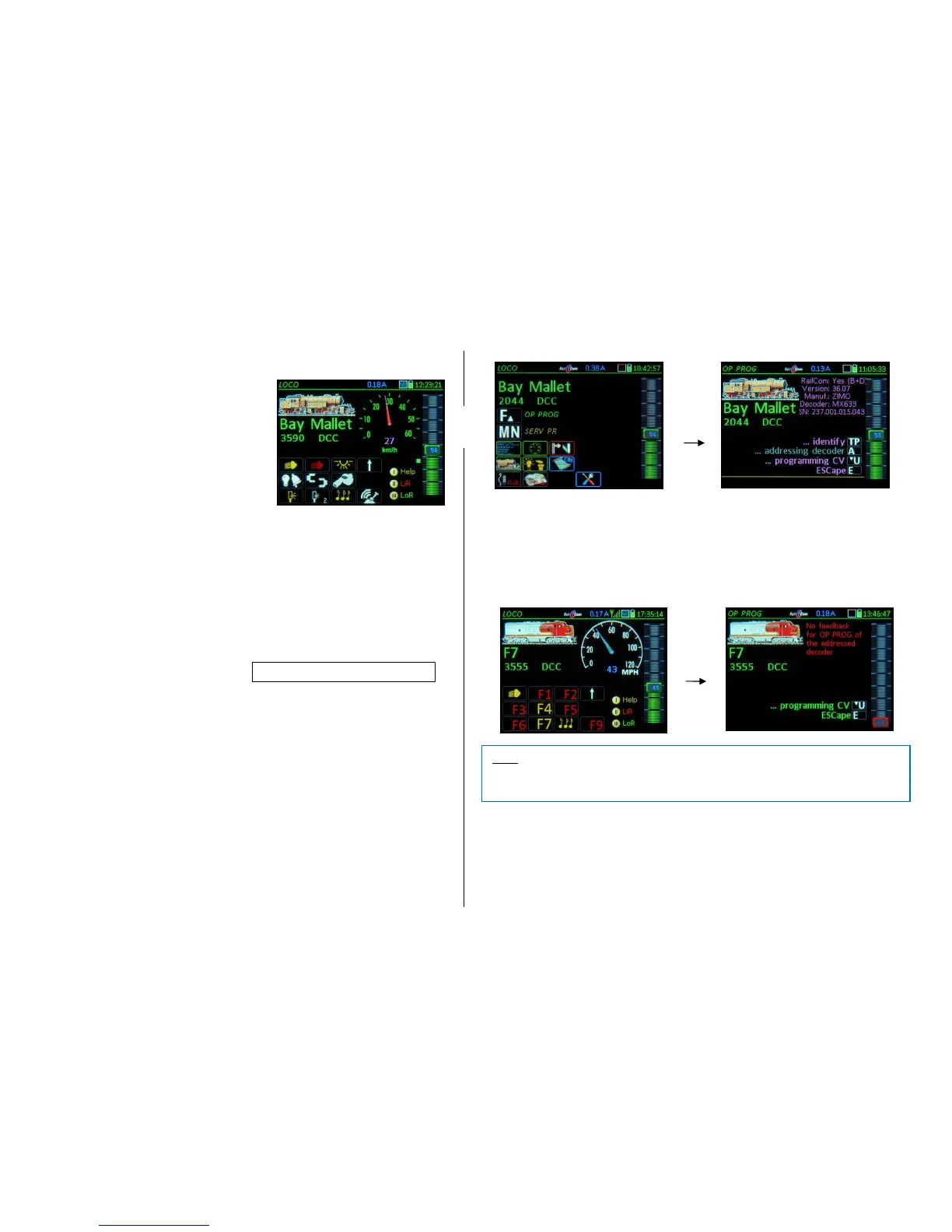
The first screen when entering OP PROG is a menu screen; ABOVE is the display shown of a de-
coder with working RailCom feedback, which makes identification possible: Information such as
manufacturer, software version and decoder ID are read out and displayed automatically (in magen-
ta, the color for RailCom);
BELOW is the display of a decoder WITHOUT working RailCom feedback and is therefore
unidentifiable (i.e. the decoder is not equipped with RailCom, disrupted transmission etc.): the
message “not identifiable” is displayed but the CV programming can still be started with the U-Key
(although reading decoder CVs won’t work).
Use the displayed function keys from the menu to switch to the actual working area:
TP- Key the decoder is once again identified (manufacturer, SW version… same as during entry),
A- Key the decoder input screen is displayed where a new address can be written to the decoder (pro-
vided the decoder allows programming a decoder address on the main track, which the NMRA R&R does not provide for).
A- Key (= Shift-A) Screen for entering a consist address (CVs #19, 20) including supplementary info.
U- Key opens the CV-Programming page, where CVs can be read-out and programmed; see
below for details.



 To Next Page