15. The STOP Options in the ZIMO System
S-Key (short)
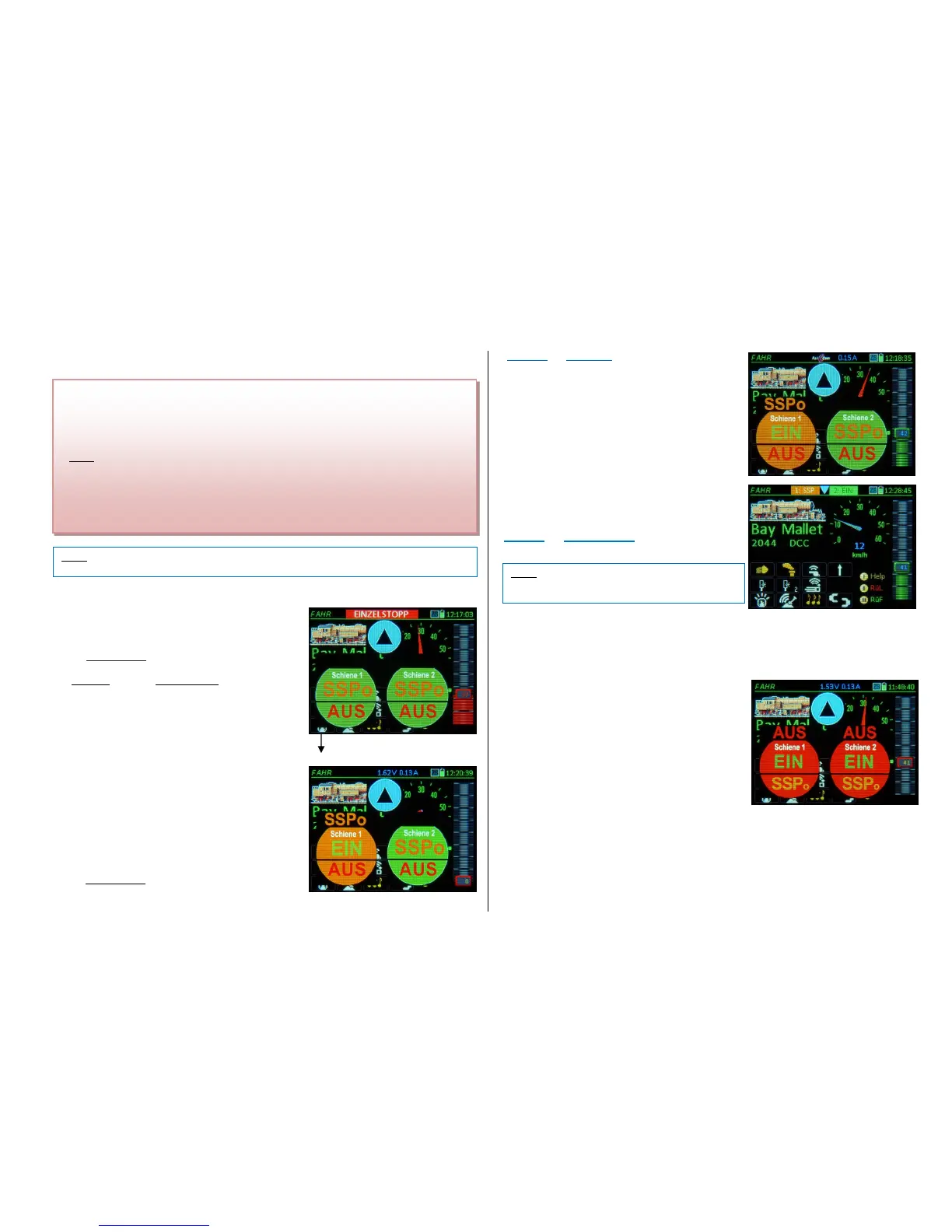
SINGLE STOP
(=emergency stop for the active engine (train), the green
speed slider indicator turns red; the speed slider must
be moved to 0 in order to restart the engine later)
and simultaneously
displays the “STOP Bullets“
(remain for 3 sec)
By touching one of the "bullet halves" with the inscription
BCS or OFF, on the command station, the two track
outputs (if two are available, i.e. the MX10) can be set
independently to BCS (= broadcast stop) or OFF
(track poser turned OFF).
The double effect of the S-bullet actuation is useful while driving
the active engine (for emergency stops) or with the engine
stopped (to access the STOP touch fields).
When a track output (or both) is set to BCS or OFF, the “STOP
Bullets” pop up simultaneously on all controllers connected to
the CAN bus (as well as on the command station MX10: red
display), so that the layout can be restarted again from any con-
troller. A “SINGLE STOP” on the other hand is only shown on
one controller.
Setting track-1 to “BCS” (Broadcast stop) can be done with
the above procedure, or simply by pressing the
S-Key (>1 sec) BCS (broadcast stop) on track-1
(stops all trains on track -1)
… and simultaneously
Displays the “STOP Bullets“
(fades out when everything is “ON” again).
Touching the blue arrow icon (pointing up)
Removes the “STOP Bullets”
the blue arrow now appears in the header (pointing down,
see picture below)
The purpose of removing the stop display is to get access
to the screen content concealed by the STOP Bullets and
thereby gain full control of the controller again, to operate
trains on other track outputs (command station / booster)
or to activate and drive another vehicle from the LoR
(Loco Recall memory).
BUT: when the STOP Bullets are no longer visible,
the track outputs CANNOT be switched between BCS,
OFF and ON, therefore…
When the STOP Bullets are replaced by the small blue
arrow in the header (pointing down):
Touching the small blue arrow (in the header)
reopens the “STOP Bullets“
The S-Key can be defined in CONFIG (see chapter
CONFIG) so that a brief S-key actuation initiates a
BCS (Broadcast Stop), instead of the longer (default)
actuation
o n l y t h e n :
S-Key (brief) BCS (Broadcast Stop) on track-1
(Stops all trains on track-1)
It makes sense when using this setting to also set the
single-stop function to the direction key (a separate set-
ting in CONFIG).
Special Key Sequences:
From the “normal” operating screen LOCO:
S-Key (short) + TP-Key
Power OFF on both tracks
From any state with at least one track not ON:
(Shift) + S-Key Track power ON on both tracks
same effect as touching both ON fields
Operating Boosters (also MX10s) connected to the MX10 command station:
Development phase APRIL 2018: All booster outputs are switched on and off together with the com-
mand station track-1; it is not (yet) possible to turn off sections of a layout.
Therefore: in the event of a short circuit (OVC) "anywhere" on the layout, track-1 and all track outputs
of all boosters are switched off normal display of the STOP Bullets for track-1 with additional in-
dication of the area that caused the short circuit.
- BCS = BROADCAST STOP (a standardized NMRA-DCC command on address 0); this command
stops all vehicles but the decoders retain the last received data (i.e. lights remain lit) and it is possi-
ble to operate these functions.
NOTE: Broadcast stops can be defined in CAB CONF (under “STOPP & OFF) as true “Emergen-
cy” stops or “SS 0” stops (= stops according to deceleration settings in the decoder, usually CV
#4). A sudden emergency stop may lead to derailments under certain circumstances.
- OFF (Track Power) this is the fastest and safest type of a broadcast stop (independent of data re-
ception). However, the decoders lose all data and the stopping distance is heavily dependent on
possible built-in capacitors (gold caps), the stops are sudden (which often leads to derailments) and



 To Next Page
 Loading...