Page 42 TETHERED CONTROLLER MX32, RADIO CONTROLLER MX32FU
16. External and Computer Control
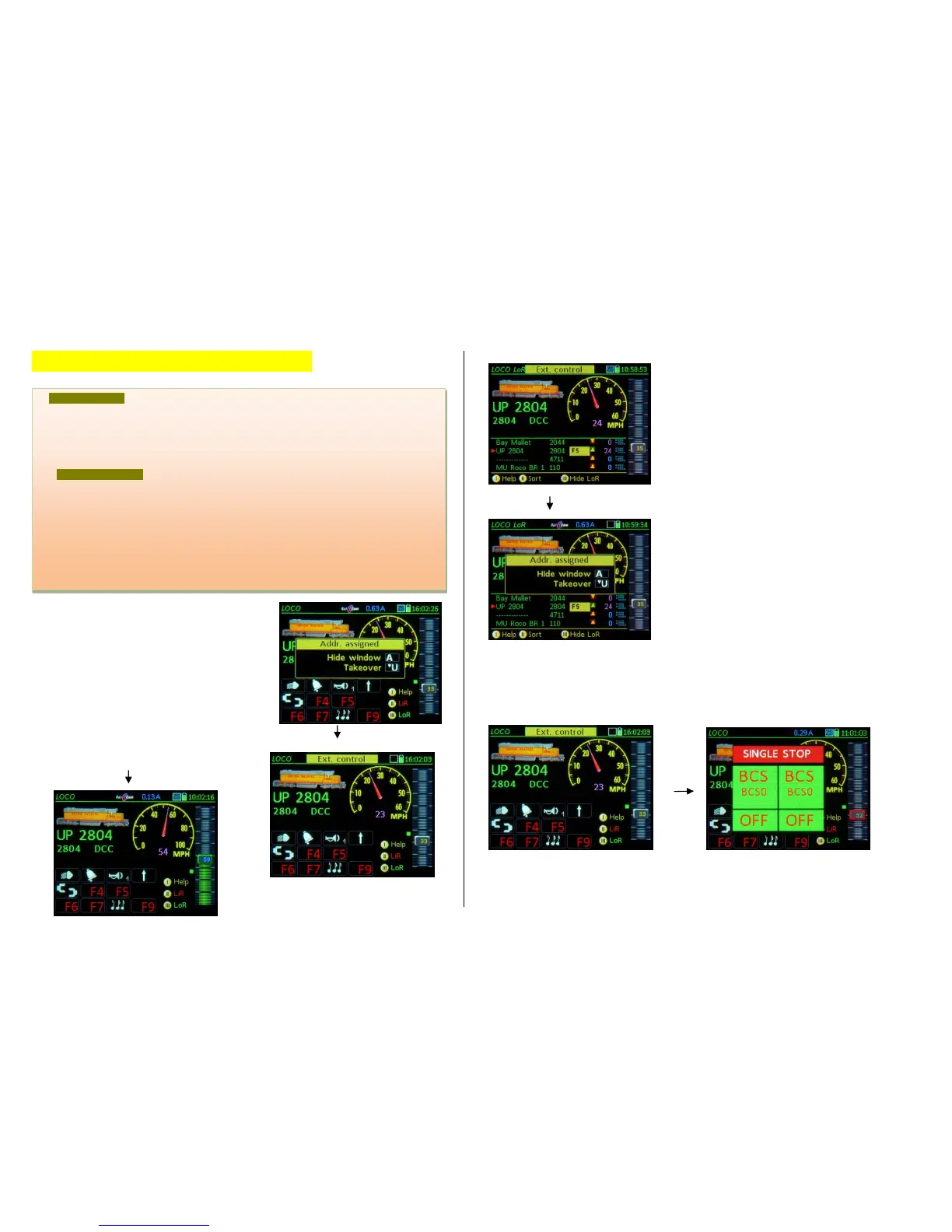
If an attempt is made to activate a vehicle address
from the LOCO IN page or from the LoR memory and
this address is already active on another controller,
the
“Address in use“ window appears.
U-Key address takeover; “steals” the address
from the other controller, which in turn displays
“External control” in its header.
A- Key closes the “Address in use” window with-
out taking over the address. The controller then
moves the label “External control” to the header.
The latter (A-Key action) also happens automatically
after a few seconds (Time-out).
With “External Control” in the header it is not possible
to do a direct takeover (as is possible with “Address in
use”), because the U-Key on this screen is used to
scroll through the recall memory.
In order to take over the address it is necessary to first
switch to the “External Control” window, by either
moving the speed slider, pressing any function key or
the RG-Key. None of them have any influence on the
vehicle itself but instead bring the window
“External Control”
back to the front. Proceed as with “Address in use”:
U- Key takes over the address and at the same
time removes it from the other controller; the oth-
er controller now displays “External Control” in its
header).
A- Key WILL NOT take over the address; the con-
troller returns to the warning “External Control” in its
header.
A special case when pressing the S-Key with “External Control” or “Address in use” displayed;
In order to initiate an emergency stop even for such an “inactive” address (without going through a
takeover procedure first), the S-Key is effective nonetheless and does a takeover at the same time:
With “External Control”: S-Key
EMERGENCY (SINGLE) STOP & TAKEOVER
The S-Key can also be used as a quick alternative to take over a loco when “External Control” is shown
in the header, but the train IS NOT moving (i.e. speed slider at 0): Press the S-Key (has no effect since
the train is already stopped) but the “External Control” is removed and the controller is fully functional
(the address is deactivated on the other controller and “External Control” is being displayed there).
means that the vehicle (train...) in the display is currently controlled by another cab (hence exter-
nal control); The speed slider and function keys have no effect but the screen and LED’s record
changes made by the other cab.
If "external control" (or "address in use") is indicated, a TAKEOVER can be made on the relevant
cab: with the U-Key if the "external control" (or "address in use") window is open; if "external con-
trol" is shown in the header, press any function key or move the slider.
- Computer control appears in the header (or the name of the computer program may be
shown instead, i.e. “STP”), indicating that the current vehicle is controlled by a computer (speed,
direction, functions) via USB or LAN.
In contrast to an “external cab” (external control), a computer does NOT have to go through a
takeover procedure in order to send commands to the vehicle; such commands will always be ex-
ecuted and the changes are shown on the cabs, along with the message “Computer control”. Nei-
ther does the cab have to go through takeover procedure to take control over the vehicle again.
BUT: although a vehicle is under computer control, an operator can still send commands directly
from the cab: function commands can simply be added (without losing computer control); when
speed and/or direction changes are made, the message “Computer control” will be deleted; the



 To Next Page
 Loading...