10. LOCO IN, LOCO MOD, TRACK-ON SEARCH
LOCO IN is accessible
from the LOCO mode: A-Key LOCO IN
from the SWI mode: A- Key LOCO IN
from LOCO or SWI with + A, if LoR is displayed (where A is used differently)
LOCO MOD is accessible
from the LOCO mode: A-Key + (repeat) A-Key LOCO MOD
from the SWI mode: A-Key + (repeat) A-Key LOCO MOD
from LOCO or SWI with + A, if LoR is displayed (where A is used differently)
LOCO is accessible
from most operating modes, including
LOCO IN: F-Key LOCO (newly activated vehicle)
LOCO IN serves to define and activate a new
vehicle by entering the address or by selecting an
existing one from the Object Database
or
to activate an accessory address!
LOCO MOD serves for the modification or com-
pletion of the GUI (name and user interface) of an
already activated vehicle. Display and procedure
is the same as in LOCO IN!
LOCO is the normal driving mode of the controller.
The Help-File for LOCO IN
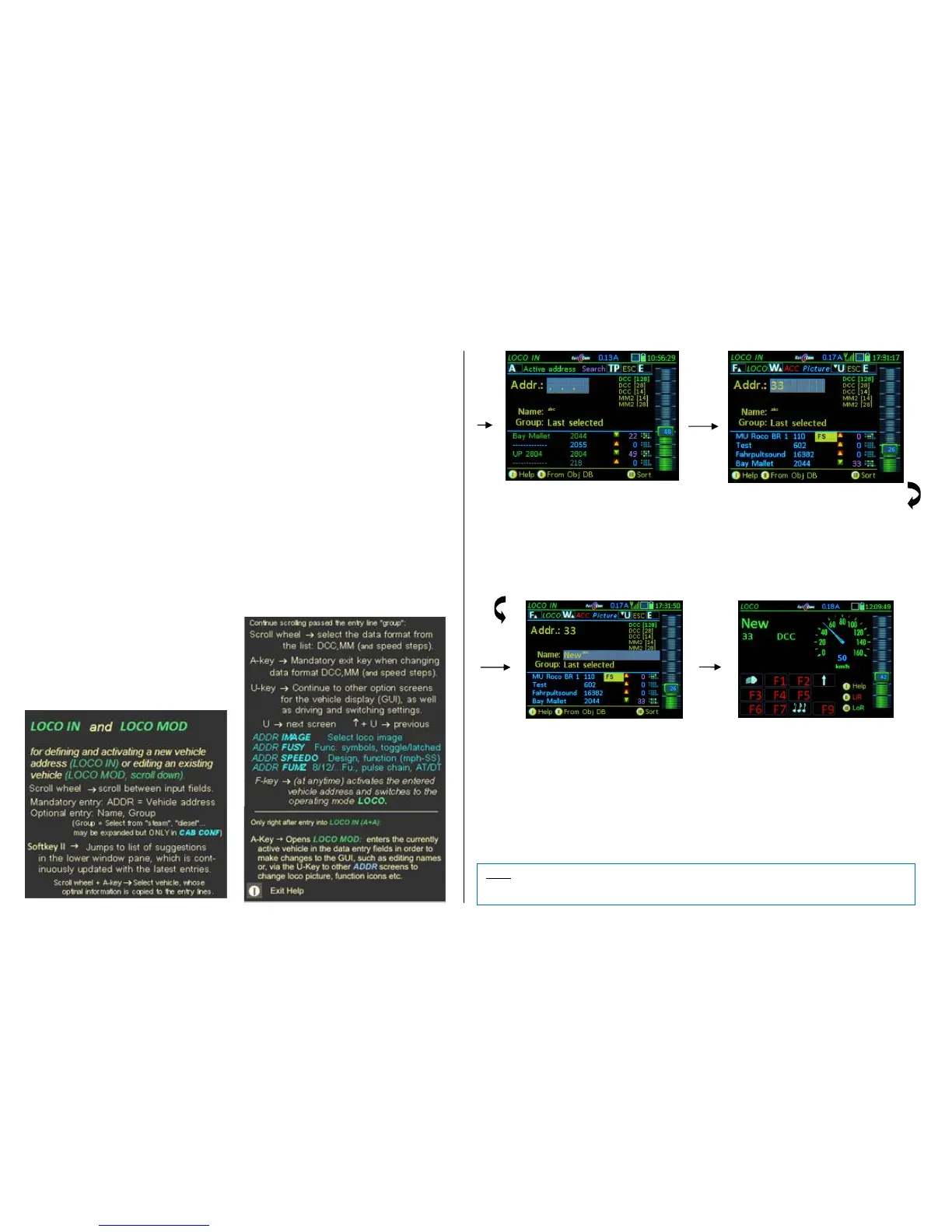
How to use LOCO IN to define and activate a new vehicle:
Enter address, name (optional), vehicle group (optional) and use the
A-Key to accept (and open the next input field)
Scrolling wheel scroll among the input fields (Address, Name, Group) and if the data format differs
from default (DCC, 128 speed steps): Select the proper format from the list DCC, MM,
(speed steps), A-Key to confirm.
Rocker switch select from the available options in the “Group” field (New entries are also possible).
While adding data in the upper half of the screen, an object list of already existing vehicles that match the entered
data appears in the lower half of the screen. This list is of NO importance when simply entering a new address. See
next page for more info on the object list on page 33 and 57!!
F-Key activates the vehicle address and switches over to the LOCO (Driving) mode. The activation
can happen at any time, either right after entering the address number or after entering an
address name and/or locomotive group.
U-Key If, in addition to the already entered data (address, name…), a vehicle image, function key
icons, speedometer and more should be added (ADDR…screens); also activate directly with
the F-Key as above.
See chapter ADDR… FUMT, IMAGE, SPEEDO… about these screens and their entries.
E-Key (= ESCape) Returns to the previous state without adding the new vehicle.
How to use LOCO IN to activate an object from the Object



 To Next Page
 Loading...