Page 60 TETHERED CONTROLLER MX32, RADIO CONTROLLER MX32FU
24. ObjectDB… = Object- Database
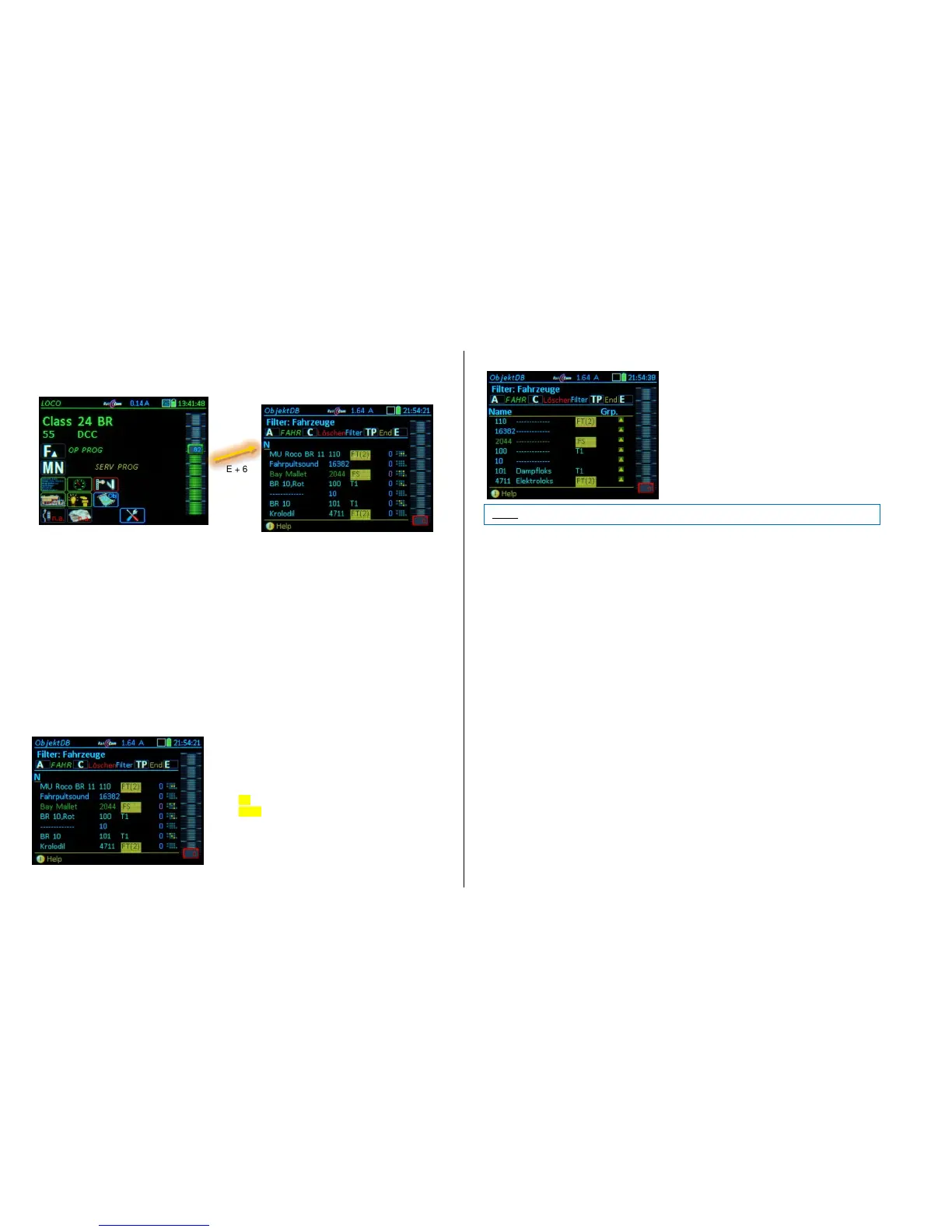
E-Key + 6 Enters the ObjectDB from the operating mode LOCO or SWI
The ObjectDB is a list of objects (addresses displayed with different data and in various states)
that are stored in the controller or the command station. All addresses (vehicles) that were active
once remain in the object database, even after deleting them from the LoR (loco recall memory).
The ObjectDB is displayed on screen very similar to that of the LoR. However, two additional
object types are included: objects (blue lines) that are no longer in the LoR (were deleted there
with the C-key) but are still in the controller, and objects (gray lines) which are no longer in the Ob-
jectDB of the controller itself, but still in the ObjectDB of the command station MX10. Overall, the
text colors for these lines in the MX32 ObjectDB have the following meaning:
blue text: Address is in the MX32 ObjectDb, but not in the LoR,
green text: Address is also in the LoR (Loco Recall memory),
turquoise text: Address belongs to a consist in this MX32, and is therefore also in the LoR.
gray text: Address is in the ObjectDB of the MX10 command station but NOT in (this) MX32.
Representation of speed: magenta: kmh from RailCom feedback, if available
(alternatively) blue: Speed step in the internal 1024 step scale (NOT in km/h)
The ObjectDb is several levels deep, and can be scrolled through with the rocker switch
The individual lines in the first level of the LoR contain:
* First column: Vehicle name (if one was given, otherwise
just -------)
* Second column: Vehicle address (no further identifier if it
is a DCC address)
* Third column: External or consist control:
“FS“: The vehicle is controlled by another controller
“FS(..)“: The consist is controlled by another controller „T1,
T2, .. “T9“: Address is part of a consist
“FT(..)“: (inactive) consist resides in another controller
* Fourth column: Direction (highlighted red, when at stand-still)
* Fifth column: Speed (see above)
* Sixth column: small function table F0…F9 (to see
which functions are turned on at a glance).
Rocker switch to second LoR level.
The individual lines in the second level of the LoR contain:
* First – fourth column: same as level one
* Fifth column: Group name (if one exists)
.
Working with the ObjectDB:
Rocker switch Select the contents in the right columns (Consists, ZACK*), Group, Qos **), GUI,
Section, Speed ..)
Softkey II Object menu
Softkey III add vehicle to or delete vehicle from the LoR (Loco Recall memory).
C-Key Delete vehicle from the ObjectDB (active vehicle cannot be deleted)
TP-Key ObjectDB filter (for vehicles, switch panels, dispatcher panels, accessories, control-
lers)
A-Key activates the selected address and opens the LOCO display; also copies the gray
lines of the command station to its own recall memory.
*) "ZACK" is derived from "ZIMO ACKnowledgement" and includes supplementary procedures of the
ZIMO train protection system (HLU). A distinction is made in the ObjectDB between ZACK1 and
ZACK2. The number indicates on which track the object is located. This function is supported starting
with the decoder software version 34. To be able to use "ZACK" it must be turned on in the MX10
menu.
**) "Qos" stands for "Quality of Service" and like "ZACK" is supported by decoders with software ver-
sion 34 and higher. The "Quality of Service" message from the decoder (transmitted via RailCom) is an
indicator of the percentage of the DCC packets that do not arrive at all or arrive with errors. The num-
ber 5 would mean that 5% of the DCC packets are faulty. Each individual decoder (with RailCom feed-
back) is shown independent of each other.



 To Next Page
 Loading...