23. ZIMO Sound Config
Configuring sound in the operating mode LOCO
Special user interface for ZIMO sound decoder configuration using pseudo-programming of CVs #300
and #301, therefore, also known under the name "CV #300 - Procedures" (see decoder manual).
Within the actual sound selection (in the "CV #300 - Procedure"), the function keys DO NOT operate
any function outputs, but rather perform special tasks within the sound selection. These are also dis-
played on the screen.
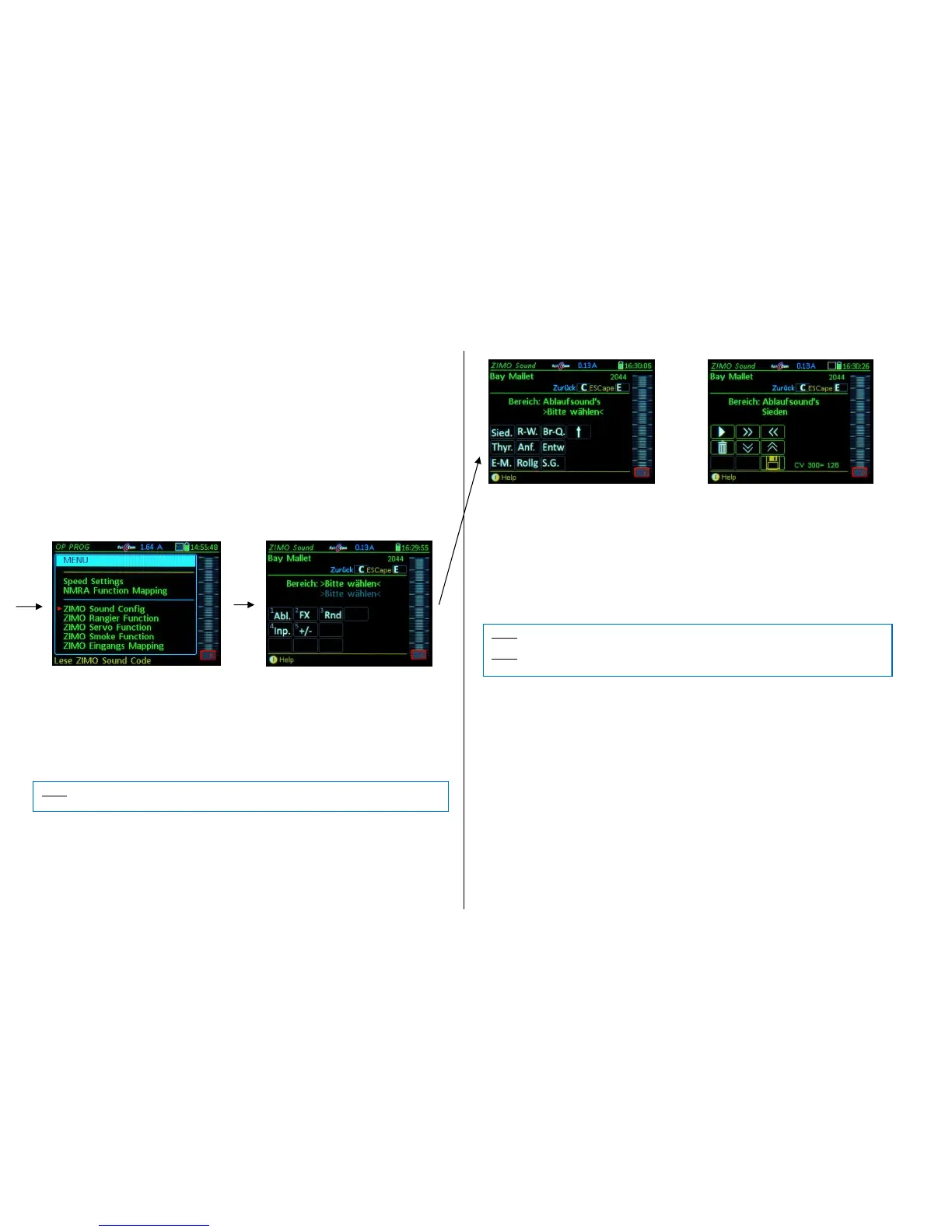
The ZIMO Sound Config is accessible from the OP PROG screen:
E-Key (to E-menu) + F-Key Enters the programming mode, then…
M-Key Menu: among other available options is also the ZIMO Sound Config
.
Function keys 1 to 5 choosing the selection area:
F 1: Driving-Sound (Abl.), contains the following sounds: Boiling, Directions change (R-W), Brake
squeal (Br-Q), Thyristor sound (Thyr.), Start-up sound (Anf.), Blow-off (Entw), E-Motor sound (E-M.),
Rolling sound (Rollg), Switch gear sound (SG), Turbo sound (Turbo), in sound groups.
F 2: Function sound (FX), the F-Keys are shown so that a (new) sound can be assigned to each key.
F 3: Randomly generated sound (Rnd): Z1 to Z8
F 4: Switch input sound (Inp.): In1 to In4
F 5: Switching between steam sets (+/-)
For example, by selecting the driving sound or the corresponding F-key, the CV #300 procedure is trig-
gered automatically with the pseudo-programming of CV #300. This will be displayed at the bottom of
the screen with the current value in CV #300.
After selecting the sound area and sound group, the sound file selection screen is reached:
F0 (= Number key 1) = playback: Plays back the currently selected sound file.
F1, F2 = prev, next: Plays back the previous or next sound sample stored in the sound decoder.
F4, F5 = prev, next: Switch to previous or next sound group (groups of whistles, bells, coal shoveling
etc.), starts playing the first sample of the group.
F6 = loop: If F6 is “on” when exiting the allocation procedures, the sound sample is stored and played
back as long as the relevant function key is pressed
Playable whistle! by repeating the sound between the loop markers
(the loop marks are part of the sound file).
F7 = short: If F7 is “on” when exiting the allocation procedures, the sound sample is shortened and
played back only as long as the function key is pressed, by omitting the center portion.
F3 = CLEAR + end: The allocation procedure is stopped and the current sound removed.
There will be no sound allocated to this function key.
F8 = STORE + end: The allocation procedure is stopped and the last selected function sound is
stored and ready for playback when this function key is pressed.
The speed regulator acts as volume control for the selected sound during allocation procedure. A
speaker icon is shown on screen.


 To Next Page
 Loading...