K Series Economic Models User Manual
25
7.2 Date/Time
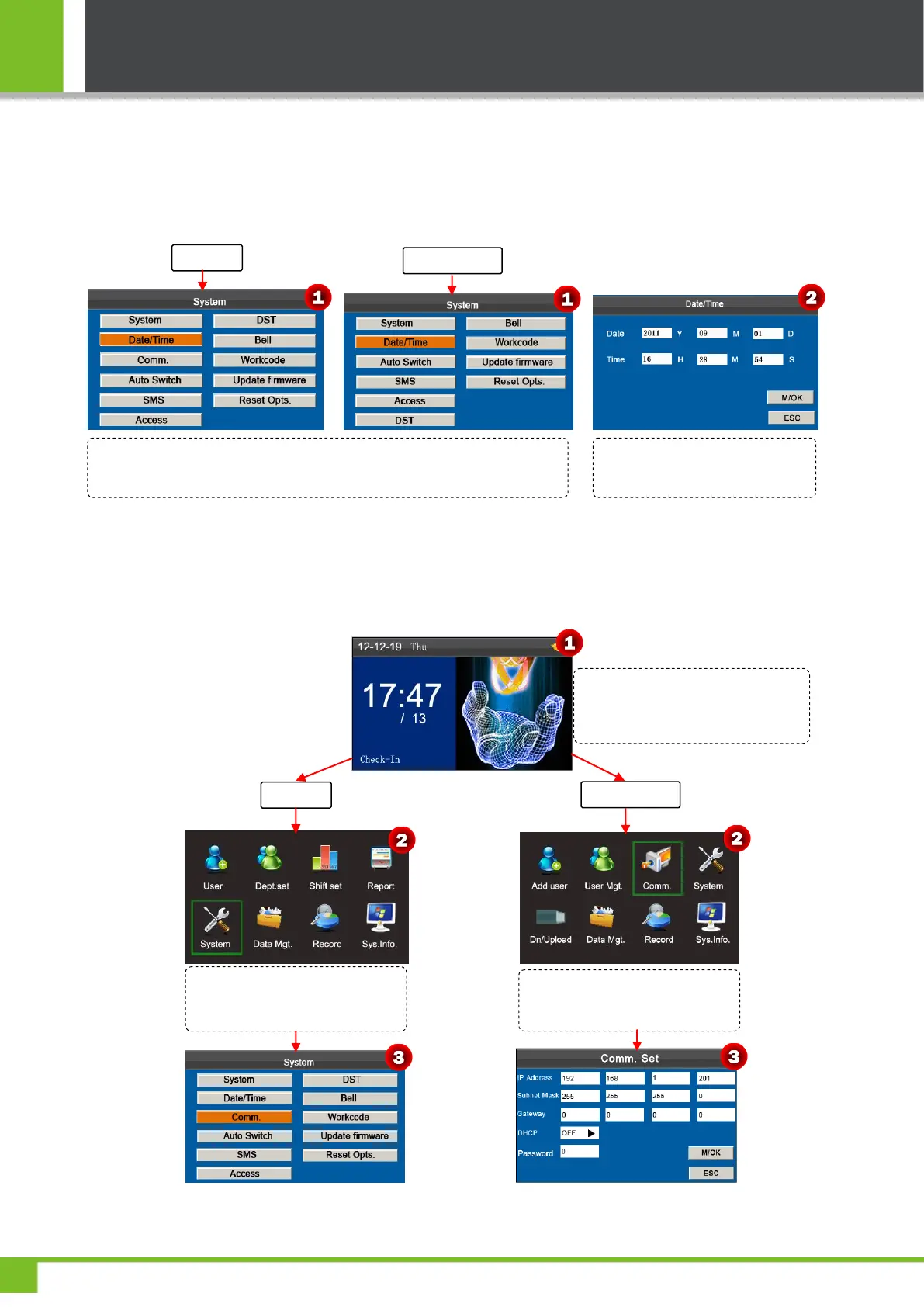
This menu item allows you to calibrate the date and time of the device. On the initial interface, press and hold [M/OK] key
to enter the Main Menu interface, then press ◄/► key to select System menu and press [M/OK] to enter the System
interface, shown as following figure:
Note: The date and time of the attendance device must be set accurately to ensure the accuracy of attendance time.
7.3 Communication Setting
Press ▼ key to select Date/Time and press [M/OK] key to enter the
Date/Time interface, shown as figure 2.
Enter the desired value by using
the keypad. Press [M/OK] to save.
Press and hold the [M/OK] key on the
initial interface to enter the Main
Menu interface.
Press ◄/► key to select System
menu and press [M/OK] to enter
the System interface.
Press ◄/► key to select Comm.
menu and press [M/OK] to enter
the Comm. Interface as following:



 To Next Page