7 System Setting
32
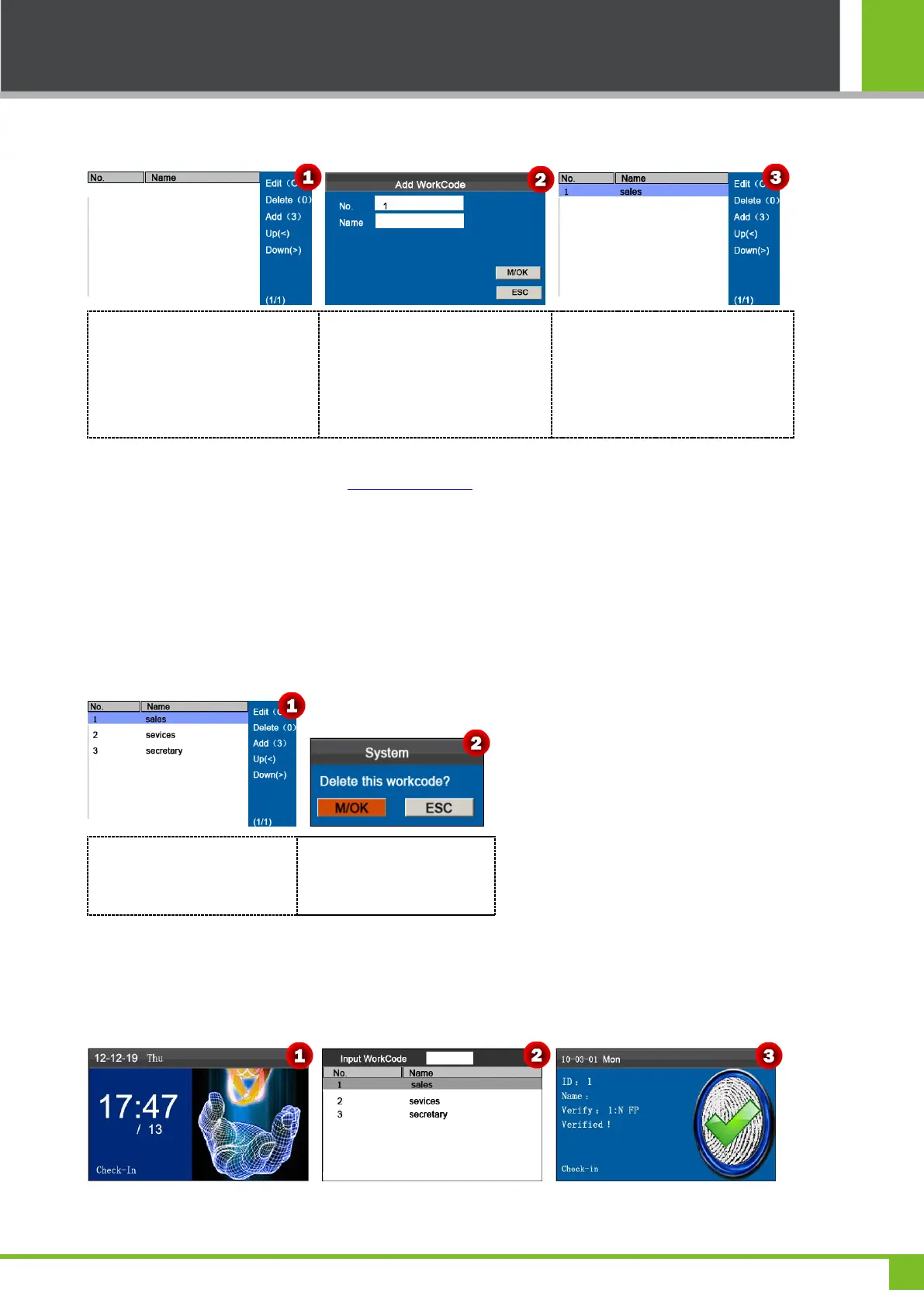
7.8.1 Add a Work Code
Press numeric key '3' to enter Add
WorkCode interface.
Enter the ID (1-99999999). Press
[M/OK] to open T9 input method
and enter the Name. Press ▼ to
select [M/OK] button then press
[M/OK] key to save.
When saving successful, the
interface is shown as above.
Note: For details of enter name, see Appendix 1 T9 Input.
7.8.2 Edit a Work Code
Press ▲/▼ to choose the desired Work Code from the list and then press [M/OK] to display the WorkCode Edit interface.
The No. cannot be modified. You can modify the Work Code Name only. After modification, press [M/OK] to save.
7.8.3 Delete a Work Code
Press ▲/▼ to select a
workcode, press numeric key
'0', pop-up Prompt Box.
Press [M/OK] to delete or
press [ESC] to cancel.
7.8.4 Use a Work Code
When the work code function is enabled, the device displays the work code selection interface upon successful
verification on the initial interface.



 To Next Page