K Series Economic Models User Manual
27
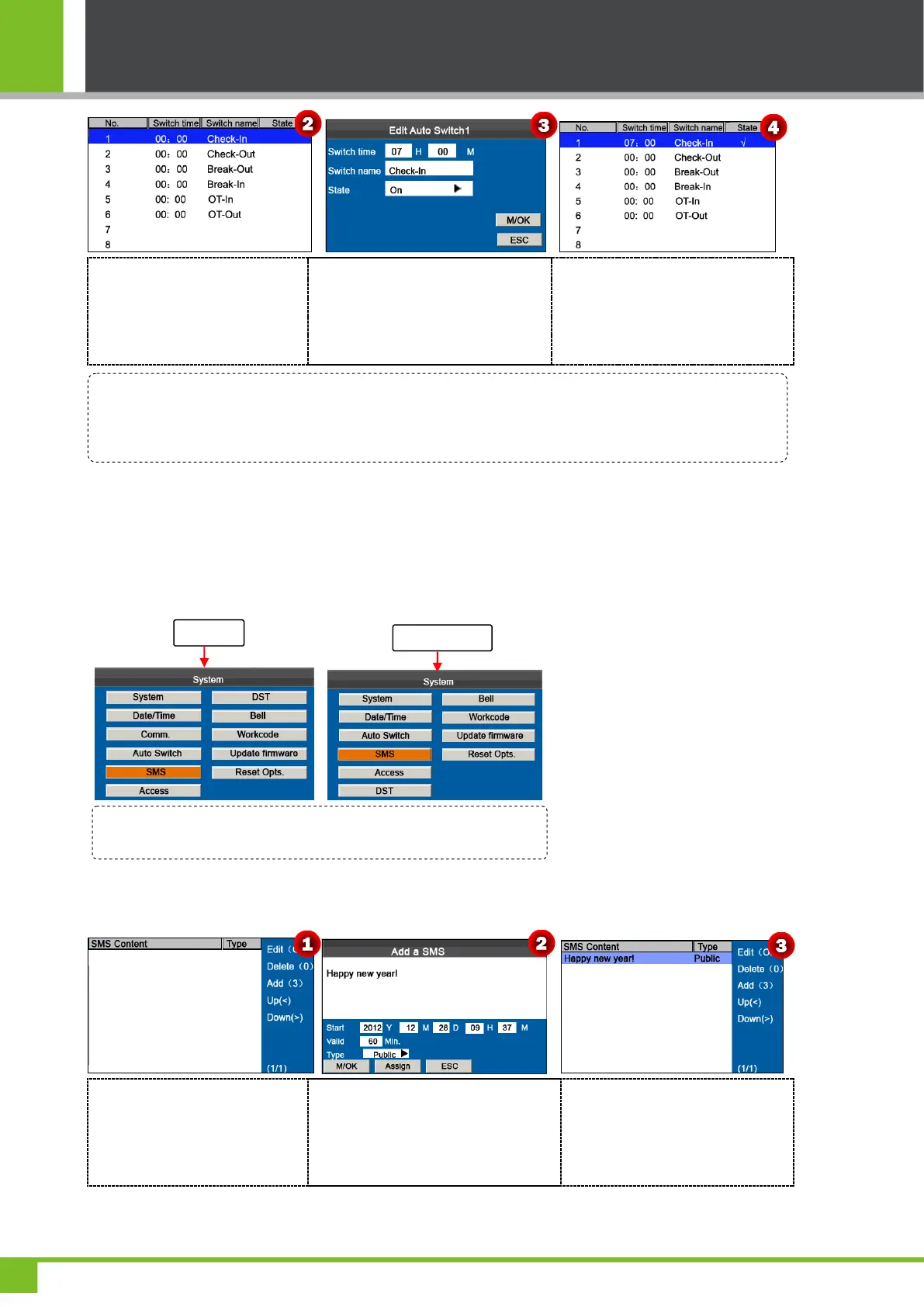
Press ▲/▼ to select the item
and press [M/OK] key to enter
the edit interface.
Set parameters by referring to the
instructions in the following text box
and press [M/OK] key to save.
As shown in the preceding figure 4,
when the time reaches 07:00, the
attendance status switches to
Check-In.
7.5 SMS Setting
The menu item allows you to add, edit, view, and delete SMS messages. On the initial interface, press and hold [M/OK]
key to enter the Main Menu interface, then press ◄/► key to select System menu and press [M/OK] to enter the System
interface, shown as following figure:
7.5.1 Add an SMS Message
Press numeric key '3' to enter
Add a SMS interface.
Press [M/OK] key to open T9 input
method and enter the SMS content.
Then enter the Start, Valid time and
choose Type. Press [M/OK] to save.
When adding successful, the
interface shows as above.
Press ▲/▼ to switch among the entry boxes. Enter the switch time using the numeric keypad and the switch
name using the T9 input method. Press ◄/►to select a state. After completed, press [M/OK] to save or press
[ESC] to cancel the setting and return to the previous interface.
On the System interface, press ▼ key to select SMS and press [M/OK]
key to enter the SMS interface.



 To Next Page