18
3.
35
31
38
Maintenance
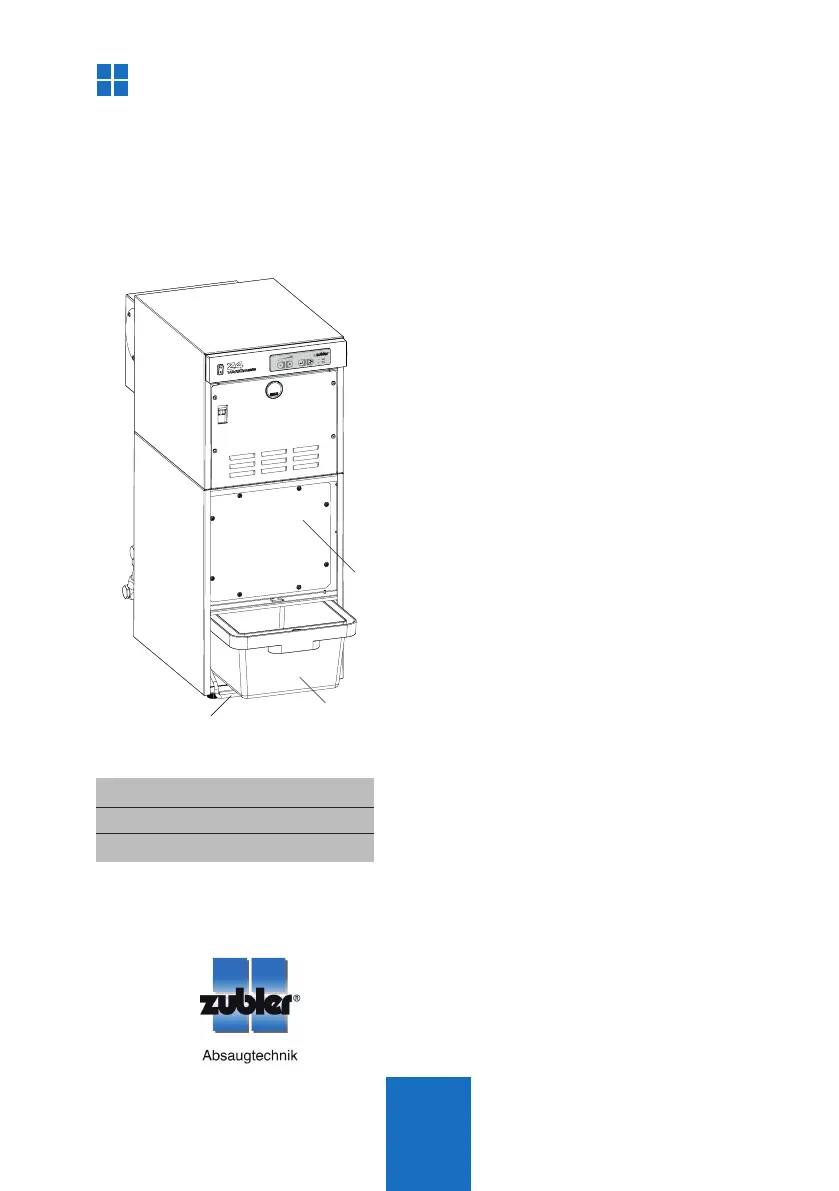
Fig. 18
Maintenance
3.1.1 Checking the fill level
Q Once the timer for the dust container has
expired, the LEDs L4 (dust container) and
L5 (service) start flashing. Next time the
suction unit is switched ON, the unit stops
working and the dust container (31) must
be checked as follows:
Q Leave the suction unit switched ON
Q Remove the door (18) as described in
section 1.2 and lower the clamping lever
(38). The LED L5 (dust container) stops
flashing and is permanently lit.
Q Pull out the dust container and empty it if
necessary, according to section 3.1.3.
Q Slide the dust container back into the
suction unit until limit stop and pull the
clamping lever upwards.
Q The LEDs L4 and L5 are blanked and the
timer is reset.
3.1.2 Adjusting the container timer
Q The dust container timer is factory set to
40h motor running time. Initially you may
have to check the filling of the dust con-
tainer dayly or weekly to evaluate the
expected amount of dust.
Q If the dust container is already filled more
than half after one week, the interval
should be shortened.
Q If the container timer is too short, we re-
commend adjusting it only, if the dust
container is less than 1/3 full of dust once
the timer has expired.
3.1 Dust removal
31 Dust container
35 Filter cover
38 Clamping lever
Q Change the container timer according to
the instructions for the Zubler suction
technology APP.



 To Next Page