Pannoramic 1000 1.2 - User’s Guide 8 Packaging instructions for Pannoramic
1000
8 Packaging instructions for Pannoramic 1000
8.1 Preparations
1. Unload slides (if there is any) from the slide holder unit by using the scanner software.
2. Close the scanner software normally.
3. Apply fixtures for transportation at the specified locations (I - II - III)
Use the service software to send the units to the transport positions (Transport positions
button)
I. Microscope
(a) Focus unit
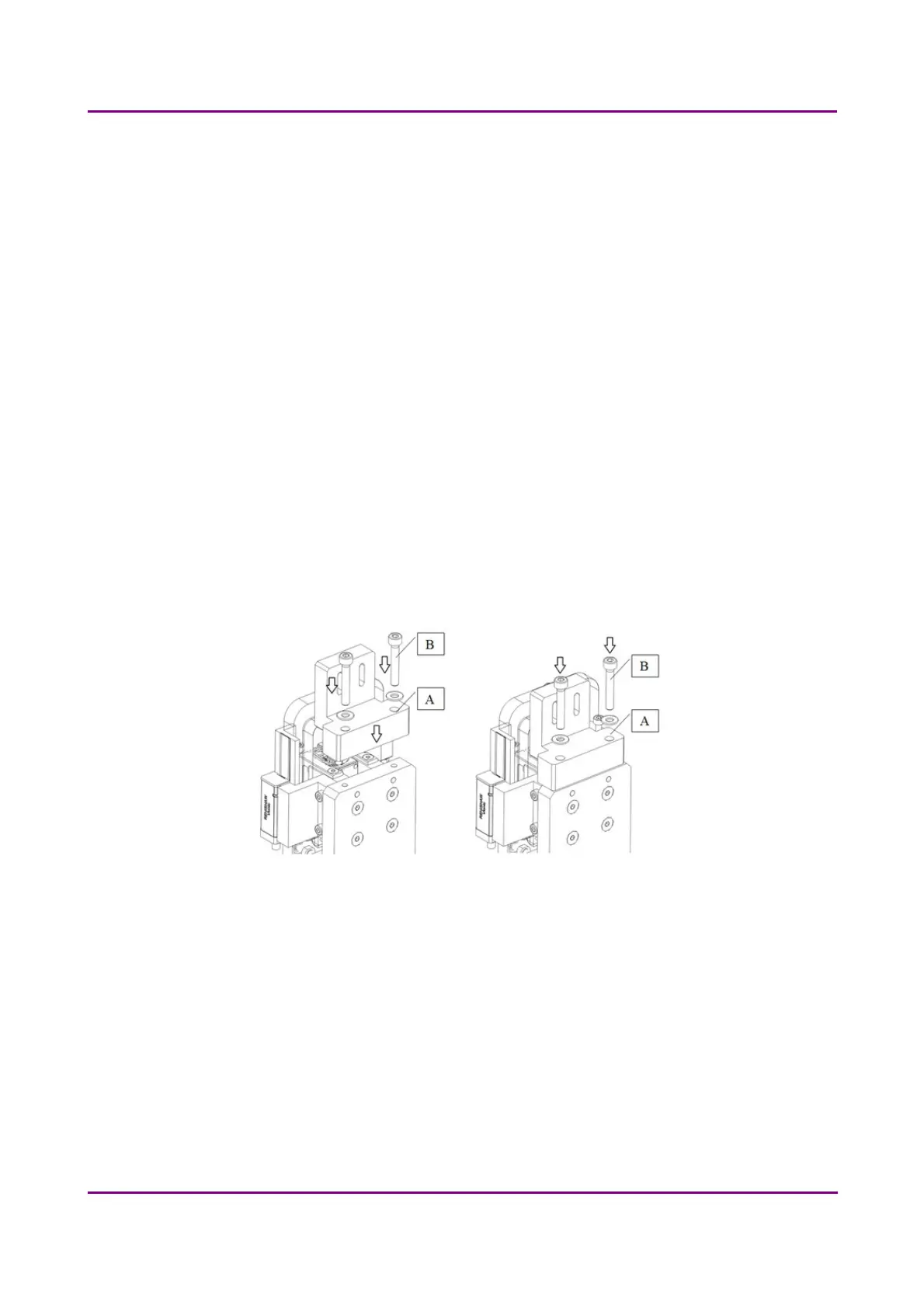
Mount the fixing block (A) for the piezo focus unit to the top of the microscope (vertical
plate) with 2 pcs of M4x25 mm socket head cap screws and washers (B). Use a 3 mm
hexagon wrench tool.
Figure 31 – Mount fixing block on focus unit
Select the objective in the middle with the software.
The piezo (Z) motor should be in a position when the 2 threaded holes are somewhere in the
holes shaped like a race-track (HOME position).
• Turn off the scanner with the switch located on the cover of the device. Disconnect
all the cables of the scanner.
• Remove all the magazines with your slides.
March 19, 2019 - Rev. 2
3DHISTECH Ltd. 57(78)



 To Next Page