Pannoramic 1000 1.2 - User’s Guide 8 Packaging instructions for Pannoramic
1000
II. Slide loading unit
(a) X-Y (horizontal/vertical) movement
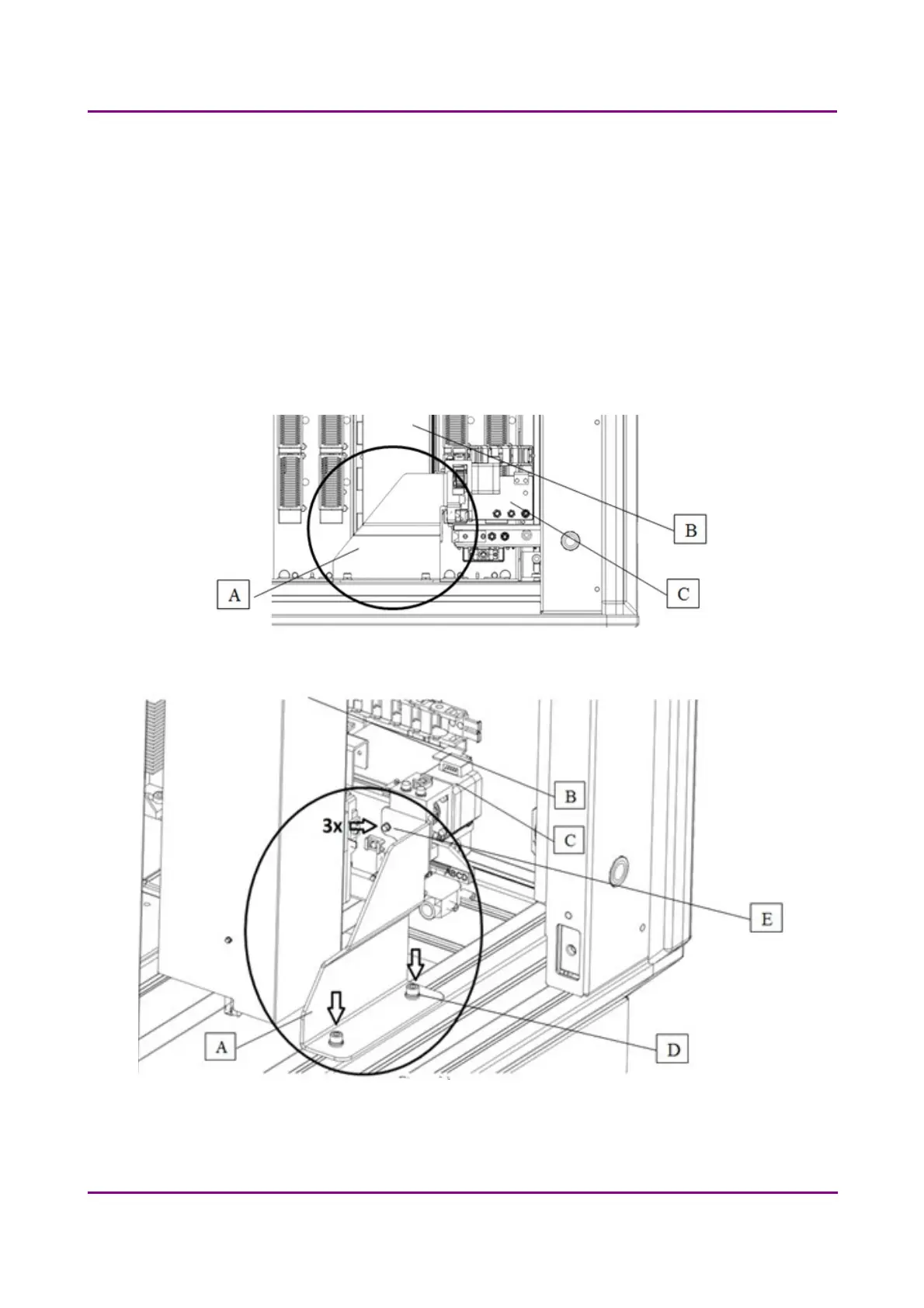
Move the X-Y slide loading unit (contains also the gripper unit) (B+C) by hand to the
transport position (to the bottom right hand corner).
Mount the red fixing to the aluminum frame (A) next to the X-Y slide loading unit with
M6x20 hexagon socket cap head screws and washers (D). Use a 5 mm hexagon wrench tool.
Lift the gripper unit (C) to the position of the holes of the fixing. Screw them together with
M3x10 hexagon socket cap head screws and washers (E). Use a 2.5 mm hexagon wrench
tool. (Figure 43-44)
Figure 43 – Mount fixing to frame
Figure 44 – Mount fixing to frame
March 19, 2019 - Rev. 2
3DHISTECH Ltd. 63(78)



 To Next Page